When I share a Lead Form link to Facebook for my HB portal it shows a thumbnail image that says “YOUR LOGO HERE”
I cannot for the life of me find where to change that image in HB.
This is what it looks like:
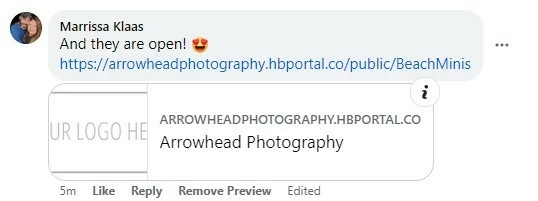



When I share a Lead Form link to Facebook for my HB portal it shows a thumbnail image that says “YOUR LOGO HERE”
I cannot for the life of me find where to change that image in HB.
This is what it looks like:
Best answer by Bianca Sanders
Yes, I do have my logo uploaded under company settings already. I’m going to upload the same logo under secondary logo to see if this resolves it.
Already have an account? Login

Welcome! To join the HoneyBook Community, log in with your HoneyBook account below.
You'll confirm your username and share a bit about yourself, then you're ready to explore and connect.
Free trial? No problem. Log in with your trial credentials to join.
Already a member? Hi and welcome back!
Welcome! To join the HoneyBook Community, log in with your HoneyBook account below.
You'll confirm your username and share a bit about yourself, then you're ready to explore and connect.
Free trial? No problem. Log in with your trial credentials to join.
Already a member? Hi and welcome back!
Enter your E-mail address. We'll send you an e-mail with instructions to reset your password.