Question

Send invoice without sending contract?

  • April 29, 2025
  • 3 replies
  • 18 views

Jamie Ovation Creative

I am wrapping up some work for the first “hourly” client that I’ve billed through Honeybook, which has presented a few challenges. 

I had them sign a contract and pay a deposit on the next page. Their work has wrapped up and they’re not a retainer client that will have ongoing work, so I need to send a final invoice with the total number of hours worked.

Ok, fine. I went in to the original invoice and updated the amount for the total number of hours worked. I’m then required by HB to notify the client that there have been changes made to their invoice so I turned that into an email letting them know their final invoice was ready and sent it off. 

My client was NOT happy that when he clicked on the link he was taken directly to the contract, and was insulted that I was showing him the “legalese” when requesting a payment. 

Yes, he could’ve clicked “Next” to get to the invoice, but that wasn’t obvious, and he’s an older client, so it’s not as intuitive for them.  


My questions are: 

  1. Shouldn’t there be a way to send the invoice separate from the contract?
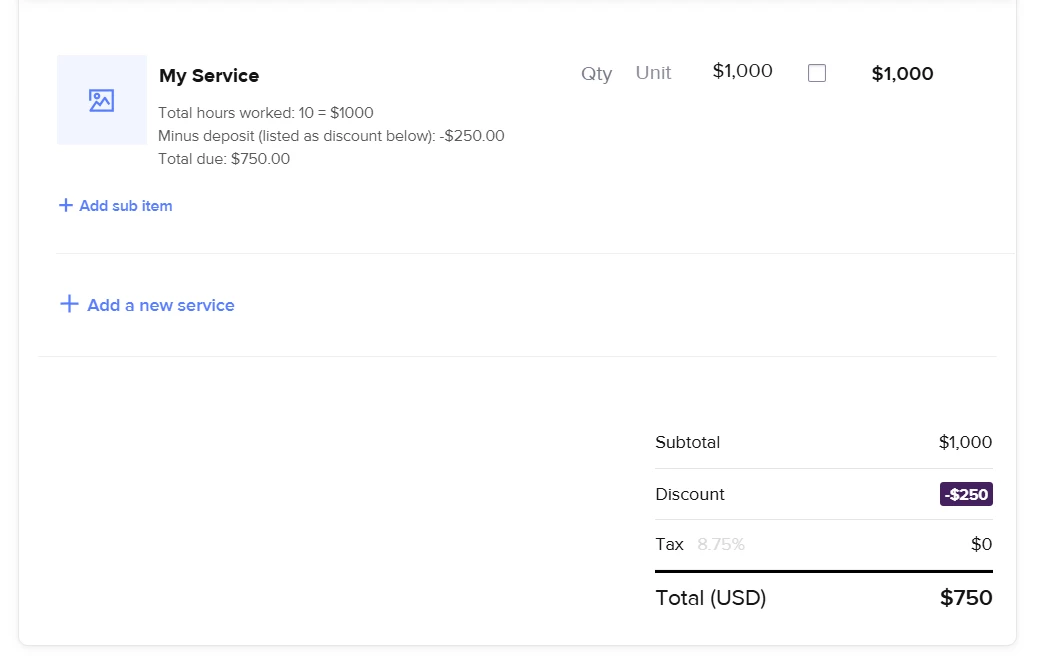
  2. Is there a way to indicate that a payment is a deposit so that it will show up as a deduction on a future invoice. For example:
    Total hours worked: 10 = $1000
    Minus deposit: -$250.00
    Total due: $750.00
  3. Is there ANY way to turn off the “must notify client of changes to an invoice” step? I wanted to adjust his due date as I didn’t mean to set it to the date the invoice was sent, and I really don’t want to have to send him yet another email. 



3 replies

Alyssa Nance
Forum|alt.badge.img+3

Whenever you update a contract, services booked, or anything related to pricing/payment inside of your smart files, HB will require your client to approve the changes. The system won’t force you to send an email, but it will suggest it- and I would highly recommend it if you’ve made changes to any of the above items they’d need to approve. This is just a level of security for the client to be aware that something that was previously agreed upon has changed and is basically getting their consent.

Whenever the client opens the file, it typically will still open at the first page, even if the only change they need to approve of is on another page. So if your contract was the first page of the file, that’s why he was shown that page first. He won’t need to do anything on that page, unless you made a change there. Otherwise, he’d just need to move forward through the file.

I can see it being a little annoying having to click through each page, but I think if you can note in the email that he can skip through to page X to approve the changes, maybe that’s how you can handle that in the future.

Another thought if you didn’t want to have this potentially happen again (though I don’t think most people would get that upset over viewing a contract) is to just collect the main amount on the original contract/invoice file and then send a separate invoice for additional hours worked.


And the best way (and really only way currently) to handle your deduction example would be to use the discount feature on the invoice and then add that to the invoice description. I’ve attached a screenshot of your example on an invoice.


I hope this helps and your client will be a bit more understanding!

Let me know if you have any other questions :)


Jamie Ovation Creative

This is all so helpful! Thanks so much. I did decide to put the deposit in the discount field, but I like the idea of noting it in the description above. 

I agree that most people won’t be bothered by seeing the contract again, but it seemed to trigger something in this client (that I’d had a great experience with up until this point!). 

Thanks for the advice!


Alyssa Nance
Forum|alt.badge.img+3

So glad that helped!

And hoping your client will see how great it’s been working with you and not let this little tech thing be a big deal.