Solved

Automations: Triggering Questionnaires

  • February 5, 2024
  • 5 replies
  • 42 views

elliemaephoto

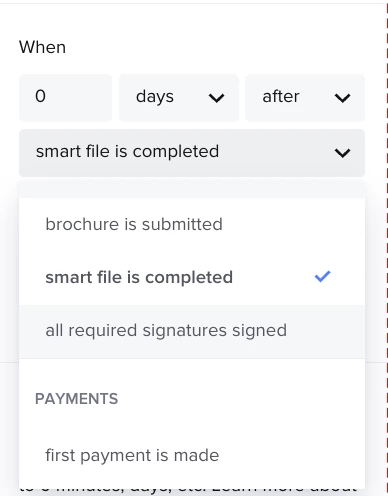
Currently, if you have multiple separate questionnaires within one automation, a task triggered to send “1 day after questionnaire is submitted” will go off when the very first questionnaire in your automation is submitted. 


It would be nice to choose which specific questionnaire to trigger to a specific task. So on the right side you would choose, “send 1 day after questionnaire is submitted” and then directly below, from a dropdown menu it allows for you to choose which questionnaire you are referring to.

Best answer by Monica R

Hey @elliemaephoto!

Monica here from the Community Team! 

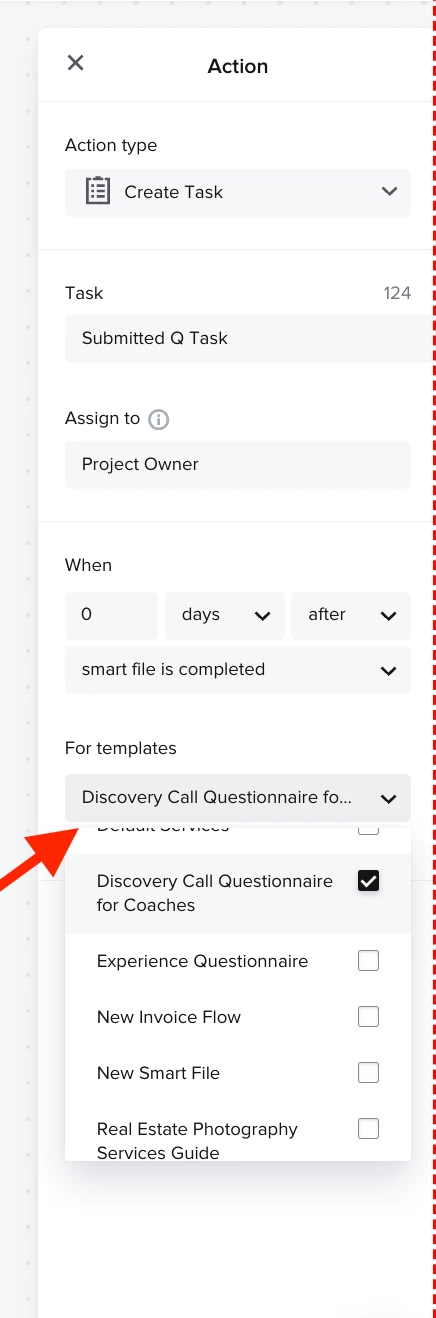
If you convert your legacy file Questionnaire as a Smart File, there actually is a way for you to select which smart file will trigger the action! 

In this screenshot, a Task will be created when the Discovery Call Questionnaire for Coaches Smart File has been completed! 


Hope this helps!

Happy Friday!

5 replies

Monica R
HoneyBook Community Team
Forum|alt.badge.img+7
  • HoneyBook Community Team
  • Answer
  • May 17, 2024

Hey @elliemaephoto!

Monica here from the Community Team! 

If you convert your legacy file Questionnaire as a Smart File, there actually is a way for you to select which smart file will trigger the action! 

In this screenshot, a Task will be created when the Discovery Call Questionnaire for Coaches Smart File has been completed! 


Hope this helps!

Happy Friday!


elliemaephoto

Hi, in the screenshot you sent, I see:


“Assign to: Project Owner” and “For Templates: Discovery Call Questionnaire”


These aren’t options in my automation for “Create Task”


Attaching a screenshot.


Monica R
HoneyBook Community Team
Forum|alt.badge.img+7
  • HoneyBook Community Team
  • May 17, 2024

Hey Ellie!

Since you don’t have team members in your account, you wouldn’t see the ability to assign it to anyone.

When you select When: Smart file is completed, your templates will show up. 


elliemaephoto

WOW! Thanks Monica. Just saw your Example Automation in my Automations tab. Thanks again!!!


Monica R
HoneyBook Community Team
Forum|alt.badge.img+7
  • HoneyBook Community Team
  • May 17, 2024

Happy to help Ellie!! 

Have a beautiful Friday!