Question

Can I assign a task for a specific date?

  • August 28, 2024
  • 12 replies
  • 63 views

Kylie Wallace

I have a few questions about AUTOMATED Tasks:

(1) Can there be a way to assign a task to a specific date? As a wedding planner, I want to be able to assign myself tasks on a specific date (as a reminder to follow up on something or just know that I have a few days/weeks before that task is due) rather than having to calculate how many days out I am from the project date to assign the task.

(2) Is there a way to only show the next task that is upcoming, versus seeing the next 3 in the “Today” section? I love seeing the upcoming tasks in the “Automation” section, but I don’t like opening up my dashboard and seeing 100 tasks due at once when I might only have 10 specific tasks due that particular day.  


(3) Is there a feature where the calendar can show me the tasks assigned for each day? This is a great way to plan out the upcoming days/weeks and see what is coming up. 


Thank you!! 


Kylie

This topic has been closed for replies.

12 replies

Diana The Finer Points
Luminary
Forum|alt.badge.img+9

You can assign tasks to a specific date outside of an automation. It’s on the right side of the project 


Kylie Wallace
  • Author
  • Newcomer
  • August 28, 2024

Thank you!! Yes, I have used this amazing feature  :)
However, I have many automated tasks that need organizing via date. I put the automated tasks in order so that one task shouldn’t populate until the previous task is completed, but they are all popping up at the same time, and all showing today when I don’t need to do that task for at least another month or so...


Diana The Finer Points
Luminary
Forum|alt.badge.img+9

You can change the task due date for that specific project. Would that help? 


Kylie Wallace
  • Author
  • Newcomer
  • August 28, 2024

It only allows me to assign the automated task’s due date as “X days/weeks before or after the project due date”
Is that what you mean?


Diana The Finer Points
Luminary
Forum|alt.badge.img+9

Yes but in this case you can adjust it for JUST that project. Instead of for every automation. If that particular project is being pushed by a month, you can adjust that date within that specific clients automation. So that would give you the specific date you need 


Kylie Wallace
  • Author
  • Newcomer
  • August 28, 2024

Oh, I am not adjusting the project’s date, I need to adjust the task’s due date. Some projects are for weddings 1.5 years out, so there are some tasks I do not need to do for a few months at a time. 


Julia Spears
Forum|alt.badge.img

All three of these are great suggestions. I hope you will submit them as a feature requests! I would definitely go in and upvote them ;) 

1. Being able to set specific dates for tasks within an automation for a particular project would be extremely helpful… Especially when it comes to trying to avoid significant dates or holidays. For example, I sent out a questionnaire three weeks before an event that we have in our venue. Well, I don’t want that questionnaire showing up in peoples inboxes on Christmas morning for their event they have planned for the 2nd week in January. Being able to specify a particular date would help avoid this. 


2. You bring up a great point! My to-do list in HoneyBook is like 100 tasks long because it will list all upcoming tasks rather than the ones that are just due today (or even this week). I’ve gotten to where I don’t even look at it because it’s overwhelming…and half of the tasks aren’t relevant right now. So basically, a feature that could be extremely helpful, is one that I just end up ignoring. :(


3. This could be a great solution to the problem!


Julia


Kylie Wallace
  • Author
  • Newcomer
  • August 29, 2024

Hi @Julia Spears! Thanks for your input on this too!! I just submitted all of this as a feature request  :)


Michal Peled
HoneyBook Employee
Forum|alt.badge.img
  • HoneyBook Employee
  • September 4, 2024

Hi @Kylie Wallace and @Julia Spears, I’m really excited about you making this feature request!
In the meantime, I have a workaround to offer 🚧

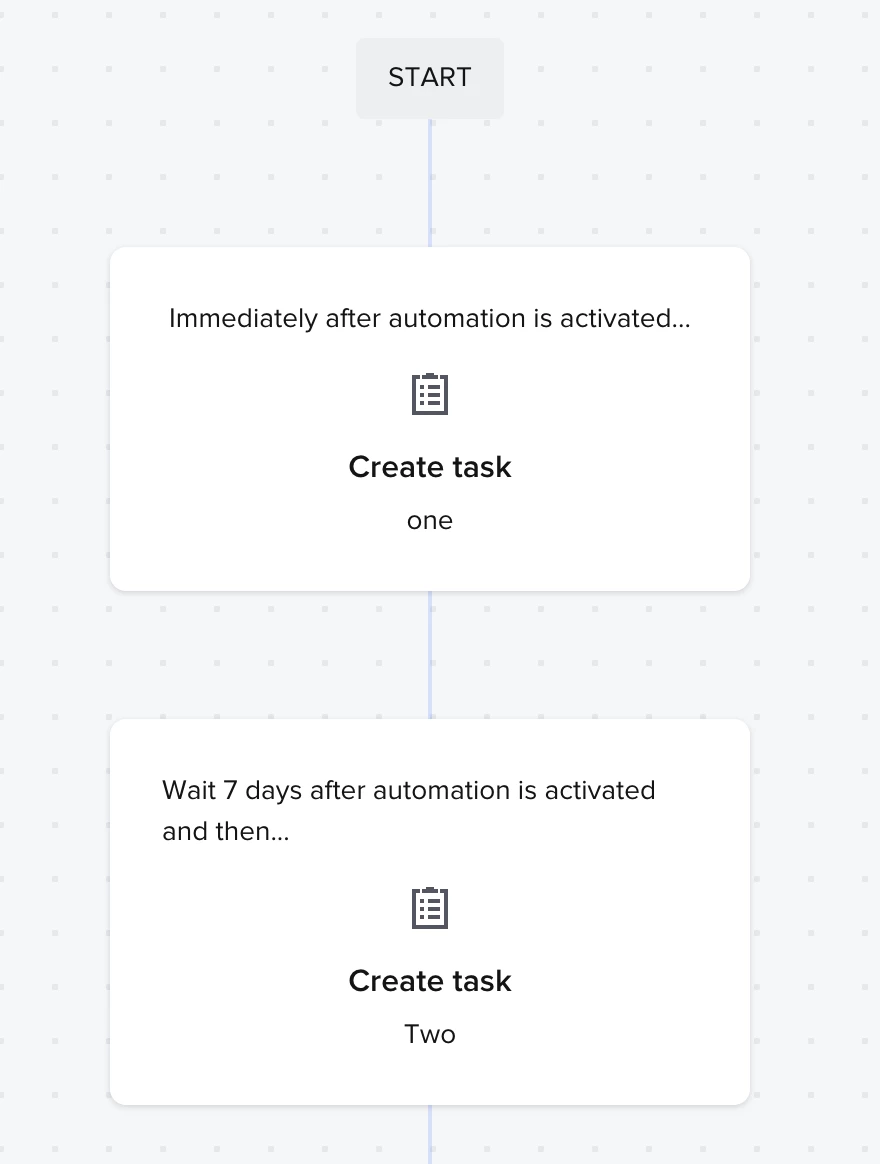
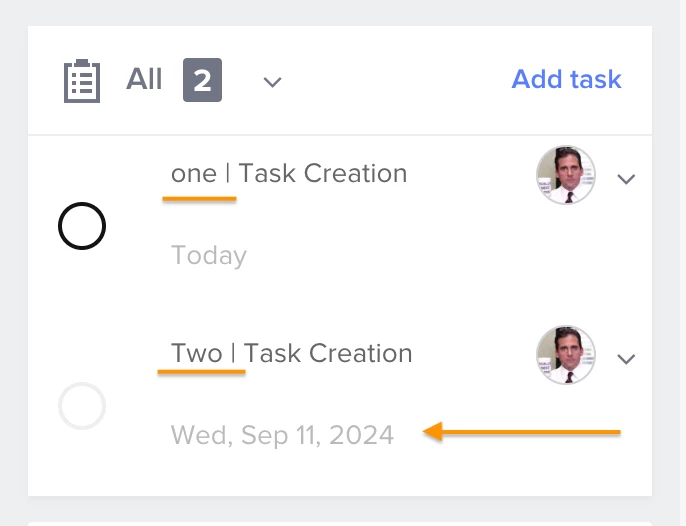
First, here’s something you may not have known: If you create an automation step set to wait X days after something else happens, the task will be created right when that happens, with a due date in X days.
For example, say you have these two steps in automation; one is set to happen when the automation is activated, and the other- 7 days after the automation is activated:


Once this automation is activated within a project, both tasks are created, and the second has a due date of 7 days:


So basically, if you set an automation step to create a task X days after automation is activated, the task will be created once the automation is activated, but with a due date like the one you set.

The same goes if you set the “Create Task” action to happen X days/hours after another action (for example, 2 days after a File is completed). The task will be created when the action is completed with a due date in X days/hours (using the same example: the task is created once the file is completed, with a due date in 2 days).

Let me know if you find this helpful!


Kylie Wallace
  • Author
  • Newcomer
  • September 10, 2024

Thank you @Michal Peled ! This is definitely helpful for a handful of tasks that need to be scheduled! Hopefully something can be done for other types of tasks that need scheduling, but I will try this out for now. 


Julia Spears
Forum|alt.badge.img
  • Newcomer
  • September 11, 2024

@Michal Peled - yes, definitely love the ability to schedule tasks after other tasks! I have many of my automations set up as you have described and I find it soooo helpful. It’s actually because of those features that I’m hopeful we will soon be able to pick specific dates… so that I can go into an automation attached to a project and tweak the task dates to ensure I’m completely avoiding certain days (like, I don’t always want my post-event “How did we do?” email to always go out X days after the event is complete… say, for instance, if I know the couple will be on vacation at that time… I’d like to go in and quickly change that to go out after they return. :)


Michal Peled
HoneyBook Employee
Forum|alt.badge.img
  • HoneyBook Employee
  • September 12, 2024

@Julia Spears This is a great use case example. I like this feature request and hope it’ll be considered soon, I’m actually going to upvote it myself! 😎