

Am I missing something? I have a smartfile that includes service selection, client agreement and invoice. Every now and then I want to give a client a discount, and am struggling with how that works in the smartfile. Whenever I’ve gone into the smartfile (from the client’s automation) to add the discount, it changes the original template. How do I give a single client a discount without altering the invoice template I use for everyone?

Solved
Giving a client a discount without altering the template?

Best answer by Matthew Eriksen
Hey
You technically have 2 ways to offer a discount inside a Smart File without changing the template:
- Manually edit the line item inside the project-applied Invoice to reflect the discounted rate; then mention you gave a discount in the line item description
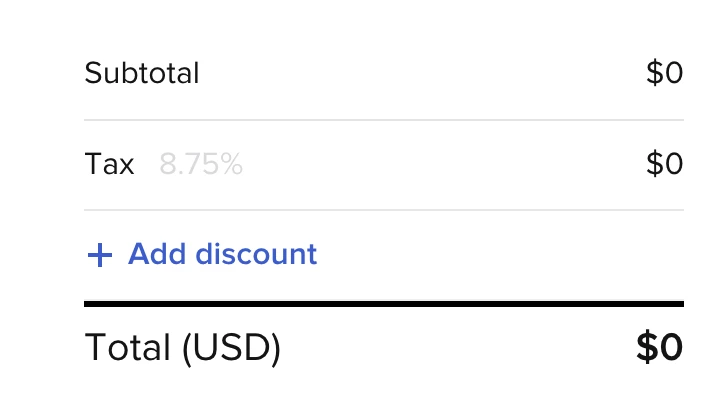
- Or use the Discount tab in the builder (image below)
Step 1: click add discount
Step 2: Add in rate
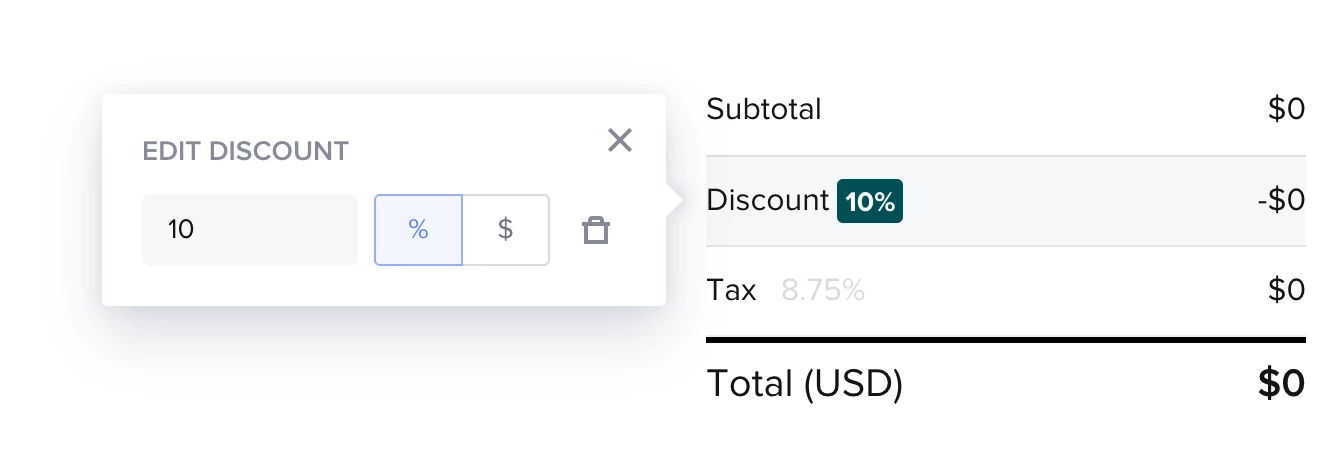
Personally, because I connect my HB to Quickbooks, I prefer to just change the rate and notify the client in the description because if I don’t then Quickbooks registers the full totla and then also the discount I gave, which for me doesn’t really serve a purpose. (Am I getting that right
Did that answer your Q? If not, please let me know! Hope you have a great day.
This topic has been closed for replies.




Sign up
Already have an account? Login

Welcome! To join the HoneyBook Community, log in with your HoneyBook account below.
You'll confirm your username and share a bit about yourself, then you're ready to explore and connect.
Free trial? No problem. Log in with your trial credentials to join.
Already a member? Hi and welcome back!
You will see the HoneyBook login page briefly to validate your trial or account.
Employee Login
Log in with HoneyBook
Welcome! To join the HoneyBook Community, log in with your HoneyBook account below.
You'll confirm your username and share a bit about yourself, then you're ready to explore and connect.
Free trial? No problem. Log in with your trial credentials to join.
Already a member? Hi and welcome back!
Welcome to the Community
Welcome! To join the HoneyBook Community, log in with your HoneyBook account below.
You'll confirm your username and share a bit about yourself, then you're ready to explore and connect.
Free trial? No problem. Log in with your trial credentials to join.
Already a member? Hi and welcome back!
You will see the HoneyBook login page briefly to validate your trial or account.
Employee Login
Log in with HoneyBook
Welcome! To join the HoneyBook Community, log in with your HoneyBook account below.
You'll confirm your username and share a bit about yourself, then you're ready to explore and connect.
Free trial? No problem. Log in with your trial credentials to join.
Already a member? Hi and welcome back!
Enter your E-mail address. We'll send you an e-mail with instructions to reset your password.