

Newbie here…, so sorry for the silly question. I am adding contacts manually. How do I assign them to the Clients or Leads list? Thanks in advance. Brad

Solved
How do I assign Lead status to manually added contacts?

Best answer by Matthew Eriksen
Hey
Alright so to build off what Kitzzy offered above, I wanted to clarify the difference between a Client vs. Lead here in HoneyBook:
- Both are Contacts, either added manually or automatically via an action to get into HB (form submitted, session scheduled)
- Contacts are considered a Lead when they have NOT ‘booked’ a project with you (either via Lead Form, or Smart File contract, invoice, payment).
- Contacts will be marked a Client once they take said action, such as investing in your 1-time session via Lead Form, sign a contract for a complete service, or pay an invoice you send them.
Sample of Leads tab within Contacts, note the bold ‘without booked projects’. This is definitely small and may go unnoticed, but once I saw that it was an ah-ha moment for me!
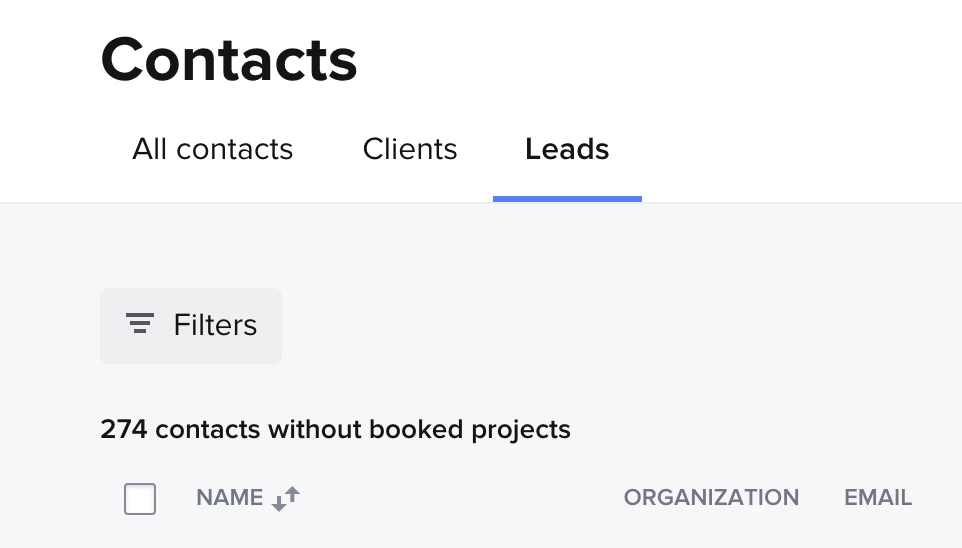
Let me know if this clarifies the difference, Brad!
This topic has been closed for replies.





Sign up
Already have an account? Login

Welcome! To join the HoneyBook Community, log in with your HoneyBook account below.
You'll confirm your username and share a bit about yourself, then you're ready to explore and connect.
Free trial? No problem. Log in with your trial credentials to join.
Already a member? Hi and welcome back!
You will see the HoneyBook login page briefly to validate your trial or account.
Employee Login
Log in with HoneyBook
Welcome! To join the HoneyBook Community, log in with your HoneyBook account below.
You'll confirm your username and share a bit about yourself, then you're ready to explore and connect.
Free trial? No problem. Log in with your trial credentials to join.
Already a member? Hi and welcome back!
Welcome to the Community
Welcome! To join the HoneyBook Community, log in with your HoneyBook account below.
You'll confirm your username and share a bit about yourself, then you're ready to explore and connect.
Free trial? No problem. Log in with your trial credentials to join.
Already a member? Hi and welcome back!
You will see the HoneyBook login page briefly to validate your trial or account.
Employee Login
Log in with HoneyBook
Welcome! To join the HoneyBook Community, log in with your HoneyBook account below.
You'll confirm your username and share a bit about yourself, then you're ready to explore and connect.
Free trial? No problem. Log in with your trial credentials to join.
Already a member? Hi and welcome back!
Enter your E-mail address. We'll send you an e-mail with instructions to reset your password.