

Hey guys! I am an electrician and I have a few guys that work for me. As I schedule service calls and such I need my team members to have access to the calendar I update so they know where to go each day. . . . . . . Or are there any other similar businesses out there that use this service and maybe have pointers on how else to make this not only client-friendly but more co-worker friendly for my team. Thanks in advance!

Solved
How do I let my employees access have access to the calendar?

Best answer by Cassie H of Premier Ops Spot
Hi Michael!! I love to hear how different service providers are using HB! There are a few options for you here.
- If you use Google calendar, you can have all the appointments book to a Shared Calendar, then just give your team members access to the shared Google calendar. Whether or not they have Gmail, they can subscribe to that calendar and add it to their own. This is great if you use contractors that have their own business or work for multiple companies, not exclusively yours, and you don't want to give them access to your back end of Honeybook.
- If your team are employees or work exclusively for you, you could potentially add them to the back end of your Honeybook account with BASIC access. Here's what that permission level gives them:
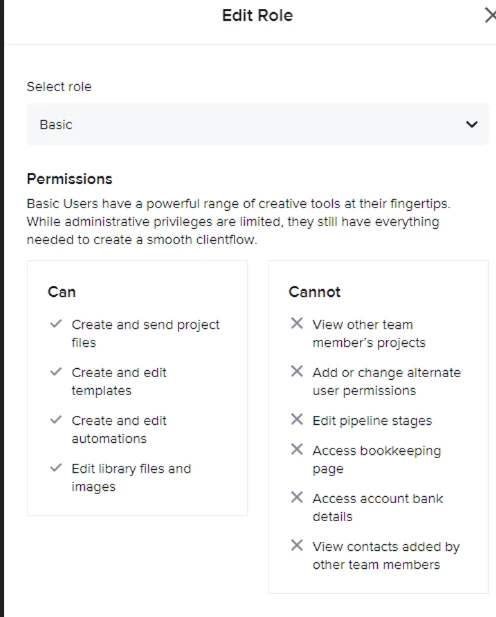
To add them, go to your icon at the top right, then click Company settings, then TEAM. Let me know if this helps!




Sign up
Already have an account? Login

Welcome! To join the HoneyBook Community, log in with your HoneyBook account below.
You'll confirm your username and share a bit about yourself, then you're ready to explore and connect.
Free trial? No problem. Log in with your trial credentials to join.
Already a member? Hi and welcome back!
You will see the HoneyBook login page briefly to validate your trial or account.
Employee Login
Log in with HoneyBook
Welcome! To join the HoneyBook Community, log in with your HoneyBook account below.
You'll confirm your username and share a bit about yourself, then you're ready to explore and connect.
Free trial? No problem. Log in with your trial credentials to join.
Already a member? Hi and welcome back!
Welcome to the Community
Welcome! To join the HoneyBook Community, log in with your HoneyBook account below.
You'll confirm your username and share a bit about yourself, then you're ready to explore and connect.
Free trial? No problem. Log in with your trial credentials to join.
Already a member? Hi and welcome back!
You will see the HoneyBook login page briefly to validate your trial or account.
Employee Login
Log in with HoneyBook
Welcome! To join the HoneyBook Community, log in with your HoneyBook account below.
You'll confirm your username and share a bit about yourself, then you're ready to explore and connect.
Free trial? No problem. Log in with your trial credentials to join.
Already a member? Hi and welcome back!
Enter your E-mail address. We'll send you an e-mail with instructions to reset your password.