Is it just me who mostly logs in to use smart files? Navigation seems to suggest it's not the main feature.

  • May 6, 2025
  • 7 replies
  • 33 views

Future Is Fiction

Looking at the new “dashboard” it took me way too long to discover the little navigation widget. OK fine, but then Smart Files are not even in the navigation..?


Then I figured out that “Create Smart File” was in a nav at the top right + sign. However, this version of the familiar Smart Files page no longer allows me to preview templates, I have to commit to adding a new smart file and link it to a project/client before I can view the document!

There are often times where I have numerous templates that are similar/variations on others (e.g. this version is targeted to authors vs corporate, or proposal for a totally new site vs remaking a site). Sometimes I want to view the template, to be sure it’s the best one to use, but that no longer seems possible with the redesign.

Moreover, I recently discovered I’ve been using smart files when I should have been creating lead forms. So now I have to convert them, and it doesn’t seem like there is any way to duplicate a template as a lead form or any other thing.

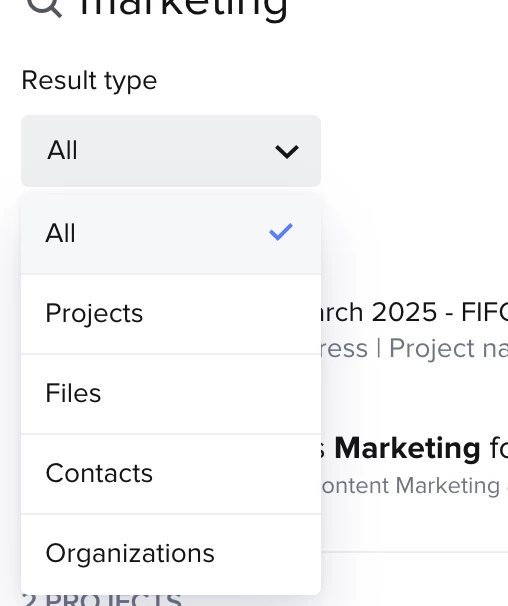
I was also surprised to discover that the search bar does not search the smart files, only client and project names. Moreover, the listing of smart files doesn’t offer a search field. I am often scrolling back and forth through my list trying to find or recall what I named a smart file.

It’s all very surprising to me that smart files keep being sidelined in the design, since isn’t creating and modifying smart files the primary use of the platform? Like this design is so de-emphasizing smart files that I am beginning to wonder if I am even using the platform the way other people are.

I’d wager that 80% of the time I go to HB with the intention of looking at my templates and deciding which to use as a smart file (whether an invoice, proposal or onboarding document). (Most of the other 20% going to time tracking and related). I’m curious, is my use case typical? What percentage are you going to HB to create or edit a template? Do you feel like when you do so, they are easy to navigate to and find the one you want? Or are there other features you are using a lot more, and what are they?


7 replies

Alicia Bauer
Forum|alt.badge.img+4

@Future Is Fiction - Thanks so much for taking the time to share your experience—you're not alone in needing a bit of time to get oriented with the new dashboard layout! With so many exciting updates rolling out across the platform, I totally understand how it can feel like things have shifted quickly.

✨ When it comes to Smart Files, it’s important to remember that every business uses HoneyBook a little differently—there’s no one-size-fits-all workflow. The way Smart Files show up in your process will really depend on how you’ve structured your client journey and what types of services you offer.

If you often find yourself bouncing between templates to decide which one to use, it may be helpful to create a set of intentional, reusable templates for the most common scenarios in your business. Whether that’s different proposals for corporate vs. authors, or onboarding documents tailored to your services, having go-to templates on hand will save time, eliminate confusion, and make your workflow feel much smoother. You may have already done this but I just wanted to share my thougths!

✅ As for the Lead Forms vs. Smart Files question—you’re right that there currently isn’t a way to duplicate a Smart File into a Lead Form. That said, you can copy and paste blocks between files, which is helpful if you want to reuse content while transitioning how you collect inquiries. Lead Forms and Smart Files serve different roles, so finding the right tool for the job can really enhance the experience for both you and your clients.

If you’d like to talk through how you’re currently organizing things and explore ways to make your HoneyBook setup more efficient, I’d love to help. I’m a HoneyBook Pro and would be happy to walk through ideas that work with the new layout and features.


Future Is Fiction

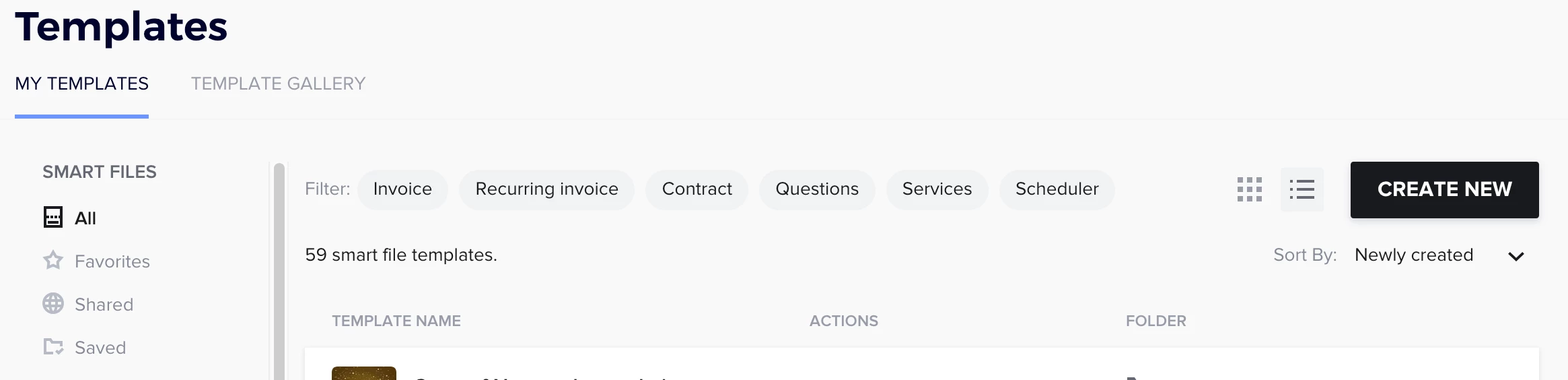
So actually it turned out that the black, left-side navigation wasn’t loaded onto the page. Now I see the option to create new templates. 😅

It probably would have been fixed by refreshing the page. I just assumed everything had loaded properly and that this was the new dashboard.

I do still wonder why it is not possible to search my templates folder nor have files come up in the general search.

Maybe I should delete this post! Not trying to be cranky but thought it would be a good conversation for the community around how they use the product and what features people use most.


Alicia Bauer
Forum|alt.badge.img+4

@Future Is Fiction  - It happens to the best of us! Glad it got worked out for you. As for searching for your templates - have you tried to filter the search to only files? 


Future Is Fiction

@Future Is Fiction  - As for searching for your templates - have you tried to filter the search to only files? 

The main search does not search templates, only files.


...and the templates page does not have a search option.

I can “CTRL +F” through the page to find a particular search term, but I’d like to be able to view all the files with that term at once, as I’m often unsure which is the most recent/best version of a template. e.g. I have this one for my corporate clients, but did I already make one for my author clients?


Kaitlyn Blair
Explorer
Forum|alt.badge.img

@Future Is Fiction

That would be such a great feature! Since Honeybook right now doesn’t offer a way to search for files, what you can do is create folders by clicking “add new folder“ underneath where it says “Smart File” on the left. You can organize them by client or by stage, so a folder titled “Corporate clients” and then another as “Author clients.” Or you can have it as “Onboarding” or “Offboarding” if that makes sense. 


It’s not an exact alternative to the search, but it may help find them a bit faster. 


I’d recommend going to the Ideas tab here in the community and input your idea! Honeybook makes changes to their platform based on the needs from that tab. 


Does that help a bit more?


Future Is Fiction

Thanks Alicia, I have added it as a feature request but put it here as well as a matter of discussion when templates disappeared from my navigation for a day. (In retrospect, I think this was because I was using Firefox’s new tabs-on-the-left feature, which sometimes hides site info on accident.)

It was such an odd thing that I wondered if I was using the site wrong, and thought it worthy of discussion.

Re: folders.

I do tend to be the type who uses navigation rather than search, but in this case the folders just add to my confusion because templates can only live in one folder, while they often share attributes across numerous folders. I also have to remember to put them in the appropriate folder, which is my own fault but still a deterrent in the moment.

For example: I have folders for Invoices, Contracts, and Proposals. But is is often the case that a proposal will include an invoice and a contract, so my template could be in any of those. Adding to the confusion, if I don’t find what I’m looking for in one folder, but find a similar file I can modify, how can I be sure the item I want’s not in one of those other folders? I can’t see all of the items at once, and going back and forth between folders requires me to keep too much info in my working memory. I end up modifying the similar template, only to discover later I already had a version I could have used in another folder.

To give a concrete example: let’s say I want to send a proposal for “new website design - author discount”. In proposals folder, I have a template for “website relaunch - author discount” and in the contracts folder I have a template for “new site design - corporate rate,” while in the invoices folder I have a template for “new website design with marketing campaign.” None of these is exactly the template I need, so I need to compare all three documents. Which means I have to end up opening three tabs, one for each folder, and then opening all the relevant documents and comparing which is most similar to the new project. This is tedious and time-consuming.

Using tags/labels instead of folders would solve this, as they can be applied to more than one item. But I think search is a higher priority, and likely easy for the team to implement.


Kaitlyn Blair
Explorer
Forum|alt.badge.img

@Future Is Fiction 100%! That would remove a lot of headache. I totally understand how the folder system can actually add to the confusion when your files overlap in purpose. And having to open several tabs just to compare different templates? Definitely not the kind of workflow that saves time.

You're absolutely right—something like tags or labels would solve a lot of these headaches since files could live under multiple categories. And yes, search functionality would be such a huge improvement too. I'm really glad you added this to the Ideas tab already! 

In the meantime, something that might help (if you haven't already tried it) is organizing folders based on where a file fits in your process—like Inquiry, Onboarding, Offboarding, etc.—instead of by file type. Or even getting really clear with yourself on how you define what makes a proposal vs. contract vs. invoice might help reduce the overlap. Totally not a perfect solution, but it might ease some of the mental sorting when you're in the thick of a task right now.