New Automations Feature being tested

  • September 10, 2024
  • 7 replies
  • 89 views

Allum

I just had a set-up service with a client who is on a different version of HoneyBook. They do not have the ability to add automations to projects but automations can only be triggered within ‘universal automations’ that have been set-up.  With this new feature HoneyBook is testing, you can’t manually add automations to projects, it will be dependent on a trigger.  IDK if anyone else has seen this new feature.  

Biggest differences from our automations builder today:

  • You do not need to (and can't) manually apply an automation,
    • as long as the trigger happens in a project, the active automation will start running
  • Because you aren't applying to a project anymore and instead the automations are just triggering on their own, you can have multiple automations happening inside of any given project
  • The new "Condition" step in the automation flow introduces branching logic based on specific criteria. When the flow reaches this step, it checks whether certain conditions have been met.
    These conditions are related to previously configured steps where smart files were sent or tasks were created, or if a session was scheduled. The "Condition" step then branches into two paths: "Yes" (true) and "No" (false).
  • You can also set a timeframe for the condition to be evaluated. If the condition is met within this timeframe, the flow proceeds along the "Yes" path; if not, it continues along the "No" path after the timeframe ends.

I like the conditional option in the new feature, but being able to manually add an automation to a project, not dependent on a specific trigger, was a big feature I enjoy.


7 replies

Katie Coverstone
Forum|alt.badge.img

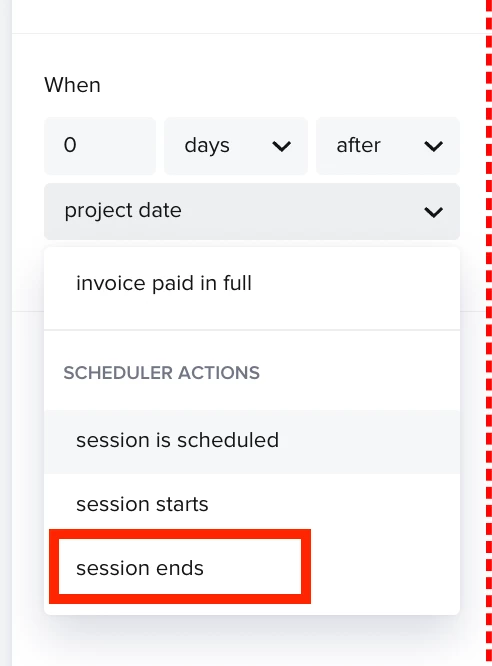
I have noticed this as well. I also don’t like that you can’t edit the wait times depending on the actual project (i.e. I like to send a particular email one day after the session.) I don’t know how to achieve that automatically if everything is dependent on the project start date.


Monica R
HoneyBook Community Team
Forum|alt.badge.img+7
  • HoneyBook Community Team
  • September 12, 2024

Hi folks! 

Thanks so much for sharing these thoughts. 

We’ve been hearing a lot about needing to manually triggering an automation and have added it to our roadmap due to feedback from members like you :) Thank you! 

And @Katie Coverstone, we do have a trigger for sending 1 day after a session! 


Allum
  • Author
  • Newcomer
  • September 13, 2024


We’ve been hearing a lot about needing to manually triggering an automation and have added it to our roadmap due to feedback from members like you :) Thank you! 


Hi Monica - Thank you for the reply. 

Hopefully we wont lose an existing feature (being able to manually add automations to projects) to gain this new feature. 


Katie Coverstone
Forum|alt.badge.img

Hi!


I've noticed there are two different versions of HoneyBook. One allows you to add manual automations, emails sent based on project date, etc. And one that wants everything to be based on one trigger. Is the trigger version new? I'm assuming because I've used honeybook for years and now that I'm helping others set theirs up, I've noticed this change. Is there a way to use the older version that allows more customization or are there trainings on this new version? I'm getting mixed messages. I appreciate your help!


Monica R
HoneyBook Community Team
Forum|alt.badge.img+7
  • HoneyBook Community Team
  • September 16, 2024

Hey @Katie Coverstone

That is correct, there are two automation versions running right now.

As for your feedback -  

  1. "Emails sent based on project date" is possible in both features, not just the old version
  2. "Everything to be based on one trigger" While it is true you have a single trigger in the new feature (a single point that initiates the automation), any trigger can initiate it, as opposed to the old automations where an automation must be applied to a project first (either manually or by auto-apply of contact/lead form submission) and then its triggers can start running.

    To summarize: old automations are initiated either from contact/lead form or manually, but new automations can be initiate using any of the many possible triggers.


@Allum I just made a feature request for manually applying an automation. Please upvote it so that when it is released we’re able to notify you straight away :) 


Allum
  • Author
  • Newcomer
  • September 16, 2024

Thank you @Monica R 


Katie Coverstone
Forum|alt.badge.img

I am becoming more confused. How do you send an email based on the project date? Is there an online training so show how the new automation is as effective and useful as the old one?