Question

Project Timeline Tracking

  • July 10, 2024
  • 6 replies
  • 65 views

Angela Laine

Hi,

I am looking for ideas on how to better track our project timelines. 


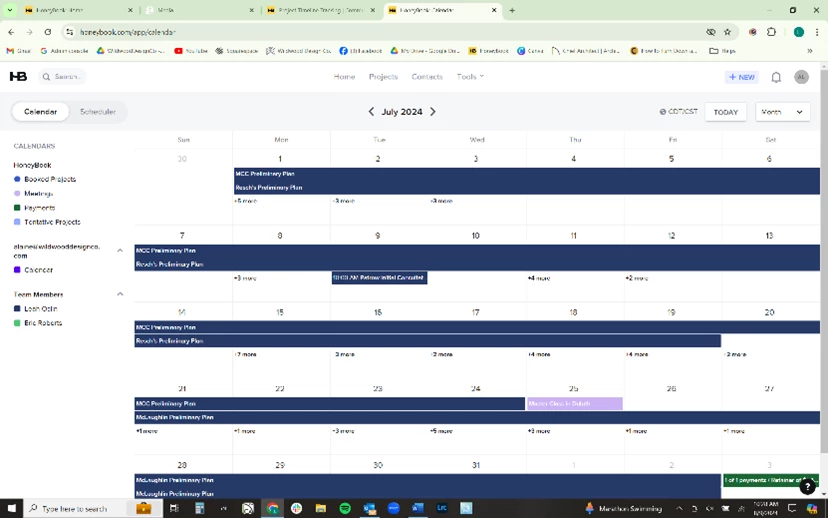
After the initial consultation and contract signed, we give ourselves a 3 week window to draw up plans. Currently I am just creating a 3 week long, “all day” meeting in a “project windows” project to track those timelines. We don’t want clients to be able to see these because sometimes it is not always possible to complete them in that amount of time, but WE need to be able to track it. 


I have asked about a Gantt Chart option or the possibility of viewing tasks in the calendar but nothing has come of it yet (hopefully soon). 


There has to be a better way to track this stuff, I just haven’t figured it out yet.

Please help.

This topic has been closed for replies.

6 replies

Naama
  • August 8, 2024

Hi Angela! I’m Hannah from HoneyBook’s design team. 

We have had a lot of discussions on enhancing our project tracking capabilities and this issue is definitely on our radar.
I was wondering about how you would best be able to view this “deadline” in HB:

- Would you want it to be more like creating a task with a deadline? Or is this something you want to be able to view daily in your calendar? 
- Is this something you would want to be reflected in the project workspace, that you and your client could view? 
- Can there be multiple windows at the same time? Like multiple clients that you are drawing up plans for simultaneously?

Thanks so much for your time! Hopefully we will be able to create something that solves this issue. 

​​​​​​​


Cindy C
Forum|alt.badge.img+1
  • Newcomer
  • August 10, 2024

Hi @Naama I’m obviously not Angela but I have some input for you. 

I think Asana has this based on a whole workflow—they are task-based but the tasks are dependent on each other so if a task is adjusted, the rest of the timeline adjusts accordingly.

I found that the way Asana and ClickUp handle it is a little confusing but it probably makes sense to the tech people who designed it. As far as I know, they both kept it in their native programs and it was individual to each project. 

Although as a small business, I jury-rigged it to create one mega timeline so I could see my entire workload and how it would affect each project (and, god-forbid, if I could take time off). 

I personally would LOVE to have this something a client could see (or at least had the option to see). 

Also—what an AMAZING feature idea. It never even occurred to me in my wildest dreams to ask to track projects on a timeline. 


Katie Soule

I am searching for a similar function so I can project into the future the amount of time I need to dedicate to a project, so I know when Im available to take on the next project.


  • Currently Im doing this in clickup, but I would love to have the simple capability to block out days in honeybook where I am working on a project. The current start and end date on my calendar doesnt work because Im not continuously working on project, they start and stop at different durations.
  • I would like the ability to hide these dates from my client.
  • I like that I can add custom dates currently, but it doesnt help me that they dont show up on the calendar so I cant see a visual of how these align.
  • Cherry on top - if I could assign hours to those date ranges, say I need to put 10 hours into the project between monday and friday. It would help me to build out my cost estimates for clients as well.

Angela Laine
  • Author
  • Newcomer
  • August 21, 2024

Sorry for the delayed response, I was trying to get team input too.

  • Would you want it to be more like creating a task with a deadline?
    • Kind of, we would like this function but also need to be able to visualize how many projects are happening at the moment, so we know if we have availability to take on more.
  • Or is this something you want to be able to view daily in your calendar? 
    • Yes, see below.
  • Is this something you would want to be reflected in the project workspace, that you and your client could view? 
    • It would be really nice for clients to not see the timeline. We give ourselves a 3 week window but are not always able to meet that so we would like to keep that date inhouse.

Angela Laine
  • Author
  • Newcomer
  • August 21, 2024

Part 2:

  • It would be great to be able to go into the project and see when the time line is due.   
    • Once a project is accepted and a contract is signed, we give the 3 week window to make the preliminary plans for a design. If we could add a “task” that shows in the project, like it does now, but also shows in the calendar, (similar to the picture below) so we can see all the projects that are in that 3 week window.

Angela Laine
  • Author
  • Newcomer
  • August 21, 2024

Part 3 (please make longer responses possible)

  • Currently we are just creating 3 weeklong, all day meetings so we can see which projects are happening now, but that prevents us from being able to use the scheduler.
  • Can there be multiple windows at the same time?
    • Yes, we have projects starting at all times, so we would need to be able to create a window for every project we have/start.
  • Like multiple clients that you are drawing up plans for simultaneously?
    • Yes. Generally, we have never had an instance where we had multiple plans per client, but I can imagine that would be a possibility for some business owners, so it might be a good idea to be able to create multiple windows for a client.