Im going to be honest, I continue to be amazed at how difficult it is to use Honeybook.
Nonetheless, I have created a smart file. I would THINK that I could use that as a template for sending contracts and invoices but everytime I use it, it isnt used as a template its used as a one off file I can send to someone. So what is the best way to create a template that contains a contract and an invoice i can send to multiple people at once for individual signing and paying?
Best answer by Cassie H of Premier Ops Spot
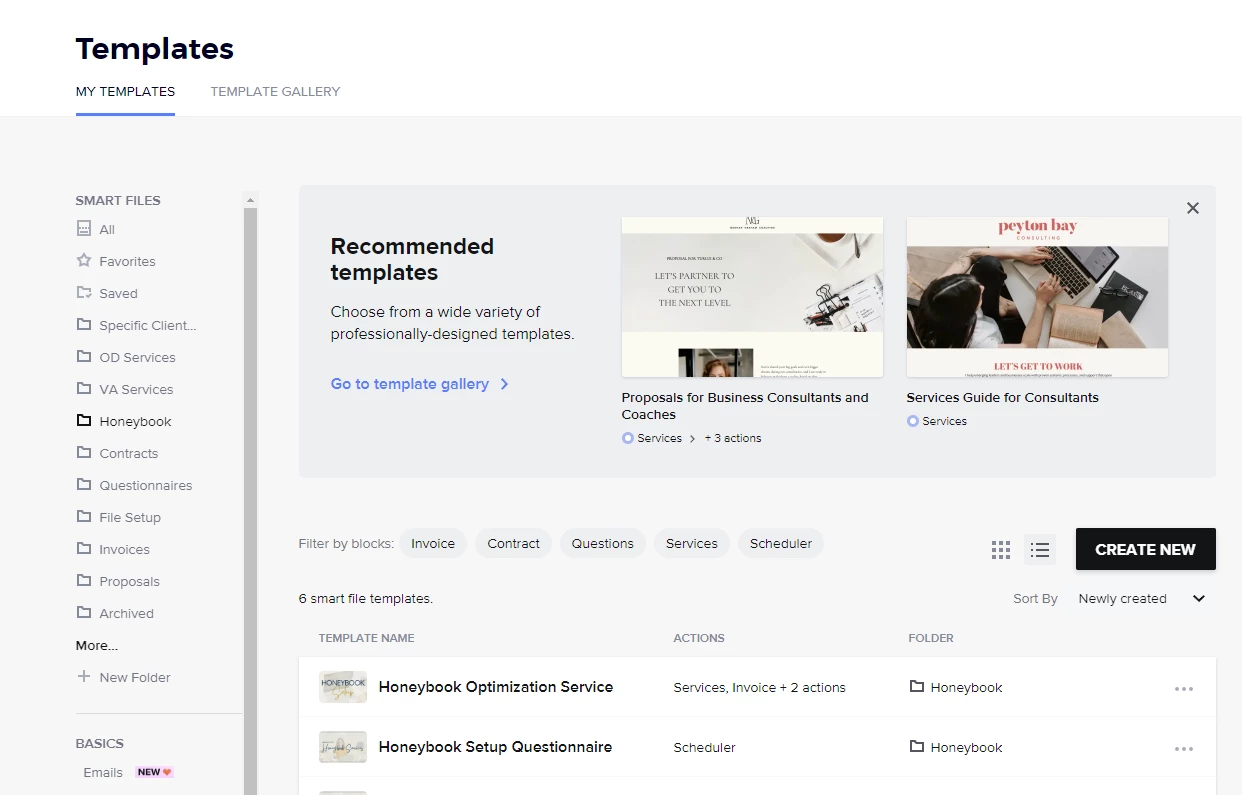
Hi @Mike Volkin ! It took me a little while to get used to Honeybook’s files as well. Here’s the best way I’ve learned to describe it: Your templates live in your “My Templates” area under SmartFiles. Any time you send a SmartFile to a client, you can customize it without changing your template. So, if you want to make changes to a template that you will use over and over, I recommend going into your TEMPLATES area (screenshot below) and then editing it from there.
Then, when you want to send that template to a client, you can send it 1 of 2 ways:
From the template screen, open the file you want to send. Then click the “Use Template” button at the top right, and either create a new project or select the existing project you want to send it through.
From inside the Client project, click “Create File” button and choose “Custom Smart File”. This will pull up the list of templates you’ve already created and allow you to customize, apply, and send.
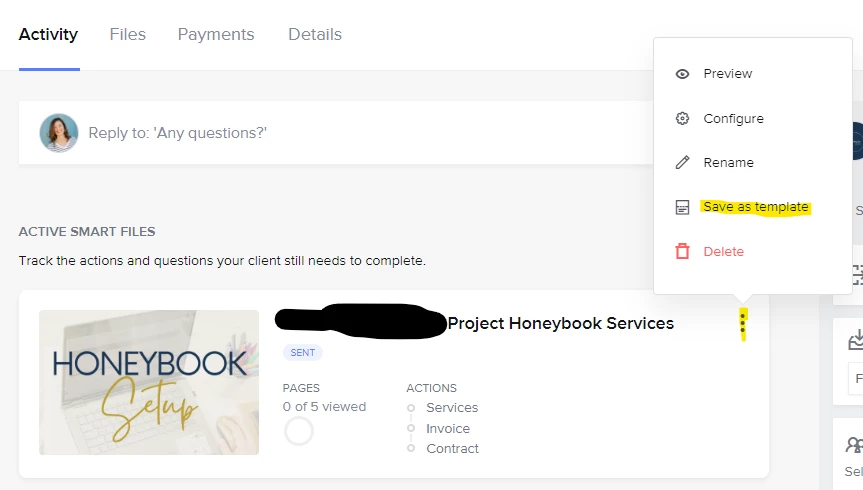
ALSO… If you have an existing invoice/contract you’ve sent to a client, and you’d like to turn it INTO a template, it’s super easy. Just go into that Project, click the 3 dots at the top right of the file, and choose “ Save as template”.
So a smart file has to be applied to a project in order to send a contract. When using a template, you can add it to an automation to make it send automatically. It will then add the smart file to the project but will use your template and be completely hands off.
If you want something totally public you need to use a lead form but you cannot currently add a contract to that form. You can have an invoice and payment on that form! I then set up for a contract to be sent immediately after the payment is made. If you want your clients to read the contract before paying, add it as a page to review and let them know they will sign the official contract after payment is completed.
Hi @Mike Volkin ! It took me a little while to get used to Honeybook’s files as well. Here’s the best way I’ve learned to describe it: Your templates live in your “My Templates” area under SmartFiles. Any time you send a SmartFile to a client, you can customize it without changing your template. So, if you want to make changes to a template that you will use over and over, I recommend going into your TEMPLATES area (screenshot below) and then editing it from there.
Then, when you want to send that template to a client, you can send it 1 of 2 ways:
From the template screen, open the file you want to send. Then click the “Use Template” button at the top right, and either create a new project or select the existing project you want to send it through.
From inside the Client project, click “Create File” button and choose “Custom Smart File”. This will pull up the list of templates you’ve already created and allow you to customize, apply, and send.
ALSO… If you have an existing invoice/contract you’ve sent to a client, and you’d like to turn it INTO a template, it’s super easy. Just go into that Project, click the 3 dots at the top right of the file, and choose “ Save as template”.