Question

Smart Scheduler for lead forms

  • February 11, 2024
  • 7 replies
  • 49 views

Taylor Kaminski

The calendar sessions should be connected to a service/package. I need them to be able to change based on the service/package the client chooses on the lead forms. Each of my packages has a different calendar availability. I haven't been able to use lead forms for this reason. 


If my client is choosing between my petite senior session, 1 hour senior session, or 2 hour session the calendar session that correlates to that package should appear. 

7 replies

Kim Fox
  • February 20, 2024

Yes!!! I agree, I thought when this feature came out we could have the client select a service and gain access to that calendar all in one file. I was so excited for it because that’s something that would alleviate me having to go in to my schedules and adjust based on the session length 


Kim Fox
  • February 20, 2024

Yes!!! I agree, I thought when this feature came out we could have the client select a service and gain access to that calendar all in one file. I was so excited for it because that’s something that would alleviate me having to go in to my schedules and adjust based on the session length 

If I could edit or delete this comment I would. I was having an issue with the session scheduler in Smart Files but I’ve figured out how to successfully link my services to the that session calendar. I have not tried this in lead forms. I can clarify further if anyone was having issues in smart files like I was!


Michelle K.

Yes!!! I agree, I thought when this feature came out we could have the client select a service and gain access to that calendar all in one file. I was so excited for it because that’s something that would alleviate me having to go in to my schedules and adjust based on the session length 

If I could edit or delete this comment I would. I was having an issue with the session scheduler in Smart Files but I’ve figured out how to successfully link my services to the that session calendar. I have not tried this in lead forms. I can clarify further if anyone was having issues in smart files like I was!

Please let me know how you did this! Thank you! 


Taylor Kaminski

Yes, please let me know how you did this!!!


Monica R
HoneyBook Community Team
Forum|alt.badge.img+7
  • HoneyBook Community Team
  • May 20, 2024

Hey folks!

I’m attaching a help center article here that will explain how to connect your sessions to your service select list on both smart files and your lead forms! 

I hope this helps!

Monica


Taylor Kaminski

Hey folks!

I’m attaching a help center article here that will explain how to connect your sessions to your service select list on both smart files and your lead forms! 

I hope this helps!

Monica

Hi Monica, I looked over the article but I do not have the option to add “service selection with scheduling” I have doing it multiple ways and even started a lead form and smart file from scratch and still nothing. This doesn’t seem to be a universal feature for all honeybook users


Monica R
HoneyBook Community Team
Forum|alt.badge.img+7
  • HoneyBook Community Team
  • May 20, 2024

Hey Taylor!

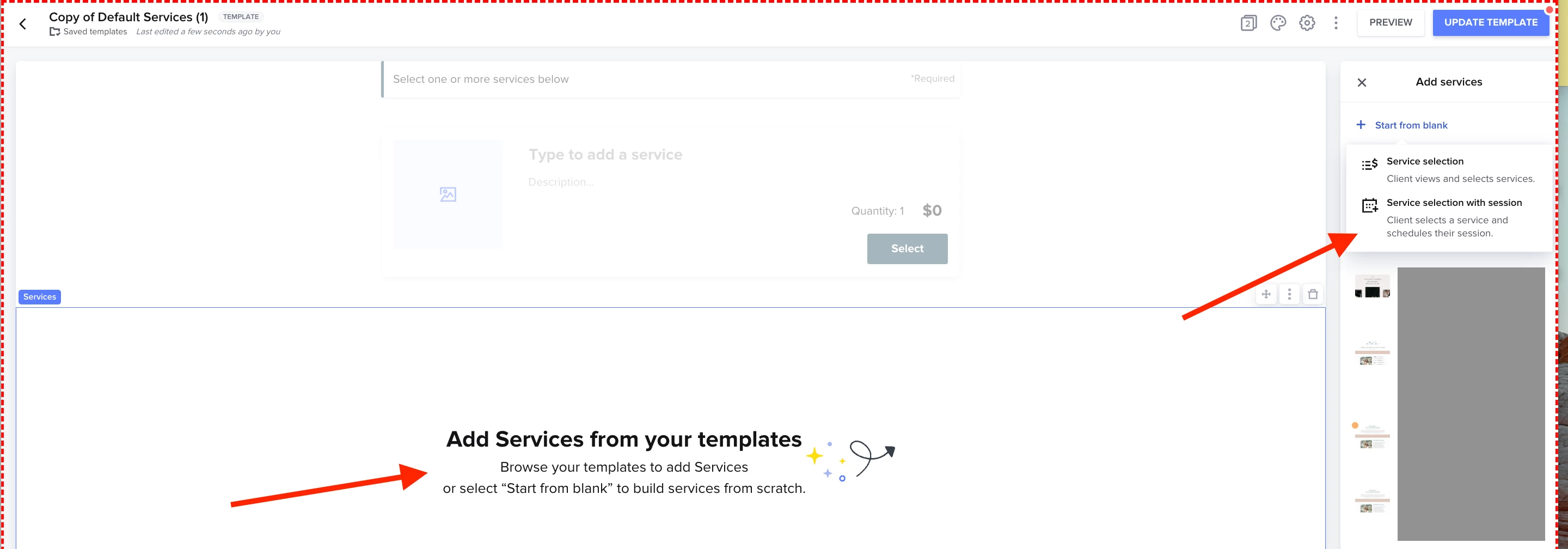
When you go into a smart file or lead form and add a service block, you’ll see the option to start from blank. Click that and from there, you’ll see the option to add service selection with session! 


If you’re still not seeing it, please reach out to our Support Team at concierge@honeybook.com