

Question

Time Tracker Reports?

  • January 25, 2024
  • 5 replies
  • 50 views

Denise O'Malley
Luminary
Forum|alt.badge.img

I have not seen this question posed, nor can I find it by searching.

I have a staff member who will be recording her time for each project via the Time Tracker. We do NOT invoice the client for this time, but I want to use it to calculate my payment to my employee.

Is there a report I can run of all entries in the Time Tracker?  I don’t see it on the reports page.

5 replies

Denise O'Malley
Luminary
Forum|alt.badge.img

Conversely, is there a report I can run to see what my staff member worked on (i.e. proposal or emails sent out)?


Cassie H of Premier Ops Spot
Community Legend
Forum|alt.badge.img+7

Hi @Denise O'Malley ! 

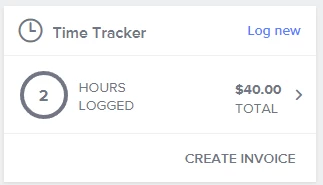
I used to use the time tracker in Honeybook and here’s the only place I know to find the report: 

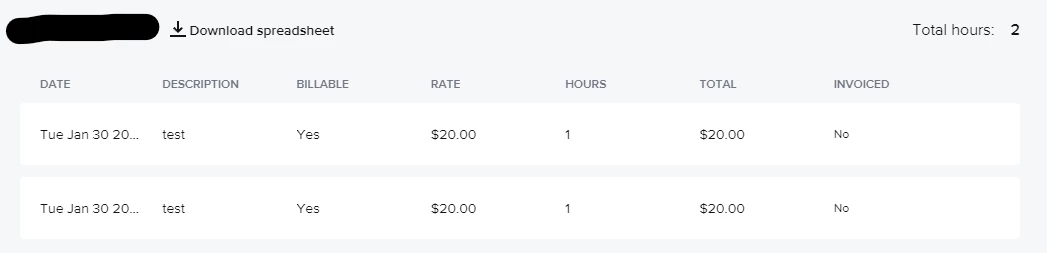
You can click on the TOTAL area and it will pull up this list: 
 

So: what you can do is have your staff member write the type of work in the Description. 

Do you have more than 1 staff member? 


Denise O'Malley
Luminary
Forum|alt.badge.img

Only one, but she works on multiple projects… right now 69 of them.  I really need a consolidated report of all projects with time.


OMEQUETZAL LLC
Forum|alt.badge.img

HI All, I’ve been with Honeybook since 2014.  I wish I could use Honeybooks time tracker but its just too basic for me.  I use Harvest App instead to track my time.  The reason I use it is because I can time track specific tasks or areas of focus in my projects.. ie, admin, biz dev, project management, travel time, DJing, sourcing content, client correspondence,  marketing.  This is very helpful with seeing where I am focusing my time in each project and where I may need to be focusing more attention.  I love seeing the data and hours broken down with precision.   Not sure if Honeybook has something I’m missing with the time tracker features but would love to know if I’m missing something.


Future Is Fiction

I came here from Toggle, which has time tracking as it’s primary feature. So I really miss a lot of those features. If you can afford it, Toggle is a good choice to supplement HB. But, once you pull the data out of Toggle, to put it back into HB you need to manually create an invoice. Not a huge deal but sometimes the data in my spreadsheet doesn’t exactly match what I get in my time tracker, due to rounding differences for seconds that are converted to decimals. It is hard to understate how much time I have sunk into this tedious matter that comes down to less than a dollar difference in the total---but it must be done because it would be unprofessional if my report doesn’t match my invoice! Of course, you could just bill for the total amount but since my clients are charged hourly, I prefer to use the hours/rate display.


I have learned a lot about spreadsheet formulas since I have been trying to work with time tracking!


Anyway, Toggl does have the option to have staff/teams per project.