Yearly Income Reports

  • August 14, 2024
  • 1 reply
  • 9 views

Cathy Gowing

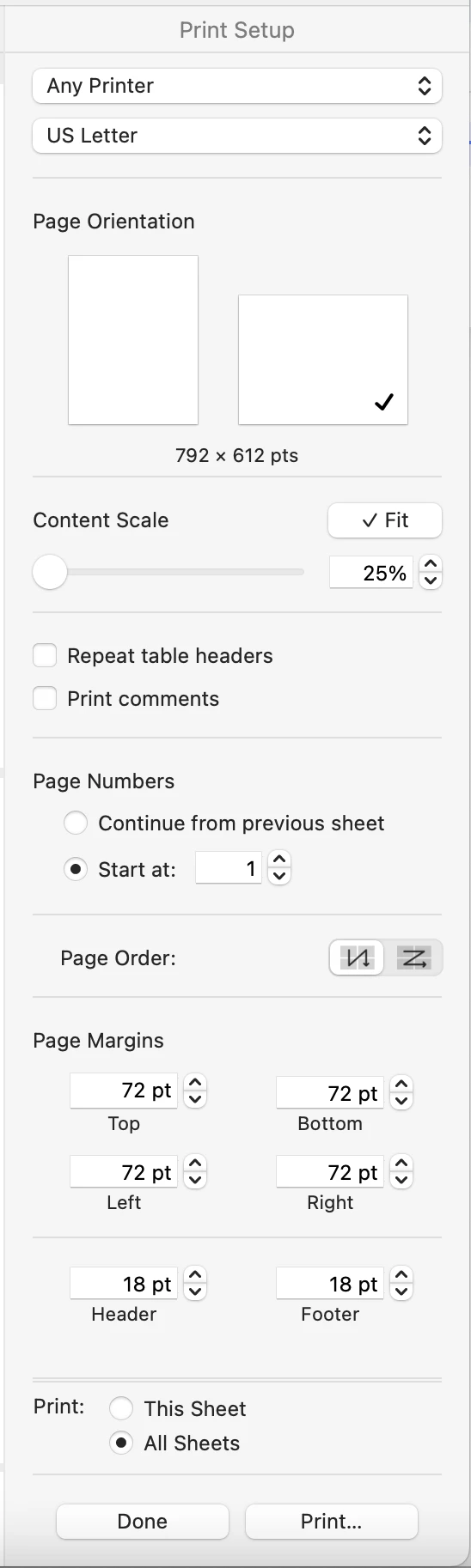
How do I print yearly income reports? I can get the reports on my computer screen but when I try to print them I am forced to print in portrait mode and can’t switch to landscape mode so my reports are cut off. 

Or If I could save original report in a PDF format I could email them.

This topic has been closed for replies.

1 reply

Geily Romero
Forum|alt.badge.img+4

Hi Cathy! Are you using a Mac? If so, when you download your report in Numbers and hit print, you should see on the “Print Setup” window to your right, where it says page orientation, click on the one that’s landscape and hit print (see attached). If you notice the report still doesn’t fit on a single page, you could go hit “done” to go back to the report and hide cells that may be irrelevant for your purposes, and try printing again. Hope this was helpful!