

You Asked, We Built: Feature of the week - File uploads

  • January 19, 2024
  • 16 replies
  • 155 views

Mac H
HoneyBook Employee
Forum|alt.badge.img

As we wrap up week one of You Asked, We Built, there’s one feature that seems to have stood out among the rest…. 🥁

The  File Upload Block is getting some serious love from you guys😍

Hop into the thread: We want to know, how do you plan to use this exciting new update?
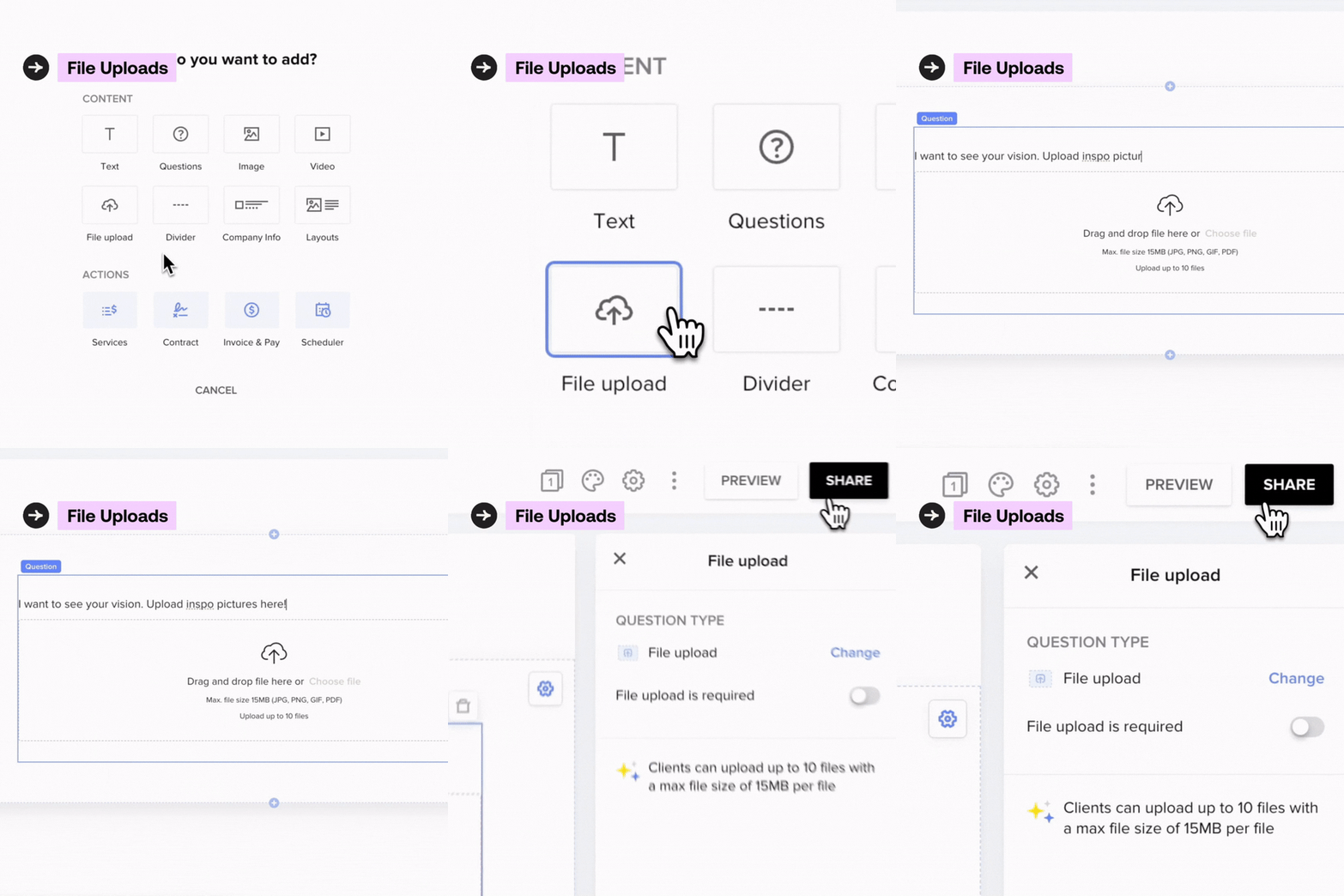
Let’s start by hearing from HoneyBook Pro, @Brandi Lilley, on how she plans to use this with her clients. Take it away Brandi!

16 replies

Brandi Lilley
Forum|alt.badge.img+2

My team and I are SOOOOO excited about this feature. We work this into our client onboarding questionnaires for nearly every project we have now. It makes it so much easier for clients to go to one place to give us all their info as opposed to answering a questionnaire, then backing out and going back into the project to individually upload files. It also makes my life easier being able to get all information in one place on the back end. It’s truly a win win for everyone! 


Mac H
HoneyBook Employee
Forum|alt.badge.img
  • Author
  • HoneyBook Employee
  • January 19, 2024

I love this, Brandi! Thank you so much for sharing.

What kind of things are you asking your clients to upload? 

I could see it being used for inspo pictures or to collecting branding elements from people...I’m curious what else you think people can upload? 


Brandi Lilley
Forum|alt.badge.img+2

Here’s a handful of the things our clients are uploading:

  • Mood boards
  • Outlines for client flows
  • Copy for emails
  • Brand messaging / guidelines
  • Spreadsheets (budgeting, email lists, seo planning sheets)
  • Logos
  • Photos
  • Program outlines
  • Copy for print/digital materials 
  • Podcast transcripts
  • Outline of travel accounts
  • Sensitive documents you wouldn’t want to share via email


There’s soooo many industries that can benefit from this feature! 


Kinah Myers
Forum|alt.badge.img

I love this! When will the file upload feature be available for lead forms?


Caitlyn Gray
Explorer
Forum|alt.badge.img+2
  • Explorer
  • January 22, 2024

This is def going into my onboarding suite. So excited. 


Mac H
HoneyBook Employee
Forum|alt.badge.img
  • Author
  • HoneyBook Employee
  • January 22, 2024

I love this! When will the file upload feature be available for lead forms?


Great question :) This is coming SOON!!!

Feel free to upvote and track that the feature request over here.


Lani Bidlack

I will absolutely be using this for my balloon decor business, it will save an extra email from having to be sent:) Have this rolled out to everyone yet? I do not see it as an option in my contact form template yet. 


Thanks!


Mac H
HoneyBook Employee
Forum|alt.badge.img
  • Author
  • HoneyBook Employee
  • January 22, 2024

I will absolutely be using this for my balloon decor business, it will save an extra email from having to be sent:) Have this rolled out to everyone yet? I do not see it as an option in my contact form template yet. 


Thanks!

Hey Lani!

This is currently in Smart Files only (coming to Lead Forms soon)!


1LamJam
  • March 11, 2024

Can we add mp3/mp4 to this as I tend to share video production files with my customers and would love to go away from google drive


Mac H
HoneyBook Employee
Forum|alt.badge.img
  • Author
  • HoneyBook Employee
  • March 11, 2024

Hey @1LamJam 👋🏼 Welcome! I love that idea.

This is actually highlighting the client upload function of smart files in HoneyBook, so this would be for your clients to send you something. But I totally hear you that streamlining the connection between Gdrive and HoneyBook would make life easier. A lot of folks like to use our Zapier Integration to help with that. 

Let me know if that looks like something that could help you too! We’re glad you’re here :)


Jessica Jeffrey

I need my clients to send me monthly statements. I am having a hard time with the upload feature. I created a smartfile with this feature. However, when I go to attach it to an email (in an automation) it won’t attach. It just boots me out and makes me select a different smart file. What am I doing wrong?


Monica R
HoneyBook Community Team
Forum|alt.badge.img+7
  • HoneyBook Community Team
  • November 15, 2024

Hey ​@Jessica Jeffrey

I think what’s happening is you’re trying to “send an email” as your automation action instead of “send a smart file” but can’t be sure. I’m going to have our Support team reach out to you for a bit more information and they’ll be able to tell you exactly what’s going on :) 

Look out for an email from Concierge@HoneyBook.com! 


All the best, 
Monica


Laurie McDevitt

In my industry clients upload documents, pdfs that I need to read. Having a document reader would be brilliant.  While I can appreciate that you are celebrating having the upload document feature, I would love to be able to read the documents that are uploaded.  Is that possible, within HB? Thanks


Monica R
HoneyBook Community Team
Forum|alt.badge.img+7
  • HoneyBook Community Team
  • January 2, 2025

Hey ​@Laurie McDevitt,

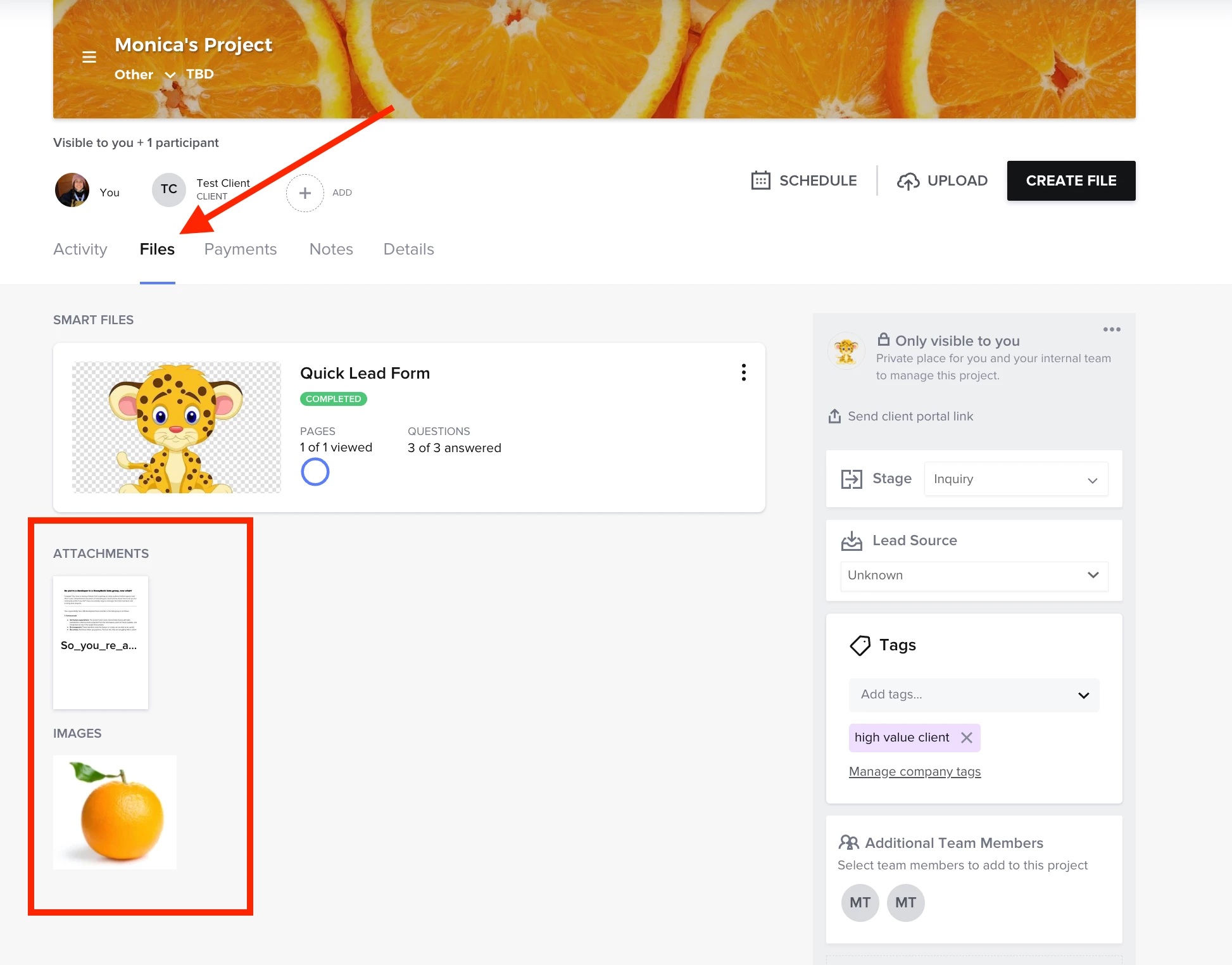
The files that your client uploads are visible to you within the Files tab of their project workspace! 


Laurie McDevitt

Thanks for the visuals. They are great. Please tell me more. How can I read the thumbnail? I can’t get it to zoom. Secondly, many times  I have to review and comment on the multi page documents that are being sent. Can you please send more ‘how to’ instructions for that scenario, because I can’t locate the arrow that lets me flip pages, like a document viewer and I definitely can’t locate a tool to make comments. I find myself downloading the document, using Adobe to comment, renaming the document, uploading the new commented on document, and then the client needs to do the same, it’s so archaic. Please send me screenshots of how I can even read the documents Assuming no edits or comments are needed. Then, another set of directions which sounds like I use Zapier to connect with Google drive shared doc,?  Thanks. 


Monica R
HoneyBook Community Team
Forum|alt.badge.img+7
  • HoneyBook Community Team
  • January 2, 2025

@Laurie McDevitt - I’m going to have someone from our support team reach out to you. Expect an email in your inbox from Concierge@HoneyBook.com sometime this morning!

Cheers!