

As far as I can tell this topic has been posted about but never answered. My clients often purchase next year’s session deposit through their session gallery. Now I am struggling to find a way to apply that $300 to their upcoming sessions. Honeybook won’t allow more than a $100 custom payment, or a discount of greater than $100 either. Does anyone have suggestions? Thanks!

Solved
Applying credit to a proposal

Best answer by Michal Peled
Hello The Enlove Creative! Michal from HoneyBook here.
Let me know if I understand your question correctly:
You would like to send a proposal, including (I assume) a service selection component to select their desired product, with an invoice, to a client that has placed a deposit in the past, and you would like to display that deposit in the form of a discount in the invoice. Is this correct?
If this is right, then the limitation of the $100 discount is not arbitrary, but probably a result of your service selection and invoice structure, and I’ll explain.
The maximum fixed amount that can be given as a discount depends on this calculation: the total price of services already in your invoice + the lowest price between all mandatory selectable services in your file.
For example, if your invoice contains no pre-selected items (= $0) and the cheapest service a client can select is $75, then the maximum discount you can give is $75.
Another example: your invoice contains a mandatory $50 payment for a 1:1 call, and a client can select one of three other services, the cheapest of which is $150, so the maximum discount can be $200.
So you are probably bound to that $100 discount because your cheapest selectable service costs $100.
There are a couple of options I can think of to tackle this situation:
- In the invoice, add an item for “a downpayment” (or something similar) in the amount that was actually given as a downpayment (in your example, it’s $300), and then you can add a discount on that amount.
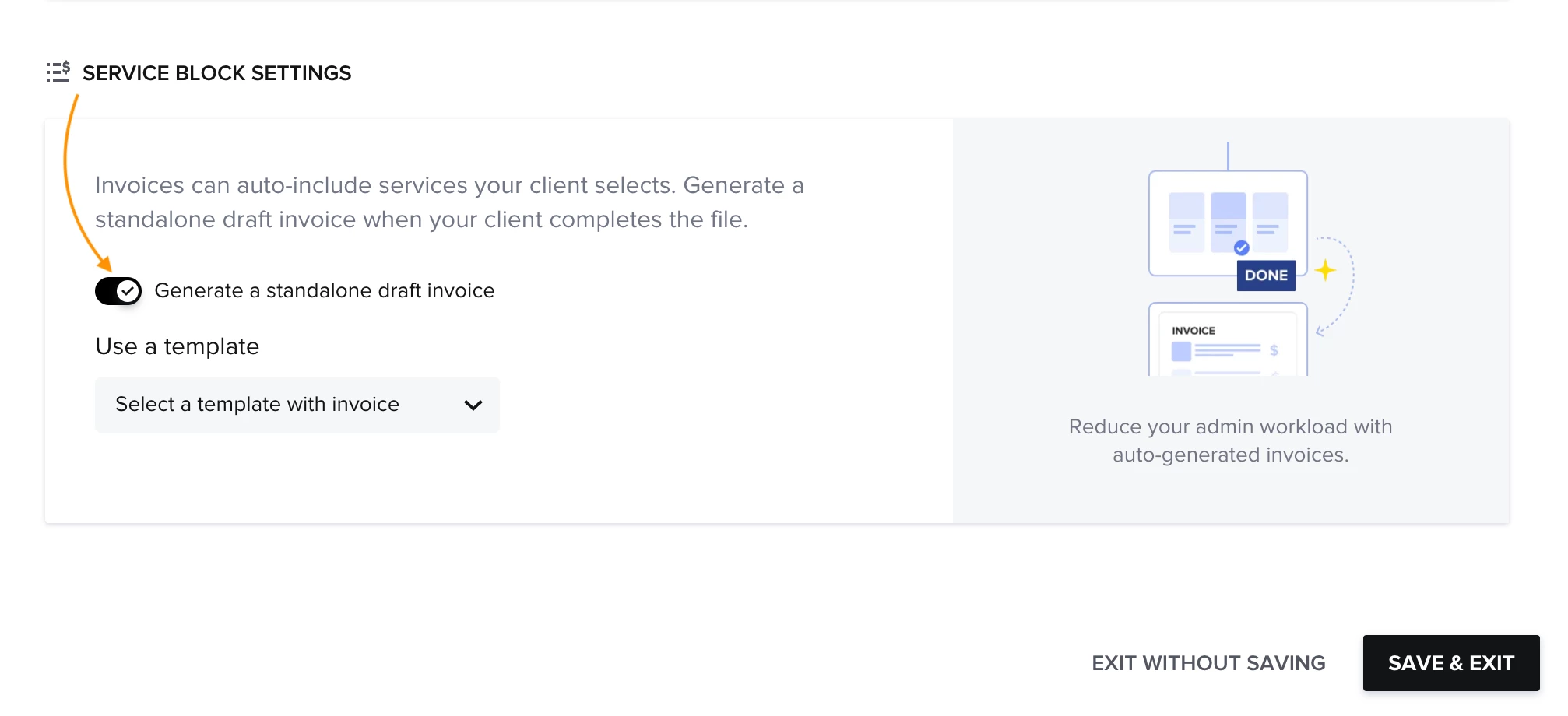
- Send a proposal without the invoice/payment component and set the file to create a draft invoice once the client submits their selection. In that draft, you can edit a discount based on the amount they’ve already paid and send them the invoice separately.
It is this section in the file’s settings menu (as long as the file contains services):
Let me know what you think!
This topic has been closed for replies.



Sign up
Already have an account? Login

Welcome! To join the HoneyBook Community, log in with your HoneyBook account below.
You'll confirm your username and share a bit about yourself, then you're ready to explore and connect.
Free trial? No problem. Log in with your trial credentials to join.
Already a member? Hi and welcome back!
You will see the HoneyBook login page briefly to validate your trial or account.
Employee Login
Log in with HoneyBook
Welcome! To join the HoneyBook Community, log in with your HoneyBook account below.
You'll confirm your username and share a bit about yourself, then you're ready to explore and connect.
Free trial? No problem. Log in with your trial credentials to join.
Already a member? Hi and welcome back!
Welcome to the Community
Welcome! To join the HoneyBook Community, log in with your HoneyBook account below.
You'll confirm your username and share a bit about yourself, then you're ready to explore and connect.
Free trial? No problem. Log in with your trial credentials to join.
Already a member? Hi and welcome back!
You will see the HoneyBook login page briefly to validate your trial or account.
Employee Login
Log in with HoneyBook
Welcome! To join the HoneyBook Community, log in with your HoneyBook account below.
You'll confirm your username and share a bit about yourself, then you're ready to explore and connect.
Free trial? No problem. Log in with your trial credentials to join.
Already a member? Hi and welcome back!
Enter your E-mail address. We'll send you an e-mail with instructions to reset your password.