Question

Coaches: how are you setting up monthly packages?

  • March 20, 2024
  • 3 replies
  • 70 views

Leah Carey

I’m excited to have found Honeybook to run my coaching business.

My business model is that they pay $x each month and receive x number of sessions for the month.

I’ve got the autopay set up, but I’m still struggling with how to get appointments credited to the client’s account each month, and how to get that information to them.

Here’s the workaround I’ve thought of, but I’m hoping someone has a more elegant solution!

  1. Created four appointment types: Session #1, Session #2, Session #3, Session #4
  2. They get a smart file where they choose 2, 3, or 4 sessions per month. After they sign the contract and set up payment they use a scheduler to book Session #1.
  3. An automation sends them an email with the link to book sessions 2, 3, and 4 (as appropriate to their contract) because it doesn’t appear that they can use the automatic scheduler more than once 
    1. I think this means there need to be three separate automations - one for 2 sessions per month, one for 3 sessions, and one for 4 sessions, so they get the email with the correct number of links.
  4. Autopay runs every 28 days
  5. There doesn’t seem to be an automation triggered by an autopayment, so an automation is set to send an email every 28 days with links to book sessions 1, 2, 3, and 4 (as appropriate) for the month
  6. There doesn’t appear to be a way to set up a recurring automation, so I set up this same pattern to run every month for 4 or 5 months, then create a task to run it again for another 4 or 5 months
  7. I’d love to send reminders to book sessions that haven’t been used yet, but that seems like it would become a monster of an automation, and I’d have to be checking whether people had booked appointments and approving emails … which seems like it defeats the purpose of automating things.


Any suggestions on how to simplify this?

Thanks in advance!
Leah Carey, S*x and Relationship Coach

3 replies

Masha Z
HoneyBook Employee
Forum|alt.badge.img+1
  • HoneyBook Employee
  • March 21, 2024

Hi @Leah Carey,

Wow, I love how much thought you’ve put into your workflow!

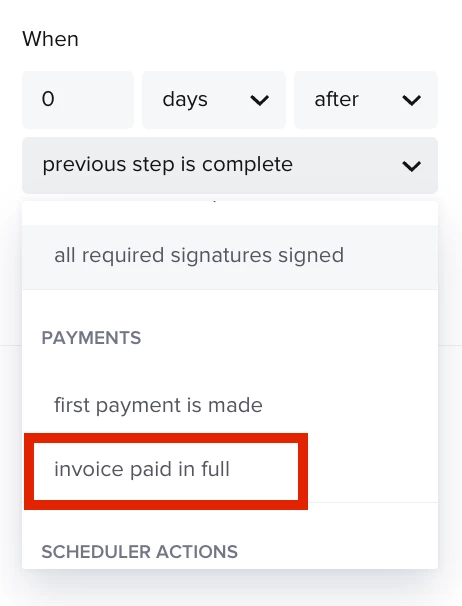
I was just trying to follow your automations to see if there’s an opportunity to simplify - but from my experience, the only place that could be optimized is where an automation gets triggered by an autopayment. You can now trigger actions once a payment has been made - so maybe that will save you some of the manual work? Attaching a screenshot below!

As for being able to book multiple sessions, if that’s a crucial functionality that’s missing for you, I’d recommend submitting it in Feature Requests. Our product team is watching that space very closely, so if it’s a highly requested feature, maybe they’ll be able to add it to the roadmap!


Leah Carey
  • Author
  • March 21, 2024

Thanks @Masha Z!

Am I understanding correctly that “invoice paid in full” will trigger every time an autopayment is processed? That would make things easier!


Cassie H of Premier Ops Spot
Community Legend
Forum|alt.badge.img+7

@Leah Carey , it looks like you didn’t get an answer here, but I’d be curious about this too… 

What I did was create 1 automation regardless of how many calls they purchase / book. The first call is booked with the initial SmartFile using a Scheduler page. Then the other steps in the process are all “Approval Required” using the following step:

  • Send Smart File (another consulting questionnnaire with scheduling page)

This way it only sends if I trigger it to send. So- there is still some manual work involved…but it works well because it’s not contingent on the payment, but on whether or not they used their last session. Does that make sense? 

Approving the Smart File to send only takes 1 little click from inside the Client’s project. I’m not sure if you send follow up emails (or NOTES now!) with notes from the call, but since I’m already doing that, clicking the little box to approve the Smart File to send is part of my workflow.

I suppose, assuming their payments are on autopay, you could also schedule that Smart File to send “x# of days after Session ends” ...