

Question

Discrepancy between Honeybook info and Quickbooks

  • February 19, 2024
  • 5 replies
  • 73 views

Denise O'Malley
Luminary
Forum|alt.badge.img

I don’t even know where to begin to get answers on something, so starting here.

I have five transactions in Quickbooks that show payment from Stacy Y.  Only one was Stacy’s, the other four are for different clients.

On the Honeybook payment page, the entries are correct.

On Stacy Y’s project record, the information is correct.

But somewhere along the line Quickbooks shows Stacy’s name five times.


How does Honeybook communicate information to Quickbooks?

5 replies

Geily Romero
Forum|alt.badge.img+4
  • Newcomer
  • February 19, 2024

Hi Denise! Sounds like you have HB and QB integrated. There may be an issue with the way the transactions are coming through. Since you say there are 5 payments shown for the same client, it could be that other clients payments are missing or duplicated as well. I’d recommend checking a few accounts in QB under chart of accounts 1. Undeposited Funds 2. Accounts Receivable. The first one is the account where money sits between the time the payment is made to the time the payment hits the bank. The other is what’s still owed to you from clients. The balances in these accounts may be off as well. This is usually where I start when I work with clients on their QB Clean Ups, I’ve seen these issues a few time. Let me know if you have any other questions! 


Cassie H of Premier Ops Spot
Community Legend
Forum|alt.badge.img+7

Hi @Denise O'Malley ! I have the QB integration set up and it may be the way you are categorizing the transaction, especially if you are charging the same amount for each client, and you have 5 of them logged for the same service. 

For example, let’s say you have a $200 consulting call and you had 5 people pay for this service. Here’s how I reconcile those in my Quickbooks:

  1. Go to your “Categorize transactions” screen (there are several ways to get there)
  2. Find one of the transactions.
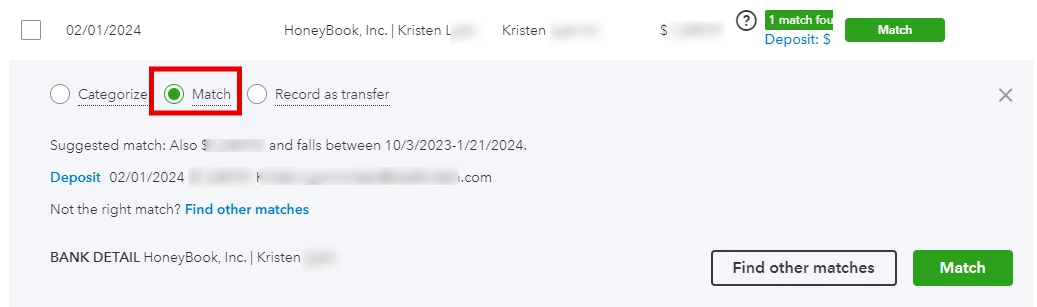
  3. Instead of choosing “Categorize”, as you would normally, you’ll want to choose “Match”. 
  4. When you have multiple of the same payment amount, you’ll see the options for all your clients who paid that amount underneath this section here:


  5. Then you can choose the correct client from the list below. (They show up as radio buttons.)
  6. Once you choose Stacey Y’s payment for one transaction, you can go to the next transaction and choose the corresponding client payment. (It will automatically remove Stacey Y from the list since you already matched that transaction.)

Let me know if this helps. If you don’t have multiple transactions with the same $ amount, you may want to go into your Honeybook and re-sync your recent transactions. Go to Tools >Payments, then make sure that for every transaction, this bubble on the right hand side is GREEN, not grey:

Worst case, you can always delete the transactions from Quickbooks if they truly are duplicates. This has only happened to me once for an ongoing retainer, and I triple checked the number of payments in HB versus in QB before I deleted.


Geily Romero
Forum|alt.badge.img+4
  • Newcomer
  • February 19, 2024

Hi @Denise O'Malley ! I have the QB integration set up and it may be the way you are categorizing the transaction, especially if you are charging the same amount for each client, and you have 5 of them logged for the same service. 

For example, let’s say you have a $200 consulting call and you had 5 people pay for this service. Here’s how I reconcile those in my Quickbooks:

  1. Go to your “Categorize transactions” screen (there are several ways to get there)
  2. Find one of the transactions.
  3. Instead of choosing “Categorize”, as you would normally, you’ll want to choose “Match”. 
  4. When you have multiple of the same payment amount, you’ll see the options for all your clients who paid that amount underneath this section here:


  5. Then you can choose the correct client from the list below. (They show up as radio buttons.)
  6. Once you choose Stacey Y’s payment for one transaction, you can go to the next transaction and choose the corresponding client payment. (It will automatically remove Stacey Y from the list since you already matched that transaction.)

Let me know if this helps. If you don’t have multiple transactions with the same $ amount, you may want to go into your Honeybook and re-sync your recent transactions. Go to Tools >Payments, then make sure that for every transaction, this bubble on the right hand side is GREEN, not grey:

Worst case, you can always delete the transactions from Quickbooks if they truly are duplicates. This has only happened to me once for an ongoing retainer, and I triple checked the number of payments in HB versus in QB before I deleted.

This is great Cassie! I would jst say be careful with re-syncing and deleting, I’ve seen that make an even bigger mess sometimes. @Denise O'Malley I also have a Masterclass I did on the HB FB group community, may be helpful to check it out! here’s the link to it: https://www.facebook.com/groups/honeybookcommunity/permalink/3285075578480781/?mibextid=W9rl1R


Denise O'Malley
Luminary
Forum|alt.badge.img

I appreciate everyone’s suggestions but it appears that all transactions are coming through as Elevate Wedding and as such are syncing to Stacy’s account even though they are different amounts.

Hi @Denise O'Malley ! I have the QB integration set up and it may be the way you are categorizing the transaction, especially if you are charging the same amount for each client, and you have 5 of them logged for the same service. 

For example, let’s say you have a $200 consulting call and you had 5 people pay for this service. Here’s how I reconcile those in my Quickbooks:

  1. Go to your “Categorize transactions” screen (there are several ways to get there)
  2. Find one of the transactions.
  3. Instead of choosing “Categorize”, as you would normally, you’ll want to choose “Match”. 
  4. When you have multiple of the same payment amount, you’ll see the options for all your clients who paid that amount underneath this section here:


  5. Then you can choose the correct client from the list below. (They show up as radio buttons.)
  6. Once you choose Stacey Y’s payment for one transaction, you can go to the next transaction and choose the corresponding client payment. (It will automatically remove Stacey Y from the list since you already matched that transaction.)

Let me know if this helps. If you don’t have multiple transactions with the same $ amount, you may want to go into your Honeybook and re-sync your recent transactions. Go to Tools >Payments, then make sure that for every transaction, this bubble on the right hand side is GREEN, not grey:

Worst case, you can always delete the transactions from Quickbooks if they truly are duplicates. This has only happened to me once for an ongoing retainer, and I triple checked the number of payments in HB versus in QB before I deleted.

This is great Cassie! I would jst say be careful with re-syncing and deleting, I’ve seen that make an even bigger mess sometimes. @Denise O'Malley I also have a Masterclass I did on the HB FB group community, may be helpful to check it out! here’s the link to it: https://www.facebook.com/groups/honeybookcommunity/permalink/3285075578480781/?mibextid=W9rl1R


Thanks, but the link doesn’t work.


Geily Romero
Forum|alt.badge.img+4
  • Newcomer
  • February 19, 2024

Oops! So sorry, here’s the right link: https://www.facebook.com/groups/honeybookcommunity/permalink/3313554228966249/?mibextid=W9rl1R

Also, from what you’re saying, it may be the way the payments are coming through, in that case, you may have to do some clean up, having HB and QB side by side and try to match the dates to the accurate transaction one by one. If you need some help, I offer HB/QB clean ups/set ups!