



Issue with Payments section of the Dashboard

  • September 23, 2024
  • 4 replies
  • 32 views

TaylorRae Schnepp

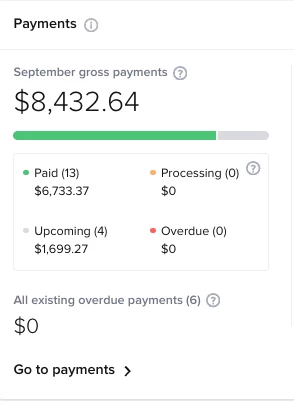
I would love edits to be made to the Payments section of the dashboard. I’m going to kinda expose my finances here but I just want to give a clear example of what I mean:

All month long I was expected to be making about $8.4k of gross income but we set our payments to all be complete by the 15th of each month. I realized the other day that we had only made about $6.7k and the next payments (the ones in the “upcoming” category) weren’t due until October 1st so there was no more income currently set to come in before the end of the month. When I reached out to the Honeybook team, they said, “this is because things due on October first show as September payments in case they end up processing early! Once they do process in October they are switched to the month they processed in.”

This is really unhelpful to me as we plan our expenses for the month. If we do happen to get extra payments, that’s great, but I don’t want to look at the expected gross payments at the beginning of each month and be expecting to make more than we will.

The payments section is really helpful and helps us to know how many projects we need to book to make our monthly income goals but if it’s giving me an inflated number just in case some of our clients pay early, this is not helping and could potentially harm my, and other’s businesses.

Has any one else noticed this?


4 replies

Shayla Tiare Ko'omoa

I have a hard time because the remaining balances for my clients are developed in the automation based on the session that is scheduled. Because I only have them due 1 week before the session, I dont get to see an accurate income until the automation creates the invoice 1 week before the session. I wish It would know that there is one about to be created based on the session and include it in projected income since the client has already booked.


Cassie H of Premier Ops Spot
Community Legend
Forum|alt.badge.img+7

I have a hard time because the remaining balances for my clients are developed in the automation based on the session that is scheduled. Because I only have them due 1 week before the session, I dont get to see an accurate income until the automation creates the invoice 1 week before the session. I wish It would know that there is one about to be created based on the session and include it in projected income since the client has already booked.

Does this happen when they’re on recurring invoices? Or is an Automation sending an Invoice as a SmartFile? 


Cassie H of Premier Ops Spot
Community Legend
Forum|alt.badge.img+7

I would love edits to be made to the Payments section of the dashboard. I’m going to kinda expose my finances here but I just want to give a clear example of what I mean:

All month long I was expected to be making about $8.4k of gross income but we set our payments to all be complete by the 15th of each month. I realized the other day that we had only made about $6.7k and the next payments (the ones in the “upcoming” category) weren’t due until October 1st so there was no more income currently set to come in before the end of the month. When I reached out to the Honeybook team, they said, “this is because things due on October first show as September payments in case they end up processing early! Once they do process in October they are switched to the month they processed in.”

This is really unhelpful to me as we plan our expenses for the month. If we do happen to get extra payments, that’s great, but I don’t want to look at the expected gross payments at the beginning of each month and be expecting to make more than we will.

The payments section is really helpful and helps us to know how many projects we need to book to make our monthly income goals but if it’s giving me an inflated number just in case some of our clients pay early, this is not helping and could potentially harm my, and other’s businesses.

Has any one else noticed this?



This is very interesting. I feel like whoever set up the Finance dashboard does not have bookkeeping experience. I wish the dashboard was helpful but it’s not, in so many ways. The buckets make bookkeeping a million times more confusing and complicated. (As much as I love them) And my Cashflow dashboard is almost never accurate. 
I’m curious where you pulled this screenshot - I don’t have one like this! But perhaps this issue you’ve identified would explain why my cashflow dashboard never seems to be correct. 


Shayla Tiare Ko'omoa

It’s an automation that sends the invoice via a new smart file.



