Solved

Tax Documents

  • February 11, 2025
  • 6 replies
  • 16 views

Magazine Photobooth

Hello everyone my name is Mark, I am new to the HB community!

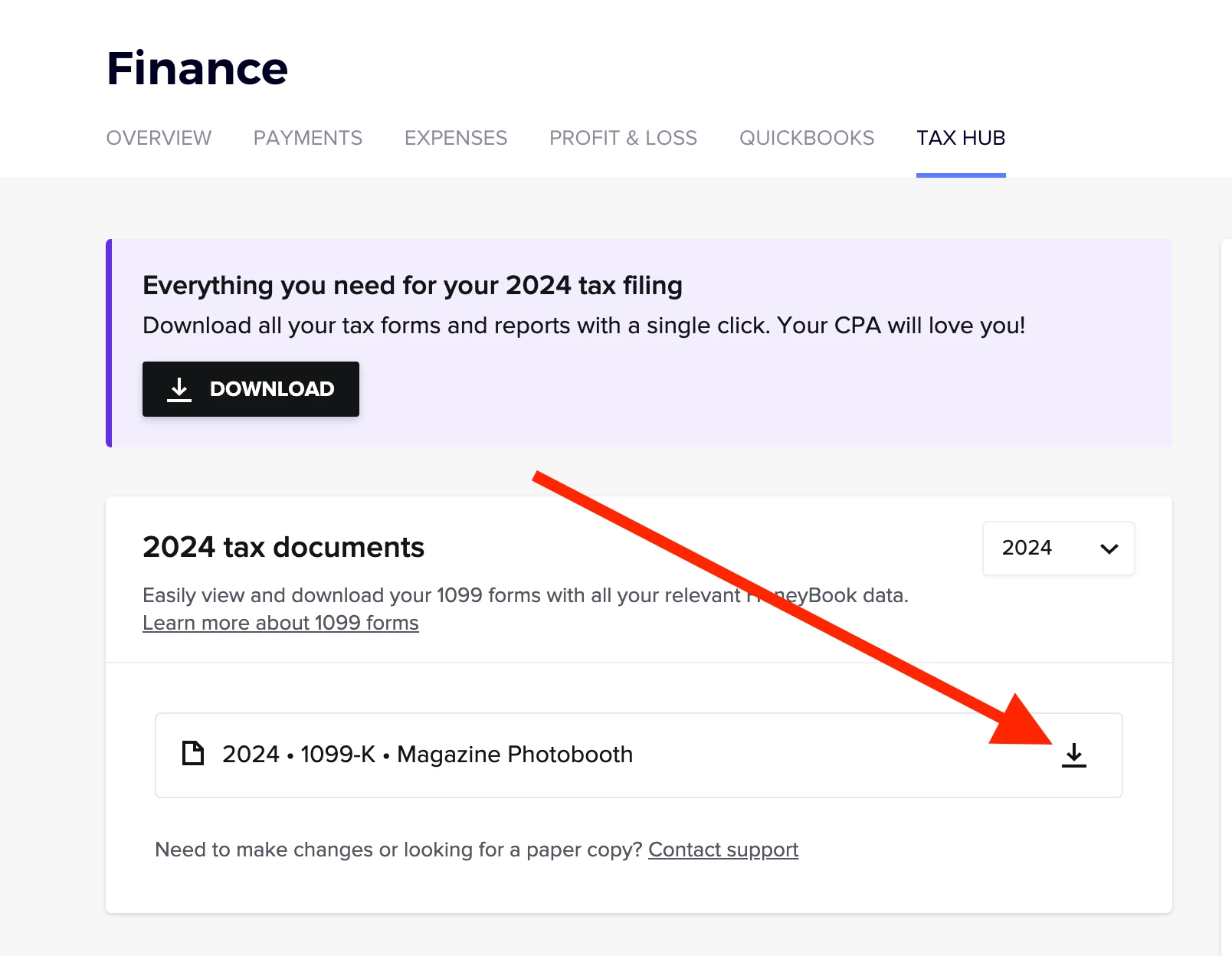
could someone help me out? I am trying to download my tax documents from the Finance tab in HB, however when I select download, a message appears in the top right hand corner of the screen says your document has been downloaded but I don't know where it is? I looked into my downloads folder its nothing there? where do I find my downloaded tax documents?


Best answer by Denise O'Malley

I had the same problem and the support team had to get me the document.

6 replies

Monica R
HoneyBook Community Team
Forum|alt.badge.img+7
  • HoneyBook Community Team
  • February 11, 2025

Hey ​@Magazine Photobooth! Thanks for posting! 

I’m going to get you connected to our Support team who will be able to troubleshoot this and get you your forms ASAP :) 

Expect an email Concierge@HoneyBook.com soon! 


Denise O'Malley
Luminary
Forum|alt.badge.img

I had the same problem and the support team had to get me the document.


Magazine Photobooth

ok thanks so much for the info I appreciate it!


Monica R
HoneyBook Community Team
Forum|alt.badge.img+7
  • HoneyBook Community Team
  • February 11, 2025

Hi ​@Magazine Photobooth and ​@Denise O'Malley - by chance, when you were downloading, were you clicking the button that the red arrow is pointing to? I think our UI there is a bit confusing as to download you’ll need to select the black button that says download on the topish, left side of the screen. Our designers are working on a fix to cut out that confusion :) 


Denise O'Malley
Luminary
Forum|alt.badge.img

I honestly don’t remember but do know it said “downloading”… but it wasn’t in my downloads, junk folder, or anywhere else.


Magazine Photobooth

Got it thanks so much everyone!