Solved

Analytics tracking contact form

  • January 15, 2024
  • 8 replies
  • 113 views

Asaf Bochman

I’ve embedded the HB contact form on my site but tracking conversions is quite confusing.

Anyone figured this out with an easy-ish solution?

Best answer by Taylored Data

Hi @Asaf Bochman, redirecting the user to a confirmation page is definitely the way to go.

I track my HB and Calendly leads in Google Analytics (GA4) so its with the rest of my website and marketing data when I’m ready to analyze my performance. You can read the full guide on how I that in my blog here

Essentially, I set up two triggers in Google Tag Manager (a tool I use to manage my marketing tags like Facebook, Pinterest, and Google Ads) to push the following data to GA4:

  1. when someone lands on my thank you page after completing the form and count that as a generate lead event.
  2. when someone sees at least 50% of my embedded HB form on my website as a proxy to track lead impressions.

Finally, I create a calculated metric in GA4 to calculate the lead form conversion rate (lead submission / lead impressions).

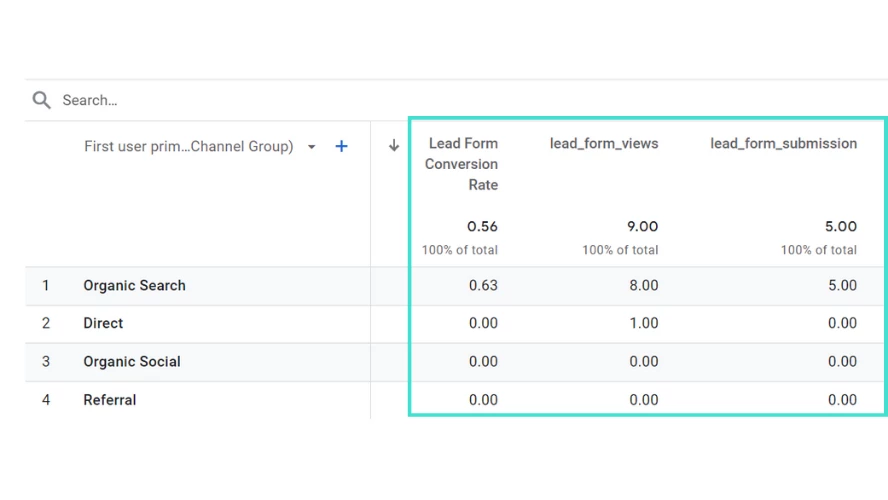
Now I can see which traffic channels contribute to my HB leads. Here’s some data from my demo GA4 account.


You can see 5 leads / 9 lead impressions = 56% lead conversion rate:
In terms of what to put on your thank you page, I aim to continue building trust and showing my value. For me that means keeping a consistent brand and providing clear next steps for the lead.

Here are some ideas:

  • Thank them: It might seem obvious, but acknowledging their action with a clear "Thank you!" shows appreciation and sets a positive tone.

  • Confirmation: Let them know what they just did, whether it's completing your lead form, downloading a report, signing up for your newsletter, or requesting a quote. Briefly reiterate the value they can expect.
  • Next steps: Clearly guide them on what to do next. For example, if they completed your lead form, tell them to check their email for the a services brochure. If they requested a quote, mention when they can expect to hear back.
  • Bonus content: Offer something extra-valuable related to their interests. This could be a related blog post, video, case study, or exclusive discount code.

  • Social proof: Showcase testimonials, customer logos, or media mentions to build trust and credibility.
  • Additional calls to action: Encourage them to explore your website, follow you on social media, or sign up for another offer. Keep it relevant and aligned with their initial interest.
  • Personalization: If you have enough information, personalize the message with their name, industry, or specific download. This adds a touch of human connection and increases engagement.


I hope that helps!

8 replies

emphoto
  • January 15, 2024

I would say that you’ll probably want to do something with google analytics. I have a thank you page that is unlinked on my website so when inquiries fill out my contact form, hit submit, it automatically goes to that thank you page. Google then tracks that and you can see which pages they visited before getting there. 

I hope that makes sense! I would probably also ask them “how did you find me?” .


Asaf Bochman
  • Author
  • Newcomer
  • January 16, 2024

Redirecting to another page is great.


Anyone have suggestions on what has worked on your confirmation page?


Cassie H of Premier Ops Spot
Community Legend
Forum|alt.badge.img+7

Smart idea @emphoto ! @Asaf Bochman , depending on what platform you use for your website, it might track the hits for you. I use Wix and it has great analytics including where people start, where they click to afterwards, etc.


emphoto
  • January 16, 2024

I tend to just try to give them more information about when they can expect to hear from me, other ways to connect, another spot to go back to my experience! Whatever you want it to ! 


Taylored Data
  • Newcomer
  • Answer
  • January 31, 2024

Hi @Asaf Bochman, redirecting the user to a confirmation page is definitely the way to go.

I track my HB and Calendly leads in Google Analytics (GA4) so its with the rest of my website and marketing data when I’m ready to analyze my performance. You can read the full guide on how I that in my blog here

Essentially, I set up two triggers in Google Tag Manager (a tool I use to manage my marketing tags like Facebook, Pinterest, and Google Ads) to push the following data to GA4:

  1. when someone lands on my thank you page after completing the form and count that as a generate lead event.
  2. when someone sees at least 50% of my embedded HB form on my website as a proxy to track lead impressions.

Finally, I create a calculated metric in GA4 to calculate the lead form conversion rate (lead submission / lead impressions).

Now I can see which traffic channels contribute to my HB leads. Here’s some data from my demo GA4 account.


You can see 5 leads / 9 lead impressions = 56% lead conversion rate:

In terms of what to put on your thank you page, I aim to continue building trust and showing my value. For me that means keeping a consistent brand and providing clear next steps for the lead.

Here are some ideas:

  • Thank them: It might seem obvious, but acknowledging their action with a clear "Thank you!" shows appreciation and sets a positive tone.

  • Confirmation: Let them know what they just did, whether it's completing your lead form, downloading a report, signing up for your newsletter, or requesting a quote. Briefly reiterate the value they can expect.
  • Next steps: Clearly guide them on what to do next. For example, if they completed your lead form, tell them to check their email for the a services brochure. If they requested a quote, mention when they can expect to hear back.
  • Bonus content: Offer something extra-valuable related to their interests. This could be a related blog post, video, case study, or exclusive discount code.

  • Social proof: Showcase testimonials, customer logos, or media mentions to build trust and credibility.
  • Additional calls to action: Encourage them to explore your website, follow you on social media, or sign up for another offer. Keep it relevant and aligned with their initial interest.
  • Personalization: If you have enough information, personalize the message with their name, industry, or specific download. This adds a touch of human connection and increases engagement.


I hope that helps!


Asaf Bochman
  • Author
  • Newcomer
  • January 31, 2024

@TMD Well that’s one way to get instant Best Answer!!


The tips at the end sealed the deal for me, this is a masterclass on how to add value, folks!


Taylored Data

@TMD Well that’s one way to get instant Best Answer!!


The tips at the end sealed the deal for me, this is a masterclass on how to add value, folks!


I’m glad you found my response helpful and I look forward to seeing what you come up with for your thank you page!


Cassie H of Premier Ops Spot
Community Legend
Forum|alt.badge.img+7

Hi @Asaf Bochman, redirecting the user to a confirmation page is definitely the way to go.

I track my HB and Calendly leads in Google Analytics (GA4) so its with the rest of my website and marketing data when I’m ready to analyze my performance. You can read the full guide on how I that in my blog here

Essentially, I set up two triggers in Google Tag Manager (a tool I use to manage my marketing tags like Facebook, Pinterest, and Google Ads) to push the following data to GA4:

  1. when someone lands on my thank you page after completing the form and count that as a generate lead event.
  2. when someone sees at least 50% of my embedded HB form on my website as a proxy to track lead impressions.

Finally, I create a calculated metric in GA4 to calculate the lead form conversion rate (lead submission / lead impressions).

Now I can see which traffic channels contribute to my HB leads. Here’s some data from my demo GA4 account.


You can see 5 leads / 9 lead impressions = 56% lead conversion rate:

In terms of what to put on your thank you page, I aim to continue building trust and showing my value. For me that means keeping a consistent brand and providing clear next steps for the lead.

Here are some ideas:

  • Thank them: It might seem obvious, but acknowledging their action with a clear "Thank you!" shows appreciation and sets a positive tone.

  • Confirmation: Let them know what they just did, whether it's completing your lead form, downloading a report, signing up for your newsletter, or requesting a quote. Briefly reiterate the value they can expect.
  • Next steps: Clearly guide them on what to do next. For example, if they completed your lead form, tell them to check their email for the a services brochure. If they requested a quote, mention when they can expect to hear back.
  • Bonus content: Offer something extra-valuable related to their interests. This could be a related blog post, video, case study, or exclusive discount code.

  • Social proof: Showcase testimonials, customer logos, or media mentions to build trust and credibility.
  • Additional calls to action: Encourage them to explore your website, follow you on social media, or sign up for another offer. Keep it relevant and aligned with their initial interest.
  • Personalization: If you have enough information, personalize the message with their name, industry, or specific download. This adds a touch of human connection and increases engagement.


I hope that helps!

… Adding this to list of things to do in 2024 🤯