Question

Automations and Team Reminders

  • May 30, 2025
  • 3 replies
  • 20 views

Tina Leisle

Hi HB Team,

I recently hired an assistant to help streamline some of my workflows, and I’ve found HoneyBook to be working well overall. However, I’ve noticed a gap in the automation functionality that I wanted to flag for your consideration.

While we’ve set up our client-facing packages (including a comprehensive welcome, onboarding, and contract bundle), I’m finding that I primarily use automations for internal operations rather than direct client workflows. For example, when a contract is signed or when I move a file to a certain stage, I’ve created triggers to prompt my assistant to complete specific onboarding tasks.

The challenge is that there doesn’t seem to be a way to assign task-based reminders or internal checklists within the automation itself—at least not without creating workaround reminder emails via templates. It would be incredibly helpful to have a built-in feature that supports internal team workflows, where tasks can be auto-assigned or prompted based on certain triggers or project stages.

Just wanted to share this as a potential feature idea—perhaps an “Internal Workflow Automation” option to complement the great client-side features you already offer.

Thanks so much,
Tina Leisle

3 replies

Alicia Bauer
Forum|alt.badge.img+4

@Tina Leisle - Thank you so much for laying this out so clearly—this is incredibly helpful feedback, and I completely hear you. Internal task automation is one of those features that so many of us would love to see more fully built out inside HoneyBook.

From what I know, the HoneyBook team is actively working on expanding the project management side of the platform, so I’m hopeful this kind of functionality is on their radar (and your example is a perfect case study in why it matters).

In the meantime, one workaround you could try is adding your assistant as a "client" on the project instead of a teammate. That way, you can assign client-facing tasks in the automation to them and use that structure to trigger certain actions—without needing to build entirely separate reminders via email templates. It’s definitely not perfect, but it can help simulate internal task management in the current system.

I’d also highly recommend adding this idea to the Ideas section of the Community if you haven’t already—it’s the best way to help the product team understand real-world needs and prioritize new features. 💛


Tina Leisle
  • Author
  • Newcomer
  • June 2, 2025

I haven’t yet but I WILL. Have to find it as they keep moving things around lol.


Cassie H of Premier Ops Spot
Community Legend
Forum|alt.badge.img+7

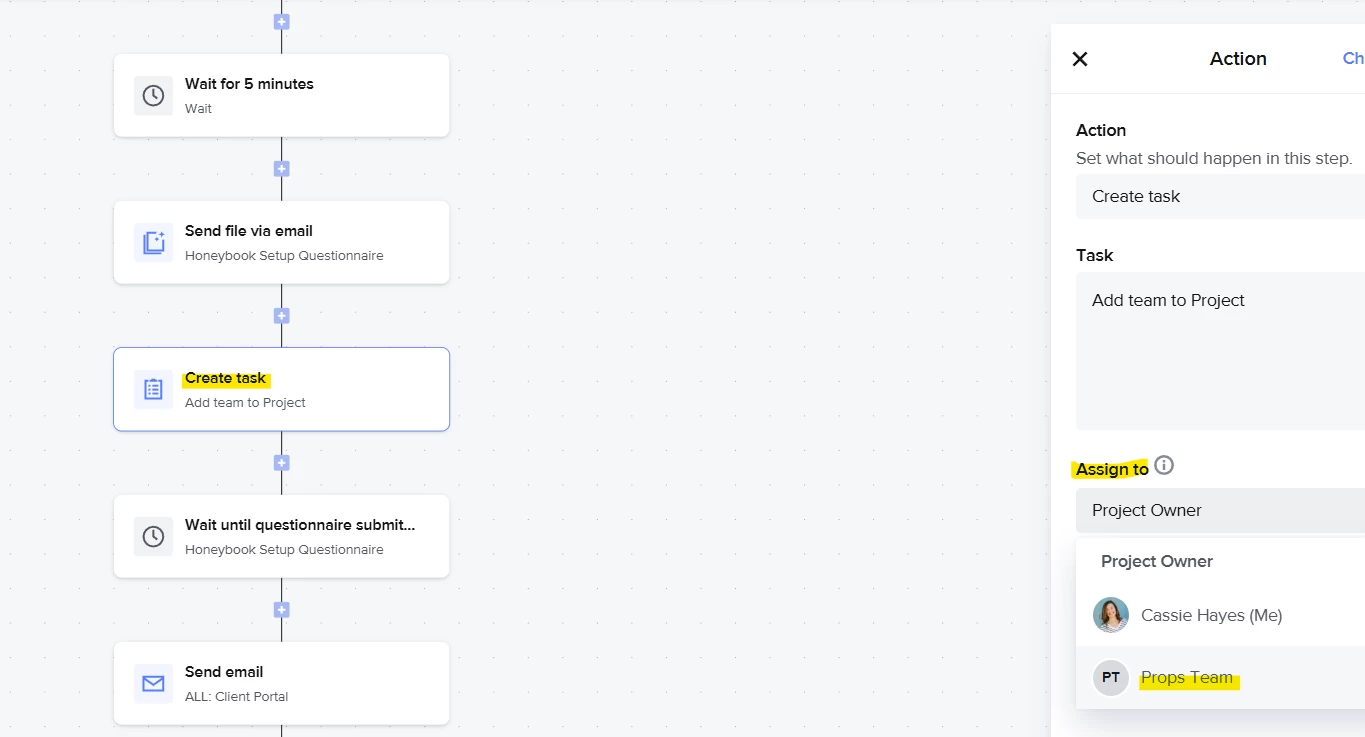
Hi ​@Tina Leisle ! Honeybook Pro here - I am currently setting up automations for a client who has an assistant managing her Honeybook. Because her assistant is added as a team member, I’m able to assign tasks directly to her in Automations. 

Here’s a screenshot from my own account: 

Does this help?