


Question

Automations outside of Contact Form

  • January 17, 2024
  • 5 replies
  • 55 views

Denise O'Malley
Luminary
Forum|alt.badge.img

I’m setting up automations (awesome, by the way), and I’m confused about something.  Here’s a snapshot for you to reference.
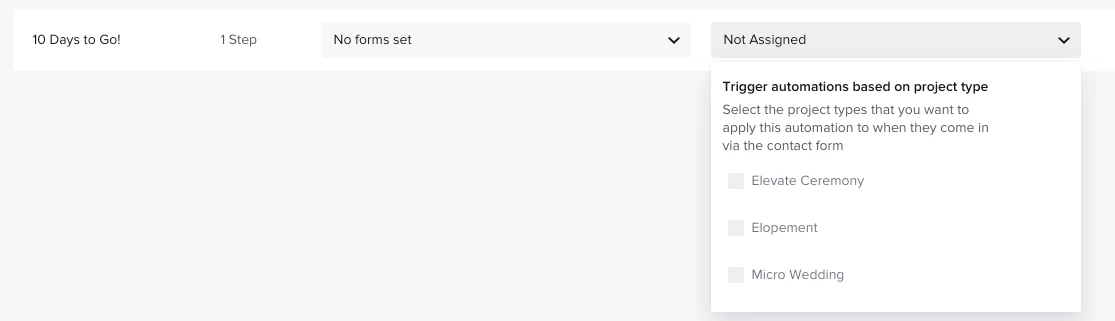
I need the automation to be generated based on the project end date which are always manually entered by us but this says “when they come in via the contact form.” 


What am I missing?

5 replies

Diana The Finer Points
Luminary
Forum|alt.badge.img+9

The automation ROOT is based out of either a Lead Form or a Contact Form. The type of automation that runs is based on a “project type”. For example - the automation I would need to serve a social media client is not the same automation I’d use to serve someone looking for HoneyBook setups. Your project date can be used within the automation steps to trigger the correct steps. 


Denise O'Malley
Luminary
Forum|alt.badge.img

So we cannot automate actions if we manually enter a client or project?  

<Scratching my head trying to figure a work-around for this>


Diana The Finer Points
Luminary
Forum|alt.badge.img+9

So we cannot automate actions if we manually enter a client or project?  

<Scratching my head trying to figure a work-around for this>

You can manually attach an automation if you need to! Once the project has been manually created, look on the bottom right and click on AUTOMATIONS. Add the one you want. 


Laura Murphy-Find Your Freedom
Forum|alt.badge.img+3

To expand on Diana’s post above, they’re added within the individual project - so in your project sidebar, hit the “+” button and as she said, manually add the one you want. 


Cassie H of Premier Ops Spot
Community Legend
Forum|alt.badge.img+7

This was one of the things that took me longest to understand when I first started. Once you get it, it will be easier! Set the automation based on the project type it will be applied to, then as Diana said, you can add a step in the automation based on the project date. Then you can always duplicate and customize that automation for other services, if need be. 

When I understood HBs automations are set up as one large workflow instead of several short ones, it made a lot more sense to me!