before/after project date in automations 2.0

  • March 26, 2025
  • 19 replies
  • 177 views

Michelle Casso

Hii! 
 

im working through all of my client’s automations right now. In old automations, you were able to select conditions such as “before” project date or after project date. I think it would be WILDLY helpful for those conditions to be in automations 2.0. I know you can do that when starting a new workflow, but I thought a major point in doing 2.0 was so you’d basically have 1 workflow rather than 3 like I do in old automations. 
 

any solutions?!

19 replies

Heather M
HoneyBook Employee
Forum|alt.badge.img
  • HoneyBook Employee
  • April 4, 2025

Hi Michelle! 

This is definitely a big change from automations 1.0 to 2.0. I’d recommend upvoting this feature request here to help it get more visibility: 

Our team does look at our most popular feature requests when prioritizing what improvements to make next!

In the meantime, you’re probably going to have to set up multiple automations. I actually find with automations 2.0 most members need more of them (vs they used to have one or a few super long ones), but each one is much more simple and straightforward (it only accomplishes one or two tasks, for example).


Within each project, it’s no problem to have multiple automations running at once or in sequence, so there’s no need to build each automation to cover everything from start to finish of a project. Think of it more as each automation accomplishing a discrete task now. But I know it’s really hard to translate that from the old system, so my biggest piece of advice would be to develop a good naming system that keeps all your automations organized.


April Slemensky
Forum|alt.badge.img

This is my biggest issue. I really can’t even use 2.0 until this is implemented as most of my stuff is set in old automations to send X days before their project takes place. Which is actually incredibly irritating. Why would this not be an option? And no, I do not want *more* automations or multiple running all at once. I need one or two streamlined automations that work well. 


Shannon Burke
Forum|alt.badge.img

I agree, I can’t even use automations 2.0 because of this as well. It’s a huge bummer because there are aspects of 2.0 that I want to utilize, but I can’t until this is fixed. And I don’t want to have multiple automations for a single project because of this..


Sholeh Munion

I upvoted the other thread on this subject and commented there, but agree with everyone here - I cannot create multiple automations for tasks related to planning my client’s event. I actually built out a comprehensive timeline of planning based on the project date and now I can’t utilize it. Please prioritize this for those of us who trigger tasks based on project date!! I’m so, so disappointed. 


Kerys Alexandra

Agreed! I’m in the same boat that I have made multiple roadmaps for a client based on project date triggers and cannot use them. 


Monica R
HoneyBook Community Team
Forum|alt.badge.img+7
  • HoneyBook Community Team
  • June 10, 2025

Hey Folks! 

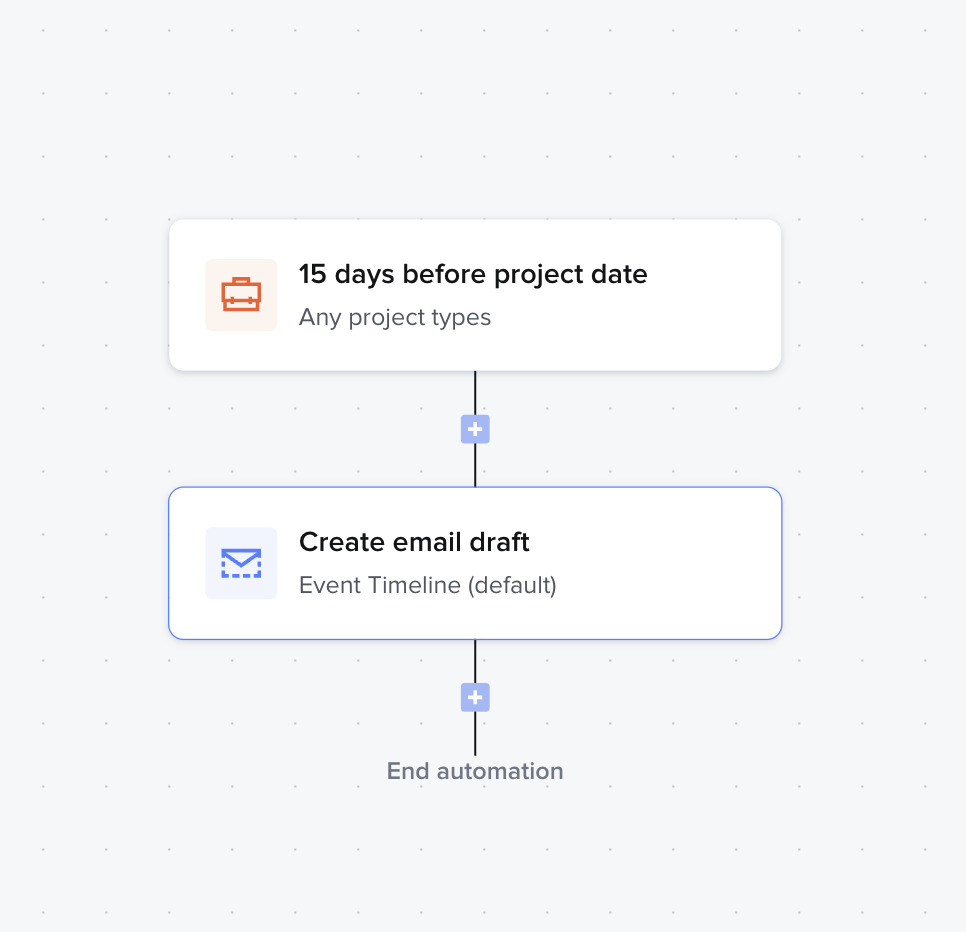
Would setting up your automations like the screenshot below help solve your automation issue?


Kate Merrill
Forum|alt.badge.img

@Monica R I think the problem with that workaround is having multiple runs for different elements of the workflow. It seems like folks really want to use one long run for each automation. I have set a lot of mine up the way you suggest, but there are still some instances where that doesn’t work. 

I just tried to create some runs with the new tags feature, and not having Project Date AND Tags available on the same run makes it really difficult to use. 

Could we add the X before Date to the “Wait” action in some way? An option in that drop down could be “Project Date” with an option to customize before/after then the number of days/months? 


Lydia F
Explorer
  • Explorer
  • June 12, 2025

I would also like to have tags as not just a trigger, but as a condition for branching logic. That way I could create a tag like “EXCLUDE FROM AUTOMATIONS” and then all my automations would have a branch right at the top where if they are tagged with that, they go no farther. It would help me manage the exceptions in a way that I currently can’t with Automations 2.0. 

But I agree with the above posters -- the inability to use project date (or better yet, session date) in the actions part of the automation is a limitation for me. I’m not able to use A2.0 until there’s a workaround. 

Multiple automations, however, isn’t the answer. Part of the purpose of a visual automation builder is so you can see holistically what’s happening with a project. The path it will take. And if we now have to manage 3 automations for every project, we’re never able to see the big picture of what’s happening. If that makes sense. 


Greilan Oliver

@Monica R ​@Heather M Based on how you currently have the “Project date” set up as a trigger, does that take into account whether the client is “booked” or not? I think most vendors have a set of emails for the inquiry process, and then they have a separate set of emails for after the client is booked. By not taking into account the ability for emails to trigger AFTER a project is booked AND # months before the project date could have clients receiving “inquiry” and “planning” emails at the same time. You have to fix that in order for Automations 2.0 to truly be useful.


Monica R
HoneyBook Community Team
Forum|alt.badge.img+7
  • HoneyBook Community Team
  • June 16, 2025

Thank you for that context everyone! I’m passing it along to our automations team! These use cases you present are very helpful.


Rebecca Daletto

Definitely need to be able to add trigger for x days before project date again. As a bridal stylist having my task to set up a bridal hair and makeup trial x days before the project is a priority and having this as a seperate work flow and automation is nonsense.


Karly Whitaker
Luminary
Forum|alt.badge.img+3

@Monica R ​@Heather M Based on how you currently have the “Project date” set up as a trigger, does that take into account whether the client is “booked” or not? I think most vendors have a set of emails for the inquiry process, and then they have a separate set of emails for after the client is booked. By not taking into account the ability for emails to trigger AFTER a project is booked AND # months before the project date could have clients receiving “inquiry” and “planning” emails at the same time. You have to fix that in order for Automations 2.0 to truly be useful.

@Greilan Oliver you can add a wait for contract sign or wait for payment made to ensure it only continues for booked projects. 


SJWeddingPros
Forum|alt.badge.img

I just got access to Automations 2.0 and was very excited to put them to work… and then I realized I can’t set a condition of “X days before project”. Without, 2.0 is basically useless to me. I have lots of reminders that are sent out on a conditions, like a 48 hour before reminder, etc.

I’m shocked that this wasn’t considered when building 2.0

So… I guess I’ll go back to waiting…

Bummer


Patricio Lopez

OMG in the same boat Automations 2.0 needs to have the before on or after feature. I know have to create multiple automations for a proposal is sent . here is my workflow: 

Automation 1

  • Trigger: Contract Signed

  • Action: Send Email 1

Automation 2

  • Trigger: Before Project Date – 90 Days

  • Action: Send Email 2

Automation 3

  • Trigger: Before Project Date – 60 Days

  • Action: Send Email 3

Automation 4

  • Trigger: Before Project Date – 30 Days

  • Action: Send Email 4

Automation 5

  • Trigger: Before Project Date – 20 Days

  • Action: Send Email 5

Automation 6

  • Trigger: Before Project Date – 10 Days

  • Action: Send Email 6

Automation 7

  • Trigger: Before Project Date – 3 Days

  • Action: Send Email 7


Anyone in the same boat?


Michaela Dunn
Forum|alt.badge.img

Reallly needing the project date feature in automations! Any update to know if we can have this soon?! I am wanting the best of both worlds for sure within the automations!


As a website designer i really need things around project dates! 


Colie James
Forum|alt.badge.img

OMG in the same boat Automations 2.0 needs to have the before on or after feature. I know have to create multiple automations for a proposal is sent . here is my workflow: 

Automation 1

  • Trigger: Contract Signed

  • Action: Send Email 1

Automation 2

  • Trigger: Before Project Date – 90 Days

  • Action: Send Email 2

Automation 3

  • Trigger: Before Project Date – 60 Days

  • Action: Send Email 3

Automation 4

  • Trigger: Before Project Date – 30 Days

  • Action: Send Email 4

Automation 5

  • Trigger: Before Project Date – 20 Days

  • Action: Send Email 5

Automation 6

  • Trigger: Before Project Date – 10 Days

  • Action: Send Email 6

Automation 7

  • Trigger: Before Project Date – 3 Days

  • Action: Send Email 7


Anyone in the same boat?

Automations 2-7 could actually all be one with wait actions in-between.  You only need the first trigger to happen x days before a project date.  so action 1 is send email 1.  then wait 30 days. then send email 2. then wait 30 days. then send email 3.  The wait actions would be time-based on when the automation begins.


Greilan Oliver

@Patricio Lopez 

My workflow is quite similar to yours, but with one key difference: I also send out questionnaires as part of my email process. Here’s what I’m trying to achieve:

  1. When a client books, they automatically receive a welcome email along with a questionnaire.
  2. I use Automations 2.0 to send follow-up emails until the client completes the questionnaire — this part works really well actually. 
  3. I also want to send a series of other emails leading up to the project date:
    • 8 months before
    • 7 months before
    • and so on…

The challenge is that we never know exactly when a client will book. For example, if someone books only 3 months before their event, I don’t want them to receive outdated emails meant for 8, 7, or 6 months out.

With Automations 1.0, I could send the initial questionnaire automatically and follow up manually. The “before project date” feature was smart enough to skip past emails that no longer applied and start at the correct point in the timeline — like month 3, in this case.

In Automations 2.0, I’d need to create multiple separate automations to handle different booking timelines. But if a client is 3 months out and one automation starts while another is still running, it can throw off the entire workflow.

@Colie James ​@Karly Whitaker ​@Monica R Any guidance on how I could solve this issue with the current features? The only solutions I can see are to add in the “before project date” feature or allow multiple automations to run at the same time. 


SomethingYouBeauty
Forum|alt.badge.img

How is this still an issue?  We are wedding vendors.  EVERYTHING revolves around the wedding date!  We need this to be fixed ASAP.  I can’t switch to Automations 2.0 until this is fixed but I also would love to send a reminder email 24 hours after a contract is sent - which I can’t do when using legacy automations because I can only assign 1 automation.  


Alicia Bauer
Forum|alt.badge.img+4
  • Newcomer
  • February 4, 2026

@SomethingYouBeauty - Be sure to upvote the feature request so the development team knows how important this is! You can find it here!