



Solved

Editing the Border and Submit Buttons on an Embedded Lead Inquiry Form

  • January 28, 2026
  • 1 reply
  • 4 views

Robert Becker

I am new to Honeybook and am trying to determine if there’s a way to edit:

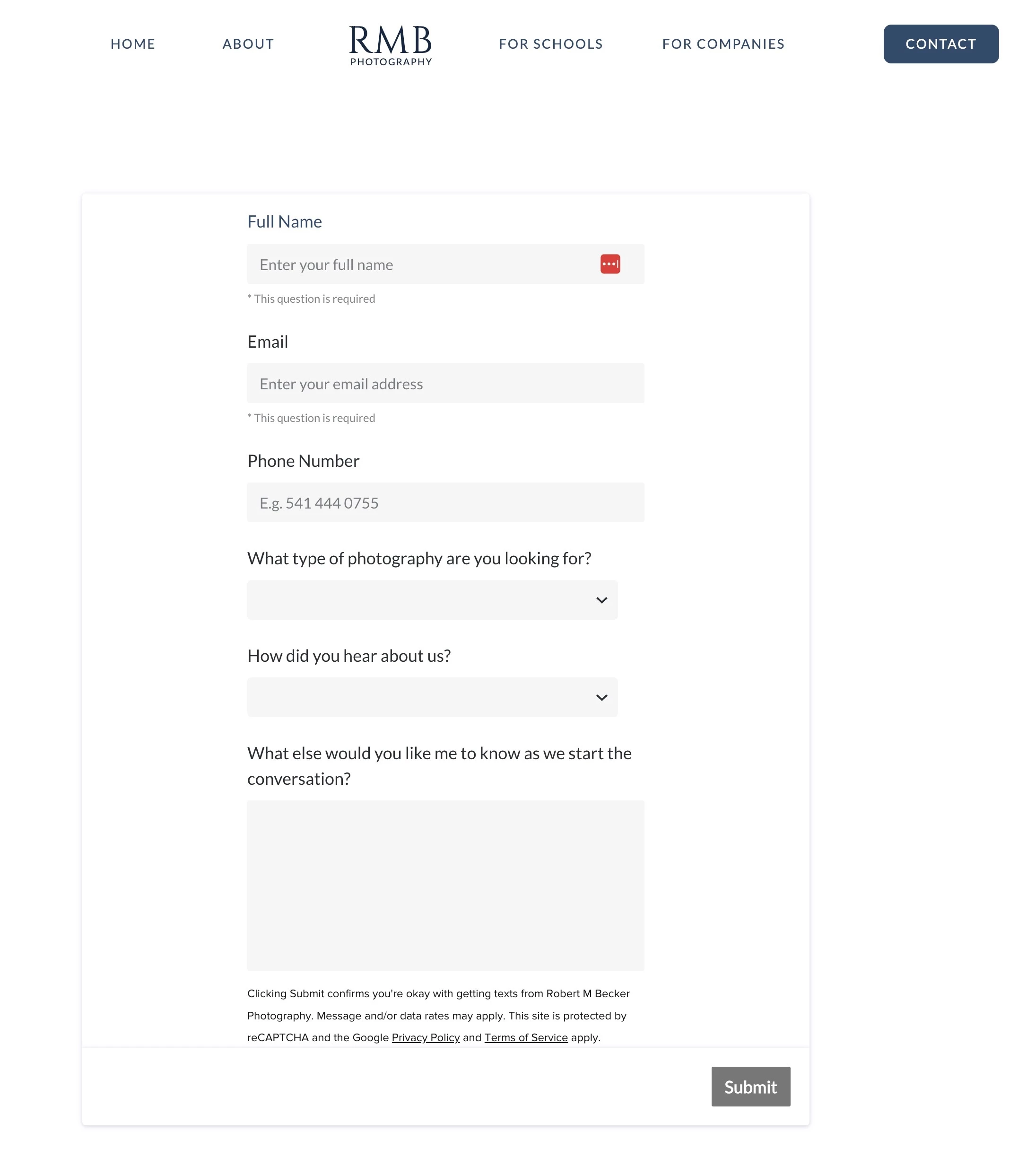
  1. That gray border line that appears around my embedded form. I do not want it appear at all but cannot see how to remove that option.
  2. Whether or not there’s a way to realign that Submit button so that it’s not always right aligned? Ideally I’d want it to be aligned to the right edge of my text above or center aligned on the form.

 

Best answer by Alicia Bauer

@Robert Becker - Welcome to HoneyBook! You’re not missing anything — styling options for embedded forms are pretty limited right now.

  • Background Border - You could check the settings in your colors and see if you have the background color set to white or transparent. Maybe making a couple of adjustments there it may disappear. It’s also worth checking your website’s embed or section settings to see if there’s a background, border, or shadow applied to the container holding the form.
  • The Submit button is only customizable in terms of color and font. Alignment (left, center, right) isn’t something that can be adjusted in HoneyBook.

If having more control over form styling is important for your brand, this would be a great Feature Request to submit or upvote so the HoneyBook team can see the need. 💛

1 reply

Alicia Bauer
Forum|alt.badge.img+4
  • Newcomer
  • Answer
  • January 28, 2026

@Robert Becker - Welcome to HoneyBook! You’re not missing anything — styling options for embedded forms are pretty limited right now.

  • Background Border - You could check the settings in your colors and see if you have the background color set to white or transparent. Maybe making a couple of adjustments there it may disappear. It’s also worth checking your website’s embed or section settings to see if there’s a background, border, or shadow applied to the container holding the form.
  • The Submit button is only customizable in terms of color and font. Alignment (left, center, right) isn’t something that can be adjusted in HoneyBook.

If having more control over form styling is important for your brand, this would be a great Feature Request to submit or upvote so the HoneyBook team can see the need. 💛

