

HB tips and tricks

  • December 14, 2023
  • 9 replies
  • 124 views

Kait former community manager
Creative Icon
Forum|alt.badge.img+6

We are looking for your best HoneyBook tips and tricks. Have you ever stumbled upon a feature that made you think, "Why didn't I know about this sooner?"

Now's your chance to share your insights! Drop your go-to tips for fellow members about how you use some of our features in this thread.




9 replies

Karly Whitaker
Luminary
Forum|alt.badge.img+3

Making questions required in your smart files so leads/clients cannot submit without answering first! 


Regina Martinez
Creative Icon
Forum|alt.badge.img+7

Adding emojis to pipeline stage names.

Even better, pair that stage with a pipeline trigger so they end up in that stage at the appropriate time. For example...after session ends, my clients end up in the review stage so I don’t miss asking them for a review.


Alyssa Nance
Forum|alt.badge.img+3
  • Newcomer
  • January 9, 2024

Making questions required in your smart files so leads/clients cannot submit without answering first! 

Also, similar to this tip: I like adding required check boxes to files and using them as a way to have a client check that they have read and/or agreement to the statement entered as the question of the check box


Staci Page
Forum|alt.badge.img
  • Newcomer
  • January 9, 2024

Making questions required in your smart files so leads/clients cannot submit without answering first! 

My BEST tip is when I first started using HB, I hired Karly 👍 who is such a superpro! Right out of the gate, she taught me a whole bunch of tips and tricks that would have taken me years to figure out on my own. So worth it!!!


Julia Spears
Forum|alt.badge.img
  • Newcomer
  • January 9, 2024

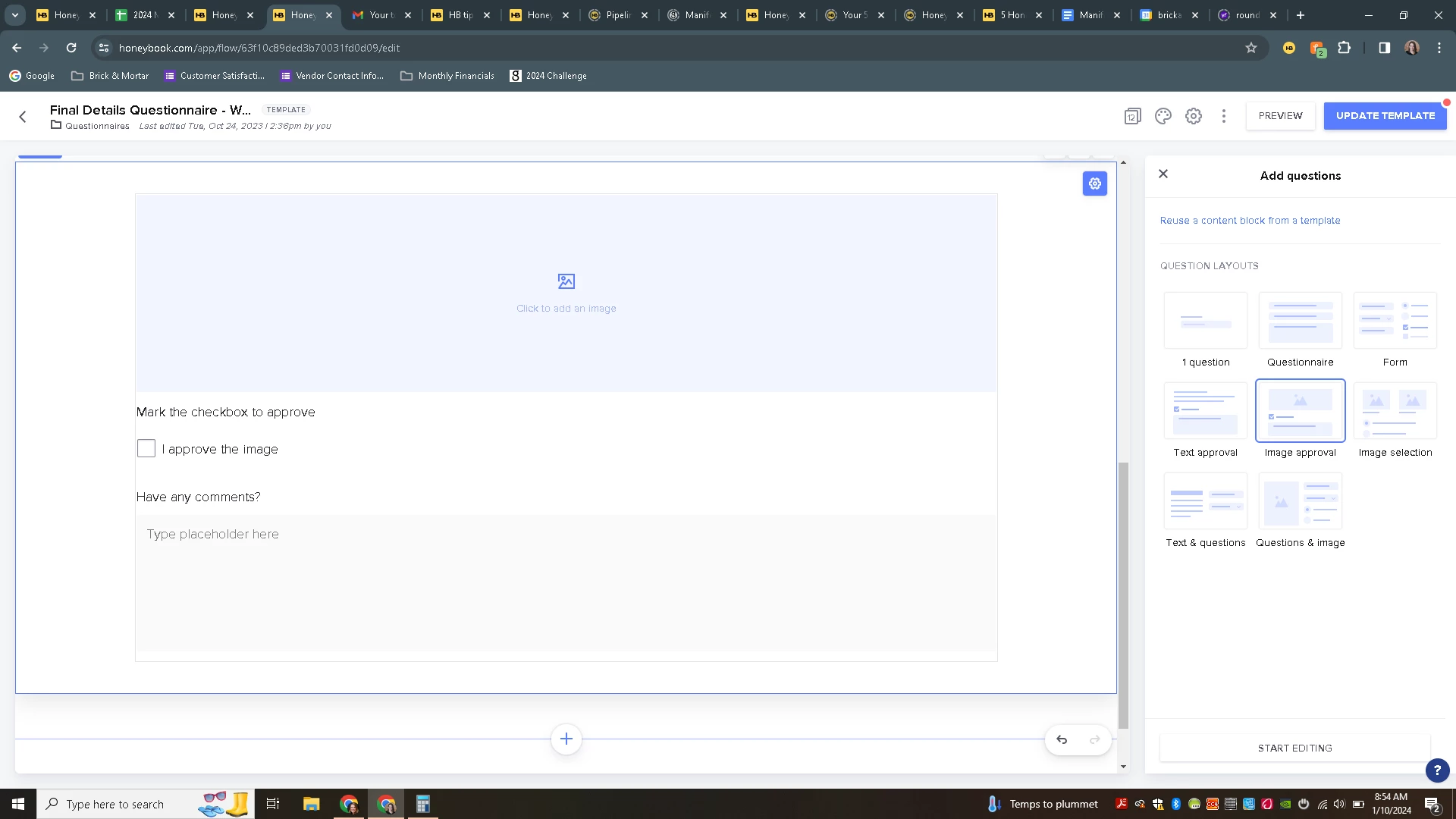
Just discovered the “Approve” question that you can add to Smart Files. I’m excited about using this for proof approvals!


Jessica Girard
Forum|alt.badge.img+2

Just discovered the “Approve” question that you can add to Smart Files. I’m excited about using this for proof approvals!

OMG! This seems so good. What is it, and how do you use it? 


Julia Spears
Forum|alt.badge.img
  • Newcomer
  • January 10, 2024

@Jessica Girard I found it in Smart Files… I added a block > chose Question and ALL of these new options appeared in the right hand menu…


Laura Davis

One feature I found that has been very helpful are linking answers to my questions to a corresponding field in the Contact Details.  For example, I ask for their pickup/delivery date and it auto adds to the project date.  I ask them to share details about the project I need to know  and it auto links to “Project Details”.  I link over half of my questions to a corresponding field and it’s been very helpful to me.  I am really excited about customizing the pipeline to cater to my business flow.  


SheCraftsBrands

SCHEDULER! YAY! Scheduling 1:1’s, follow-ups, and everything else through Scheduler to keep track of all client interactions. I use a combination of Apps for tracking time and workflows, but can automate most, and having everything centralized in a CRM has been great when offboarding clients and providing a recap for longer-term projects. 😊 Calendly and my other Doc app have been removed from my workflow and now saving that cash to use on other tools.