
Solved

How can I update a client's email who is now a Honeybook user

  • March 19, 2024
  • 3 replies
  • 22 views

Meighan O'Toole

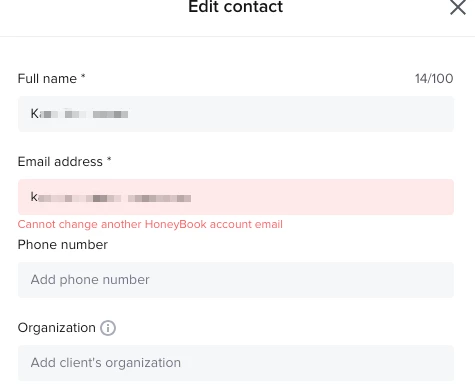
A past client signed up for Honeybook and now she’s unable to use her email address because it’s tied to a project I did for her.

This seems crazy to me. I can’t update her email or remove her and she’s unable to use her business email.

Is there a fix for this?
 

Best answer by Diana The Finer Points

Just let support know. They can sort that out on the backend for you or the client!

3 replies

Diana The Finer Points
Luminary
Forum|alt.badge.img+9

Just let support know. They can sort that out on the backend for you or the client!


Margaret Gerety

Additionally, there’s simply no way to remove/delete a contact so if they book a consult using the wrong email address (slippery fingers adding an extra “s”!), that bad contact lives in the system forever. So now I have two Daniel M.’s in my contact list - one with the right email address and one with the wrong one! And there’s no way to fix that!


Kaitlyn Blair
Explorer
Forum|alt.badge.img

@Margaret Gerety 

That’s frustrating! Typos happen so easily, and it’s tough when something as simple as an extra “s” ends up cluttering your contact list with no way to clean it up.

Right now, HoneyBook doesn’t offer a way to fully delete or merge contacts, which can definitely be limiting when you're trying to keep things neat and accurate. I’ve seen this come up with a few other users too, so you’re not alone.

I’d definitely recommend submitting this to the Ideas tab in your HoneyBook account if you haven’t already—feature requests with user examples like this go a long way in shaping what the product team prioritizes next. 

Thank you for sharing!