Solved

Move "tasks" back to the right side! 😡

  • May 6, 2025
  • 53 replies
  • 364 views

Show first post

53 replies

Aimee Flynn
  • Newcomer
  • May 16, 2025

Hey everyone,

Thanks for leaving feedback. We’re here and we’re listening.

First, I wanted to share some of reasons behind the decision to move the tasks from the side bar of a project to a tab at the top.

  1. Tasks are now client-facing and the right side panel is specifically for things clients should not and cannot not see. This is no longer a place where client facing things can live.
  2. We added new functionality — like grouping by tags and importing tasks — which introduced more detail than could fit in right panel’s small space.

We’ve heard for years that HoneyBook’s task feature is lacking in functionality and subpar when it comes to other task management systems. Recently, the dev team was able to devote time to our task features and will continue to do so that they can delivery the same value that many other task management systems that our members use provide. And clearly, we didn’t nail it in this updated task roll out! 

We appreciate all the conversation around this and our dev team is monitoring feedback closely and thinking through the best ways to restore the lost functionality without compromising the improvements that were introduced.

Thanks again,
Monica

When you say that task are client facing, do you mean that clients can see the tasks assigned to their project?


Alicia Bauer
Forum|alt.badge.img+4

@Aimee Flynn - When she is speaking of client facing tasks - she is talking about the ability to assign tasks to your client and they will see in their view what tasks they have within the project. This is a new development that has been rolling out. Here is a quick doc on it for some more information.


Let me know if you have questions on this and I will try to help as much as possible!


Haley Hundt
Forum|alt.badge.img+1

Came to the HB Community forum for the first time to find this thread about tasks 😬 I can understand why the change has been made, but bringing back the original task bar on the right hand side is the move it looks like many of us want. In my business I don’t personally need a client facing task list, nor do I want to risk creating a task now in a project with the potential for a client to see it. Is there a way to keep this new functionality while simultaneously bringing back the old one? 🙏


Jacque M
  • Newcomer
  • May 16, 2025

I agree. Put the tasks back where they were!


Monica R
HoneyBook Community Team
Forum|alt.badge.img+7
  • HoneyBook Community Team
  • May 16, 2025

@Aimee Flynn, earlier this month we released the ability to assign your clients tasks - so now, if you choose to assign your client a task, it will appear in the Tasks tab. Your own tasks will remain private! 


Savannah_Greg
Forum|alt.badge.img

Hey everyone,

Thanks for leaving feedback. We’re here and we’re listening.

First, I wanted to share some of reasons behind the decision to move the tasks from the side bar of a project to a tab at the top.

  1. Tasks are now client-facing and the right side panel is specifically for things clients should not and cannot not see. This is no longer a place where client facing things can live.
  2. We added new functionality — like grouping by tags and importing tasks — which introduced more detail than could fit in right panel’s small space.

We’ve heard for years that HoneyBook’s task feature is lacking in functionality and subpar when it comes to other task management systems. Recently, the dev team was able to devote time to our task features and will continue to do so that they can delivery the same value that many other task management systems that our members use provide. And clearly, we didn’t nail it in this updated task roll out! 

We appreciate all the conversation around this and our dev team is monitoring feedback closely and thinking through the best ways to restore the lost functionality without compromising the improvements that were introduced.

Thanks again,
Monica

Can I just ask a general question? Who recommended that tasks be client facing?

Why wouldn’t this be a separate, new feature and not a removal of an existing tool? Honeybook really overdevelops things with little to no input from the end user. This, plus the recent price shift, is why you are losing photographers.


Kim Jundt
Forum|alt.badge.img
  • May 17, 2025

Hi Monica and HoneyBook Team,

Thanks for the update, the transparency, and for continuing to monitor feedback.

I wanted to kindly suggest that it would be really helpful if future updates included some form of beta testing or opportunities for feedback from end users before being fully rolled out. Many of us use HoneyBook in different ways depending on our workflow, and sudden changes—, specially when features are moved or repurposed, can significantly disrupt daily operations.

I understand and appreciate the effort to improve functionality and introduce new client-facing tools, but it might be more effective to add those as separate features instead of replacing tools that many of us have come to rely on.

We truly appreciate the work your team is putting into the platform and the ongoing improvements. I just hope future updates involve a bit more collaboration with the community so changes better align with how users are actively using the system.

Thanks again for listening.
Kim


Alice Brown
  • Author
  • Newcomer
  • May 17, 2025

so basically, Honeybooks answer is NO, deal with it? 


Samantha Brammer

I went to start a topic about this because I’m so frustrated. I’ve been with Honeybook since I started my business & this is the first time I’ve ever wanted to beg for them to switch something back. This is horrible & completely ruining my workflow. It’s enough to make me want to switch possibly before I renew next because it genuinely is adding so much extra time/clicks to my workflow. 


Samantha Brammer

Agreed and while we’re talking tasks, why did they take out the ability to click into the project through the task list on the home page? I used to be able to see a task on the list, click the project, go right to their portal and do the thing. Now, I have to have 2 HB windows open to work through my task list, very annoying. 

THIS!!! I thought maybe it was something wrong with my browser for the past, I don’t know, month or however long it’s been. I don’t even understand the point of the tasks page now if I have to go into the project to click on it & find it myself anyways. 


Steve Macke
  • Newcomer
  • May 21, 2025

Why Did You Fix What Wasn’t Broken, HoneyBook


Dear HoneyBook,

I’ve been a loyal user for some time now, and while I appreciate many of the features your software offers, I’m really struggling with a recent update that I hope you’ll consider revisiting.

The recent move of the "Project Task" bar from the right side of the project files to the top has caused a major disruption in my workflow. Having the task bar on the right allowed me to quickly glance and assess where I stood within each project — from the stage of automation tasks, emails, brochures, and other key elements. It was also incredibly convenient to add tasks on the fly, such as my daily “Check In” reminders for specific clients, helping me stay on top of my workload without a hitch.

Now, with the task bar moved to the top, I’m forced to click through to the "Tasks" tab every time I need to check or add a task. Considering HoneyBook already has performance lag when switching between sections like Activity, Files, Notes, and Details, this extra step slows me down even further. Every second counts in my busy day, and these unnecessary clicks and delays add up.

Why fix something that wasn’t broken? I strongly urge you to reconsider this change and return the task bar to its original location on the right side of the project. It was an efficient, intuitive layout that worked for many of us who rely on HoneyBook for streamlined organization.

Please listen to your users and bring back the functionality we need!

Yes, I fully agree! Please bring the “Tasks” back to the sidebar


Kelsey - CBK

100% AGREE!!!!  HoneyBook, PLEASE move tasks back to the Activity page. This move has completely disrupted my workflow and made processes less efficient. Honestly, I would love to see Tasks back as a widget at the TOP of the right side on the Activity page. It would also make a lot more sense for Automation to move from a right side widget to its own tab.


Steve Macke
  • Newcomer
  • May 29, 2025

Yes! We need more comments on here so we can get HoneyBook’s attention. 


Linka Odom

I agree, I need to see it - that is the whole point of a tasks bar - this is so annoying. Please put it back.


Michelle Surlaya

Is there any update on this? 

As much as we didn’t get a choice in this change, I have “given it a chance” over the last 2 weeks. It is limiting in visibility and time consuming to toggle back and forth between the tasks and activity tabs. Our business does not need client task functionality, and have already baked this into our automations. Another pain point for me is clicking a task in the notifications menu takes you to the Tasks page which again is extra clicks to then DO THE TASK in the applicable project. 😫


HoneyBook, we’d appreciate an update with greater detail than we take your feedback seriously. 

Thank you!


Linka Odom

I literally have forgotten things because I cannot see my tasks anymore as I’m working. Why not make it optional to see it on the right side again?


Victoria Dunbar
Forum|alt.badge.img

Still can’t get over how much it sucks not to have the tasks on the right side like they were before. I am constantly using tasks and I don’t assign tasks to my clients so it’s really killing me to not be able to see everything on one page like it was before. 😭


Michelle Evans

Couldn’t agree more with this being an issue and workflow disruptor.


I’d like to also mention that for me (chrome user, fully up to date) I have to scroll to the right constantly to see all of the info assigned to the task. And then scroll back to the left to check it off. Whether it’s in the project task tab or in the task management section for all projects.


Someone mentioned used the task management section for all projects instead. For me that’s not much of a solution because I often, after viewing the task, have to click into the project and do other tasks as well. The full task management section is helpful for smaller tasks. Not necessary project specific items.


York Trolley Company

Please put tasks back on the right for all the reasons Alice mentioned. This change has been a major disruption to the workflow and customer experience. I have now looked like an idiot to my clients several times because i didn’t know I had an outstanding task because you moved tasks out of sight. It was a much better experience when tasks were on the right and visible at a glance. Please consider moving it back. Of all the changes you have made, this has been the most disruptive by far.


Lydia F
Explorer
  • Explorer
  • June 18, 2025

Agreed and while we’re talking tasks, why did they take out the ability to click into the project through the task list on the home page? I used to be able to see a task on the list, click the project, go right to their portal and do the thing. Now, I have to have 2 HB windows open to work through my task list, very annoying. 


@Veronica Brend  -- I just created a feature request to make the homepage/dashboard tasks list include a way to get to the project with one click. You can upvote it here


Justina
  • June 26, 2025

AGREEEEED. I feel like I message honeybook on a weekly basis to see if it can be changed back. At the very least would love the OPTION to have tasks displayed on the home page of a project. I gave it time to see if it was something that just need to get used to like when the notes changed.


Nope. Totally disrupts my work flow and does not give a clear picture of the project at a glance which like the author said is hard since honeybook does lag quite a bit.


PLEASE please please give us the option to move tasks back.


Rebecca Cross

I also miss it on the right of the activity page because I hate more clicking around….but what I am really frustrated about is that when “I check it off” as done it disappears completely. So now I don’t even know if the team has complete the task I assigned to them or not. Did it disappear? did they do it? I etc.


Please leave the list there even if it does get checked off and grey it out or something if someone marks it complete. 


PLEASE!! 


Aimee Flynn
  • Newcomer
  • August 27, 2025

I also miss it on the right of the activity page because I hate more clicking around….but what I am really frustrated about is that when “I check it off” as done it disappears completely. So now I don’t even know if the team has complete the task I assigned to them or not. Did it disappear? did they do it? I etc.


Please leave the list there even if it does get checked off and grey it out or something if someone marks it complete. 


PLEASE!! 

Yes this. I’m getting so so frustrated with how tasks have been updated. The task list exists so I don’t have to constantly remember what I have to do or have done for all my projects. This change is causing me to be late on tasks, miss tasks, and duplicate tasks because that “record” is gone. Massively kneecapping my organization and making my life harder. Cannot explain how frustrating this is. 


Monica R
HoneyBook Community Team
Forum|alt.badge.img+7
  • HoneyBook Community Team
  • September 9, 2025

Hi everyone! 

I come bearing good news.

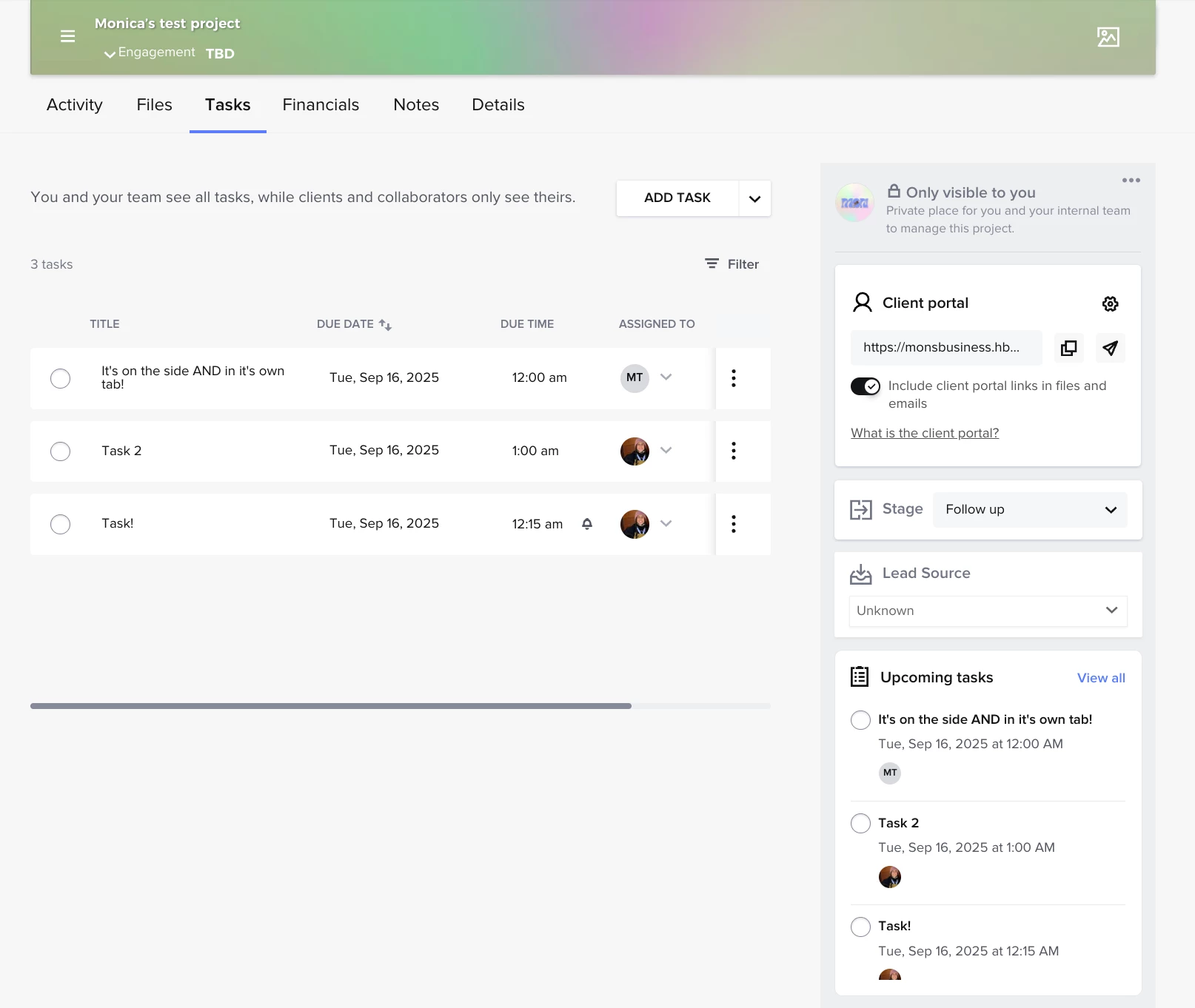
It’s back. Tasks is back on the side nav.


I know it took some time, but we really are listening and care about building a product that helps you save time and grow your business 💛 Thanks for sticking with us, ya’ll. 


Note: Only tasks with due dates will appear in the side nav view! Tasks without due dates will show on the tasks page (pictured above).


Alicia Bauer
Forum|alt.badge.img+4
  • Newcomer
  • September 10, 2025

Just a quick heads-up - HoneyBook has added a Tasks section back to the right-side column in the client workspace! 🙌 While it may not be perfect just yet, it’s definitely a big step in the right direction and a sign that they’re listening and working toward improving the platform. Keep the feedback coming - these little wins add up!