The growing obsession with AI is annoying af

  • September 9, 2025
  • 10 replies
  • 54 views

onthevinephoto

I don’t understand HoneyBook’s growing obsession with putting an AI feature on everything.


Originally, you could toggle these options off. Now, you can’t. You’re stuck with an AI block hovering above every email you type, whether you use it or not. I HATE these AI features. They do nothing for me - and nothing for you except make you sound like a generic ChatGPT bot. If I received one of these fake emails as a client I would move on so fast. Clicking on one of them by accident pisses me off every time, then I have to delete its stupid generated email and start all over on what I was doing.

I’m SO incredibly disappointed that there is NO WAY to get away from all this useless AI! I will never ever ever use these AI features and should be able to turn them OFF. 


This is on TOP of the endless (and I really do mean endless) glitches that come up when using the platform after their major update earlier this year. (Lead forms not working, contracts not loading, emails erasing, uploads not working, automations not working, automations misfiring, I could go on… and yes, I have a ticket in about every single one of these.)


I’m over it. Do better, HB.

10 replies

Alicia Bauer
Forum|alt.badge.img+4
  • Newcomer
  • September 10, 2025

@onthevinephoto - Totally hear your frustration, and just want to mention that I’m not a HoneyBook employee, just a fellow community member trying to help where I can. From what I understand, there are separate teams working on app development and AI tools, so the growth in AI features shouldn’t take away from overall platform improvements.

AI really is the wave of the future, and HoneyBook is likely trying to stay ahead of that curve. That said, I agree, it would be great to have more control over what we can toggle on or off. Definitely recommend submitting a feature request so they can log your feedback directly.


onthevinephoto
  • Author
  • Newcomer
  • September 10, 2025

@Alicia Bauer as I said in my post I do have feature requests and tickets submitted. I don’t understand the need to jump in to defend this. I strongly disagree with your opinion on AI and how it impacts UI on their platform. 


Tonisha J Stalnaker
Explorer
Forum|alt.badge.img+4

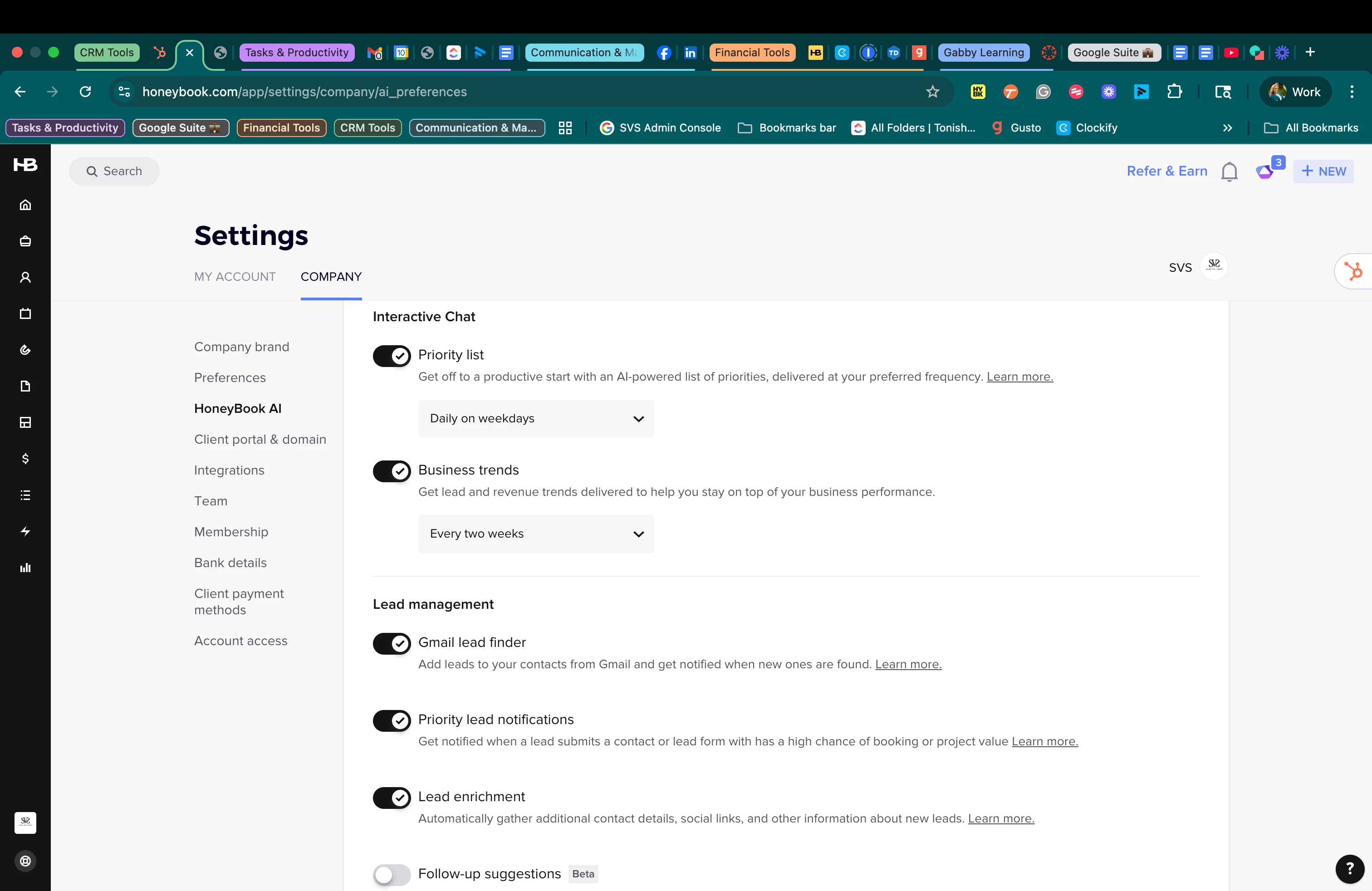
Hey ​@onthevinephoto If you go to your company settings, do you see this tab? If so, you can turn many of the AI features off.


onthevinephoto
  • Author
  • Newcomer
  • September 11, 2025

@Tonisha J Stalnaker Of course I do and have turned them all off. I am still receiving mobile notifications for AI summaries and they have now updated the feature to where you cannot remove the AI box at the top of your email. It’s frustrating posting here and everyone assuming I haven’t done the most basic research to solve this problem. I’ve also reached out to CS countless times, as I said in my original post.


Tonisha J Stalnaker
Explorer
Forum|alt.badge.img+4

@onthevinephoto I’m sorry this is so frustrating for you. I am trying to help find a solution to your complaint. Since I cannot see your setup or account, I have to check a few things to make sure I understand. I’d be happy to hop on a call and take a look at your setup and see if I can offer guidance. It’s totally up to you. 


Mimi Heberlein

I am right there with you onthevinephoto! I got the “help” from HoneyBook Support on how to turn off the AI email Draft response and I followed the directions.

I turned off ALL of the AI features as I find them useless, annoying and time consuming, like a bratty older sister looking over your shoulder and trying to correct your homework.


GO AWAY AI!  Guess what? Even with the EMAIL DRAFT off in the AI preferences, it STILL dumps their computer generated response into my email. Just like a predictable SciFi foreshadowing of CYLONS making their first appearance through my laptop.


THIS IS NOT OK! There needs to be a clear, simple and permanent way to shut off AI features in HoneyBook! We pay too much each month to have this creepy stalker program wasting our time!


onthevinephoto
  • Author
  • Newcomer
  • September 13, 2025

The fact you can’t turn it off AT ALL, and that new features keep being snuck in AFTER you’ve shut off all the option you possibly can, is absolutely ridiculous. 


onthevinephoto
  • Author
  • Newcomer
  • September 13, 2025

@Tonisha J Stalnaker ​@Alicia Bauer the only reason I posted here is because CS specifically told me to if I wanted to leave feedback. The only reason I have ever posted on this forum is because CS told me to do so to leave feedback. I imagine if you haven’t had these ongoing issues you’ve never gotten to this point with CS.
 

Respectfully, I wasn’t looking for advice, since I’d gone to the very end with CS about these issues already and have been using HB every day for five years. There is nothing you can do, or it would have been done already. 
 

They have changed their AI features to where even if you toggle them off, certain ones are still there. So toggling off those tabs does absolutely nothing.


Food for thought when interacting in this community. There are probably a lot of people who are only here because CS drove them here out of frustration and no real option to leave feedback on features otherwise. 


Andi Schoenbaum

I am unhappy with the automatic AI email draft as well.  I like the option of electing AI to draft the email, but when it pops up as I’m trying to think through what I want to say, it’s like a child or animal vocalizing for attention mid-thought.  It acts as a mind eraser and I can’t even remember what I intended to communicate to the client.  The automatic response is counter productive.  Please remove it.


Tonisha J Stalnaker
Explorer
Forum|alt.badge.img+4

@Andi Schoenbaum  were you able to turn yours off? I have been speaking with the HB Dev who manages AI, and I have shared any frustrations when I see them.