Question

Wait time BEFORE a certain event/session

  • March 3, 2025
  • 7 replies
  • 77 views

JessMcKnight

I’m loving the new automation builder but have run into a snag. In the previous builder, I had “wait until 3 days before session type X” to send out a certain email. I’m not seeing before as an option anymore - only a wait until things are completed or wait a certain number of days. 

Anyone found a work around to that yet?

7 replies

Kimberly Crist

Same! I miss this so much. The only work around I was able to find was that you can do the very first trigger can have a before project date set but that’s it. I asked the robot thing last night and it said that you have to create a new automation for every one 😩https://help.honeybook.com/en/articles/10149122-how-to-automatically-trigger-actions-leading-up-to-a-project-date


Ashley Rufino
Creative Icon
Forum|alt.badge.img+6
  • Creative Icon
  • March 4, 2025

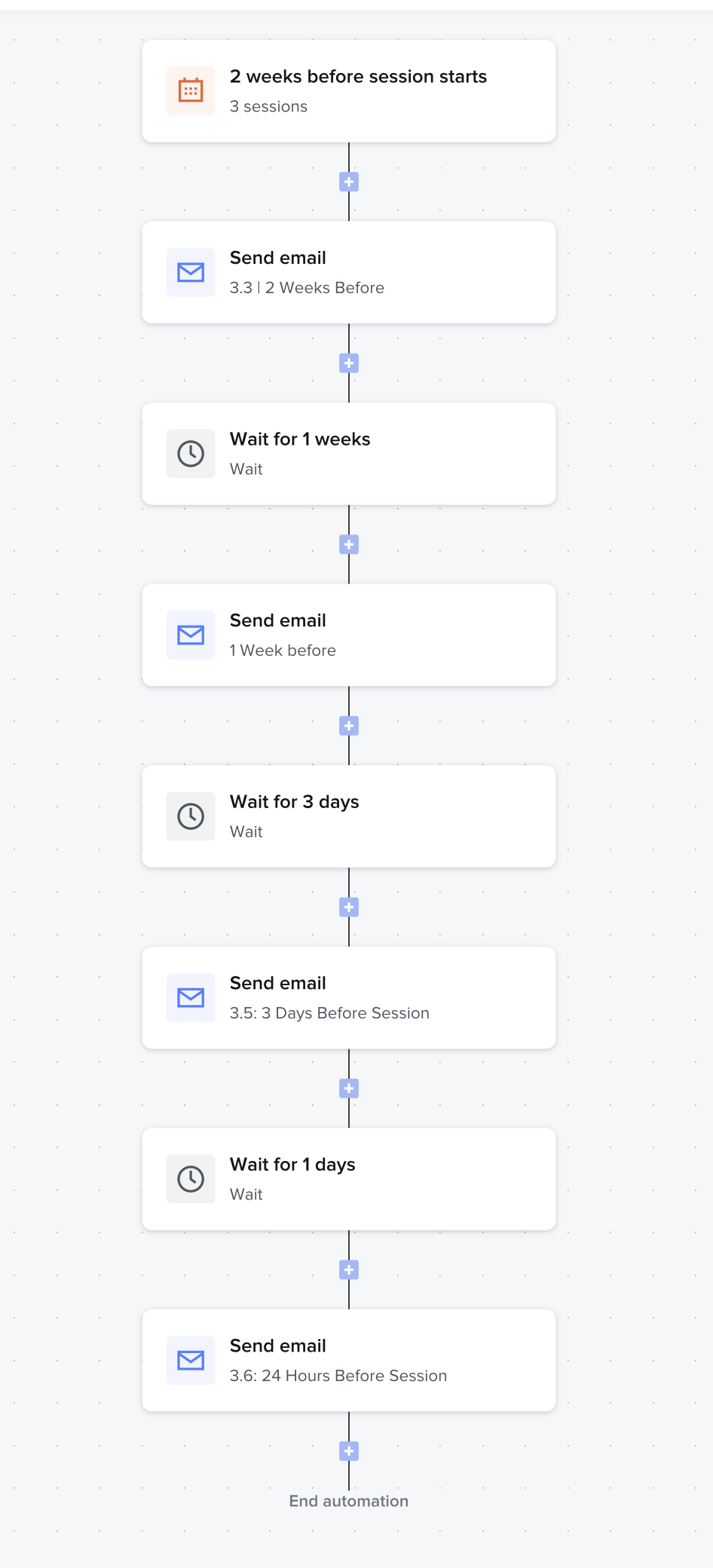
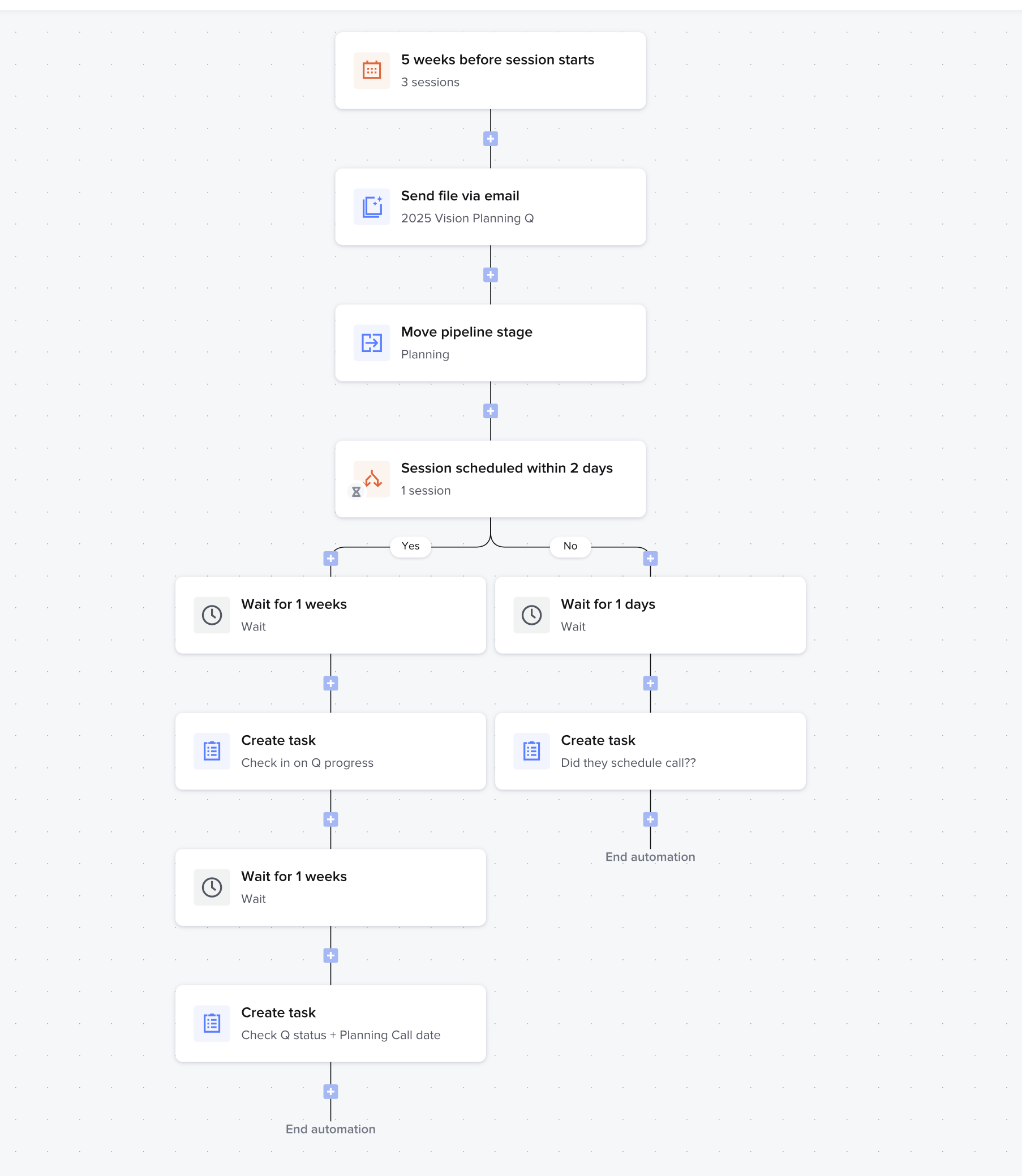
@JessMcKnight yes its a bummer that the new automation2 2.0 doesn’t have this exact structure after the initial trigger without a new automation. Here are some examples of how I still am able to send out times e-mails/actions leading up to a session. 

This could technically be 1 automation but wanted to have the conditional logic with the scheduler without impacting the rest of the flow


Katrina Naylor
Forum|alt.badge.img

Yep, this is something definitely needed.  I have triggers from previous version of automations that I could do before an event.
BUT...
My work around for this is to set a new automation for the start of the trigger to be x days before project date.  From what I understand we can have multiple automations per project so it will allow me to activate them on the project. 

I am a wedding venue so I’m working on my Planning automations which are for clients booked with me.   I have automations that are a move at the client’s pace up and then I have timed automations that are on my timeline.  I do have to make a few more automations than before but I like the detail with the conditions but i think this work around will work. 


edit...alas...i found an issue in my work around.   I set the automation run to begin x amount of days before project date however it does not show up as an option to add the run to the project.  I then attempted to set the it to a specific project type and it still did not pull up the option.  When I put it as manual trigger it adds to my list of automation run options.   I attempted a few different settings to see if I could trigger this.  Essentially you can but ...

Leaves me with more questions now…. Do i need to set  a specific project type in order for it to automatically apply to my project?   or is this an actual issue? 


Heather M
HoneyBook Employee
Forum|alt.badge.img
  • HoneyBook Employee
  • March 10, 2025

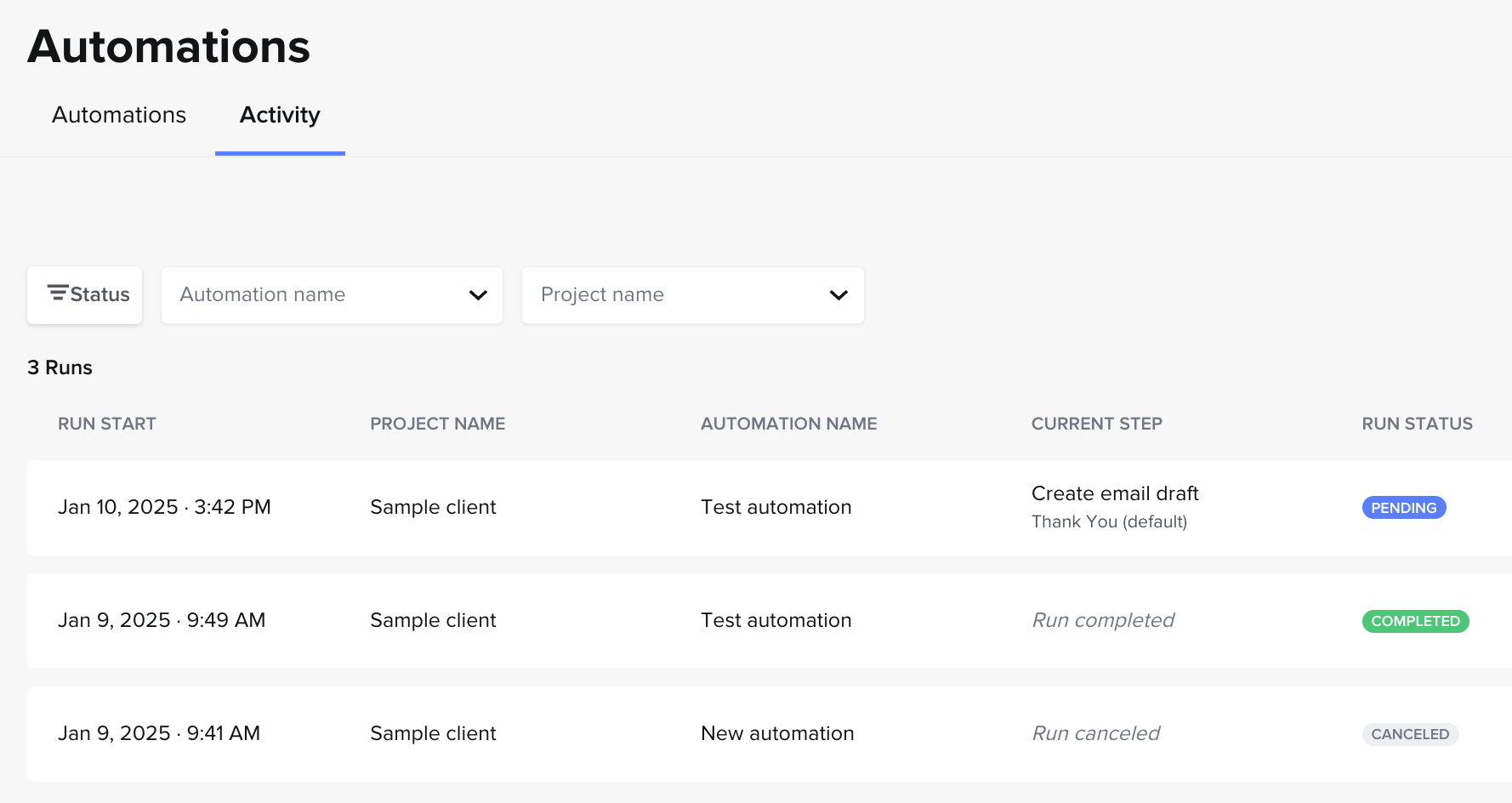
Hey ​@Katrina Naylor, automations 2.0 will automatically be applied on a more global scale than on a project-by-project basis (unless you pick manual trigger, as you saw). So basically, you don’t need to manually “add the run to the project” on a project-by-project basis. (If you want to do that, you can use “manual trigger”). Once your automation is active, it’ll just automatically start running in all your relevant projects! You can always keep track of which projects it is running in under the “Activity” tab on the automations page.

Active vs. inactive automations
Automations activity tab

Re: Project types… If you don’t specify the project type, and your automation is active, it’ll automatically run in ALL new projects where the trigger occurs. If it’s active and you specify the project type, it’ll only automatically run in all the new projects you have of that type where the trigger occurs.


Katrina Naylor
Forum|alt.badge.img

Oh yes!  I just experienced this before i read your explanation.   I see the work around where I can assign project types and I can add more project types so that i can detail it. 

Unfortunately the run started on a project i did not intend it for.  Fortunately, it was one project and not much had started because it was a small run. 


Bre Poole
  • May 14, 2025

I am genuinely looking at switching to another CRM just because this feature has been lost. The conditional logic isn’t really useful to me if I have to create different automations for EACH timeline (eg: client books 12 months out vs client who books 3 months out). It is SO frustrating. 


Jess Biancardi

I want this too! just added an idea just like this to the community!