


Question

Automation for calendar availability on query

  • Oct 7, 2026 2:17 AM UTC
  • 5 replies
  • 51 views

Jayda Khan

Hi Everyone, 


I am finding it frustrating using the automation features and have discovered the automation options are very limited and basic for what is needed and as such considering dropping this platform for something more robust. 


I want to set up an automation for a New Inquiry based on the date query condition. The problem is the date query only takes into consideration a project booked status and doesn’t look at the calendar. I have created a fake project with a blocked off time for vacation mode but the query condition still is sending an email saying we are available because we do not have a contract signed or payment received and as such the proect is in tentative but not, booked. 


This seems like incredibly basic functionality that is required just on an inquiry. How on earth do you manage an automation for such a simple function?


Two things….


  1. How do you set a project to booked even with moving it to a later stage? We created a vacation not available stage and still doesn’t change it to booked. 
  2. How can you get the conflicts to show for booked calendar meetings on external calendars rather without having to create fake projects?

Please help...ready to jump ship!

 

5 replies

Kaitlyn Blair
Creative Icon
Forum|alt.badge.img+2

Hey ​@Jayda Khan,

Because the query feature will ONLY say your booked if there’s a signed contract, I’d recommend reformatting your automations to something like this:

  1. Trigger: contact or lead form submitted
  2. EMAIL DRAFT! This means the automation will pause until you send the email. This can be an “available” email template that you can edit and send after you manually check your availability. I know it’s a bit of a manual step, but it also gives you control over the situation. If you’re NOT available, you don’t have to send that email. It won’t continue! (of course you’ll want to still let them know you’re unavailable by sending a different email. Archiving the project will also stop the automation from continuing!)
  3. Condition for session scheduled (if you offer a consultation/discovery call)
  4. If they don’t schedule a consultation, you can follow up with them automatically after “X” amount of days :)


To answer your questions:

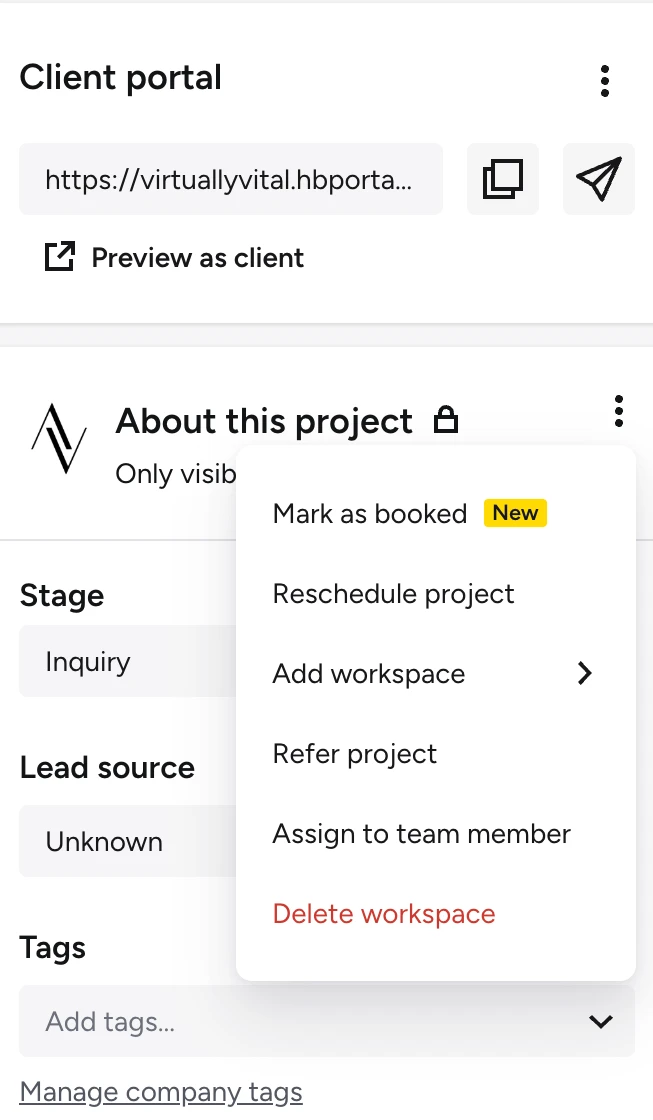
  1. You can manually mark as project as booked in the project by clicking the 3 dots in the “about this project” section. But manually marking the project as booked won’t carry into the automation feature, which is why I’d recommend reformatting it! But it will block out that time in your calendar. 
  2. For your second question about projects showing on your external calendar, if you manually mark it as booked, it should show on your calendar. Just make sure the integration is working correctly in your Company Settings > Integrations :)

Does that answer your questions?


Jayda Khan
  • Author
  • Newcomer
  • Oct 15, 2026 4:29 PM UTC

Hi Kaitlyn, 

Thank you for the suggestion but it doesn’t fix my issue in that the automations are not robust enough for what I need. The automations need to consider factors outside the booked projects such as meetings in the calendar, booked sessions, vacations etc. In the grand scheme the automations on HB are very basic. It just isn’t capable of handling this and makes the manual work around still manual. 

This workaround doesn’t save the time I was looking for. I shouldn’t have to create fake booked projects for the conflicts to be taken into consideration. This actually creates unnecessary work for me and my accountant when running reports as well

Unless automations become more robust in their features I do unfortunately need to look at alternatives. 

For question 2 I don’t think you understood my question. If create a vacation blocked busy time in my calendar, the system doesn’t set the warning on an incoming inquiry to say conflict because it’s not a booked project. This means I need a booked project for that warning to appear. 

I appreciate your help.


Jayda


John Branch IV
Forum|alt.badge.img+3

I’m with you ​@Jayda Khan 

I just ran into this issue myself. I stopped taking weddings on Sundays so in my automations a created a query to check if I’m available and then based on that either send my I’m not free email or my intro emails. This should span family trips, vacations, or any other time that I wouldn’t be able to take on a project. However, the way it is now it’ll just send out my intro email, and then I have to follow it up with the “oh sorry I’m not free” which doesn’t look good.

It should take into account more than just booked projects. Did you put this in as a feature request yet? If not I’ll try to and we can up vote it because this is a HUGE missed opportunity and automations should be able to handle this.


Alicia Bauer
Forum|alt.badge.img+4

​@Jayda Khan & ​@John Branch IV  - I can definitely understand what you're both trying to accomplish here, and I think the distinction between project booking status and actual calendar availability is really important.

Right now, the automation condition is looking at whether a project is considered booked in HoneyBook, rather than evaluating everything that might make you unavailable on a particular date. That means things like vacations, blocked calendar time, personal commitments, or even days you've decided not to accept bookings aren't necessarily being considered when determining which automated response to send.

I can see why manually reviewing every inquiry or creating placeholder projects doesn't accomplish what you're hoping to achieve with automation in the first place.

Ideally, there would be a condition that evaluates actual calendar availability, including busy events from connected calendars, rather than relying solely on whether another HoneyBook project has a booked status. That would make it possible to automatically send the appropriate response without accidentally telling someone you're available when you aren't.

I think this would make a really valuable feature request! I'd recommend searching the Ideas section for something related to calendar availability conditions in automations. If there's already an Idea, definitely upvote it and add these examples. If not, I would encourage submitting one because you've both explained the business need really well.

And I especially like the point about not wanting to create fake projects just to account for time off. Those projects can affect other areas of your business, including reporting, so having automations recognize calendar availability directly would be a much cleaner solution.


John Branch IV
Forum|alt.badge.img+3

​@Alicia Bauer I actually never really thought to do a reoccurring project. That can at least take care of my Sundays for now. But it’s still really important that this feature gets implimented.