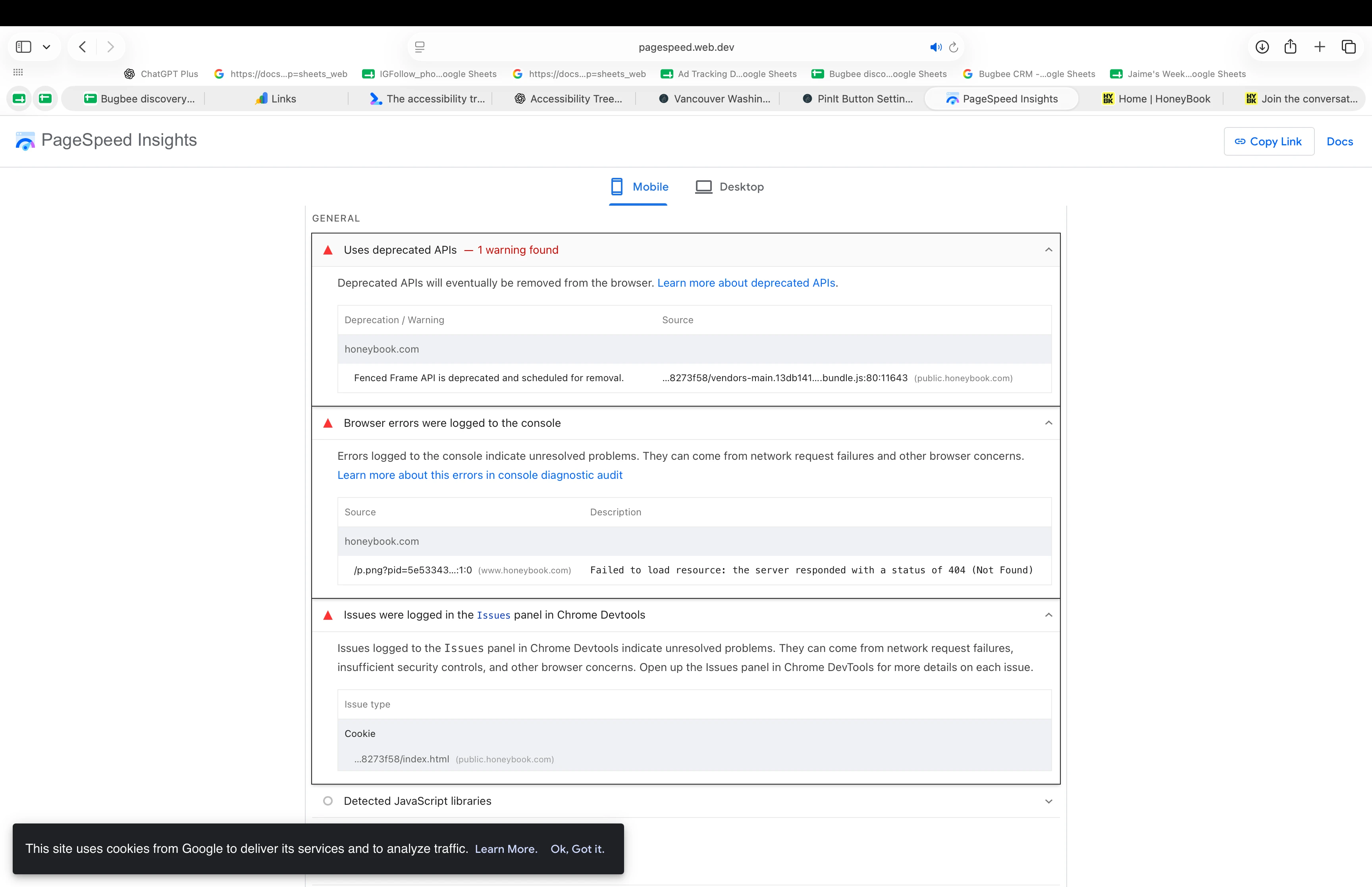




Has anyone else noticed that their embedded HoneyBook contact form is negatively affecting their Google PageSpeed Insights scores?
I've been working on optimizing my Showit website and have successfully resolved several performance issues. However, my remaining Best Practices warnings are all coming from HoneyBook's embedded contact form.
Here are the specific issues Google is identifying:
-
Use of the deprecated Fenced Frame API.
-
A HoneyBook-hosted resource returning a 404 error.
-
Cookie-related warnings in Chrome DevTools.
-
Missing iframe title, which affects website accessibility.
-
Approximately 225 KiB of unused JavaScript during initial page loading.
I've reached out to HoneyBook support and was advised not to modify or defer the embed code myself.
I'd love to see HoneyBook prioritize improving the performance and accessibility of its embedded contact forms, particularly as website speed, accessibility, and AI browsing become increasingly important.
Is there a plan to address these issues or provide a more lightweight, optimized contact form embed in the future?
I love using HoneyBook for my photography business and would prefer to keep my contact form embedded directly on my website without compromising website performance.
I've attached a screenshot of my Google PageSpeed Insights report for ref
erence.
Has anyone else experienced this or found a solution?