I’m loving the new automation builder but have run into a snag. In the previous builder, I had “wait until 3 days before session type X” to send out a certain email. I’m not seeing before as an option anymore - only a wait until things are completed or wait a certain number of days.
Anyone found a work around to that yet?
Best answer by Heather M
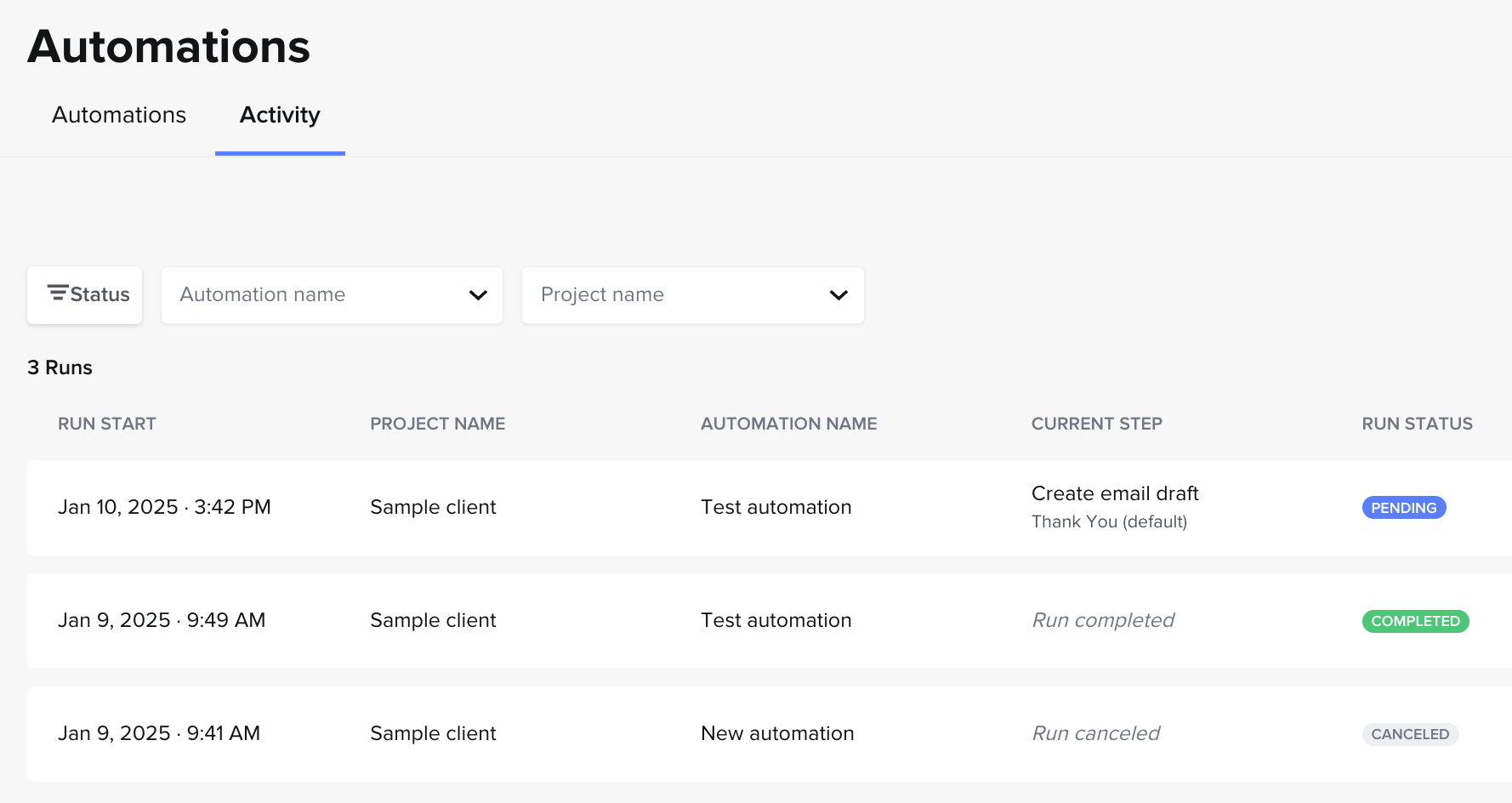
Hey @Katrina Naylor, automations 2.0 will automatically be applied on a more global scale than on a project-by-project basis (unless you pick manual trigger, as you saw). So basically, you don’t need to manually “add the run to the project” on a project-by-project basis. (If you want to do that, you can use “manual trigger”). Once your automation is active, it’ll just automatically start running in all your relevant projects! You can always keep track of which projects it is running in under the “Activity” tab on the automations page.
Active vs. inactive automationsAutomations activity tab
Re: Project types… If you don’t specify the project type, and your automation is active, it’ll automatically run in ALL new projects where the trigger occurs. If it’s active and you specify the project type, it’ll only automatically run in all the new projects you have of that type where the trigger occurs.
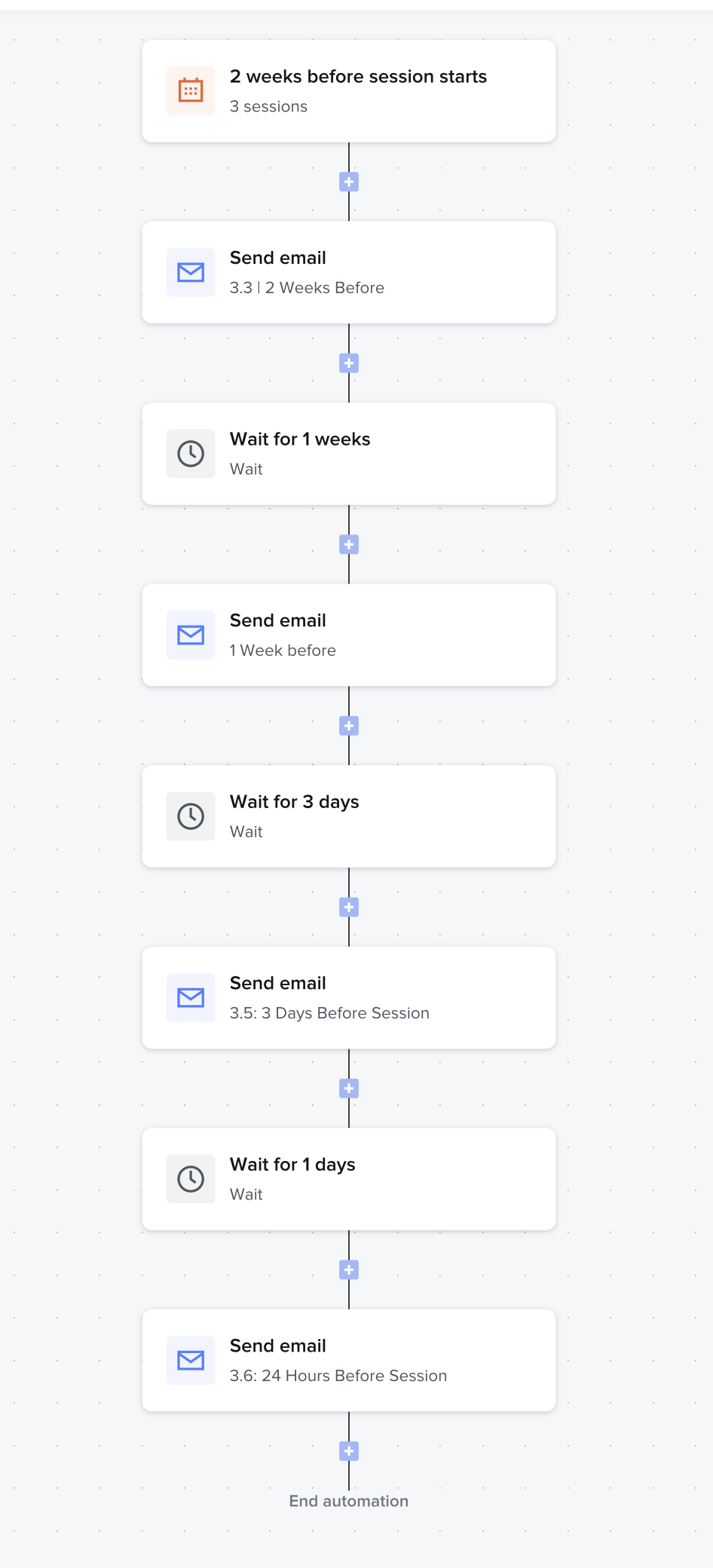
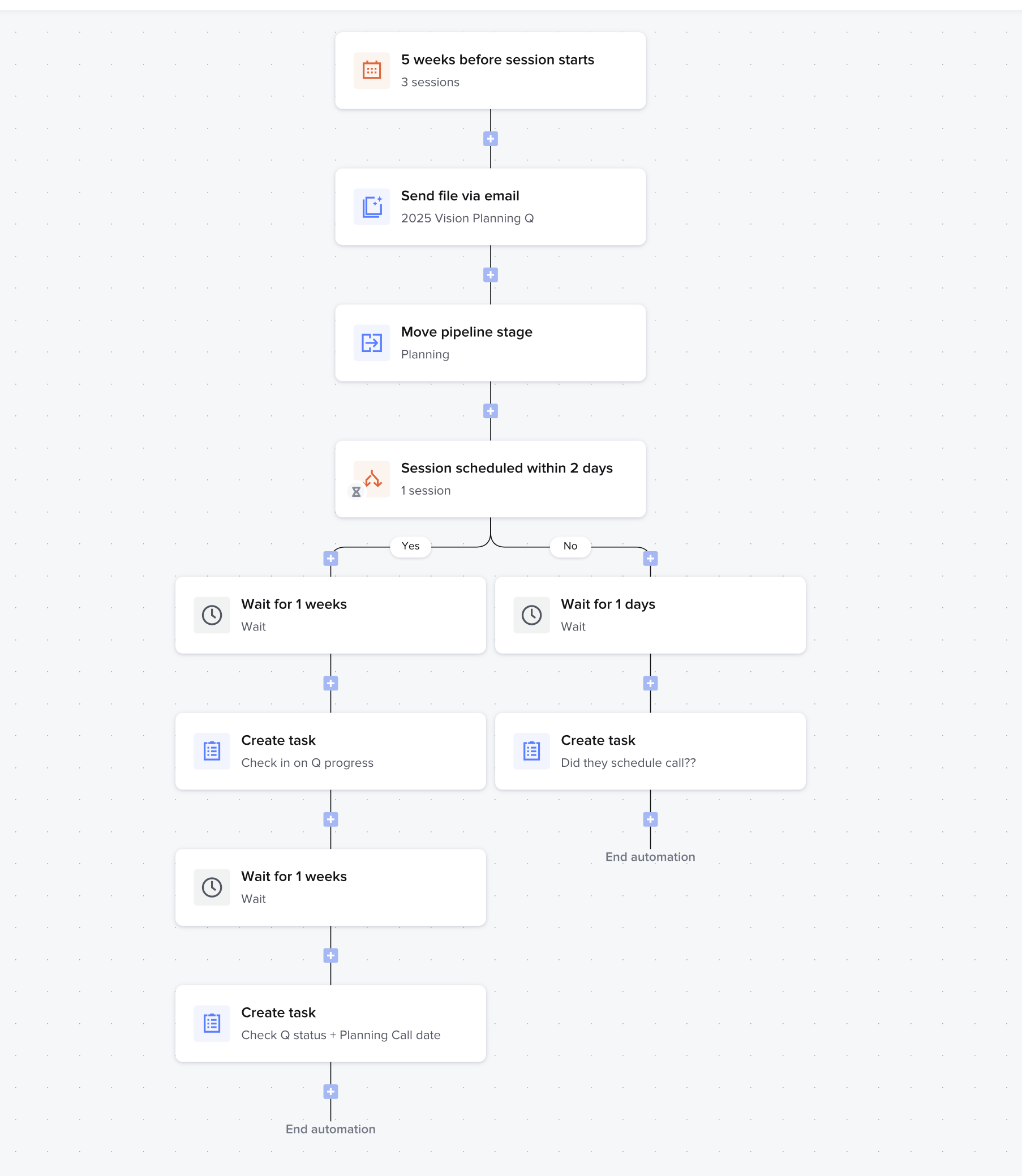
@JessMcKnight yes its a bummer that the new automation2 2.0 doesn’t have this exact structure after the initial trigger without a new automation. Here are some examples of how I still am able to send out times e-mails/actions leading up to a session.
This could technically be 1 automation but wanted to have the conditional logic with the scheduler without impacting the rest of the flow
Yep, this is something definitely needed. I have triggers from previous version of automations that I could do before an event. BUT... My work around for this is to set a new automation for the start of the trigger to be x days before project date. From what I understand we can have multiple automations per project so it will allow me to activate them on the project.
I am a wedding venue so I’m working on my Planning automations which are for clients booked with me. I have automations that are a move at the client’s pace up and then I have timed automations that are on my timeline. I do have to make a few more automations than before but I like the detail with the conditions but i think this work around will work.
edit...alas...i found an issue in my work around. I set the automation run to begin x amount of days before project date however it does not show up as an option to add the run to the project. I then attempted to set the it to a specific project type and it still did not pull up the option. When I put it as manual trigger it adds to my list of automation run options. I attempted a few different settings to see if I could trigger this. Essentially you can but ...
Leaves me with more questions now…. Do i need to set a specific project type in order for it to automatically apply to my project? or is this an actual issue?
Hey @Katrina Naylor, automations 2.0 will automatically be applied on a more global scale than on a project-by-project basis (unless you pick manual trigger, as you saw). So basically, you don’t need to manually “add the run to the project” on a project-by-project basis. (If you want to do that, you can use “manual trigger”). Once your automation is active, it’ll just automatically start running in all your relevant projects! You can always keep track of which projects it is running in under the “Activity” tab on the automations page.
Active vs. inactive automationsAutomations activity tab
Re: Project types… If you don’t specify the project type, and your automation is active, it’ll automatically run in ALL new projects where the trigger occurs. If it’s active and you specify the project type, it’ll only automatically run in all the new projects you have of that type where the trigger occurs.
Oh yes! I just experienced this before i read your explanation. I see the work around where I can assign project types and I can add more project types so that i can detail it.
Unfortunately the run started on a project i did not intend it for. Fortunately, it was one project and not much had started because it was a small run.
I am genuinely looking at switching to another CRM just because this feature has been lost. The conditional logic isn’t really useful to me if I have to create different automations for EACH timeline (eg: client books 12 months out vs client who books 3 months out). It is SO frustrating.
Here to comment that “send X days prior to date” is a MUST for automations 2.0
Here is why the example by Honeybook employee above does not work…
We set an automation to “just start running” and it has 20+ tasks that are based off of their actual date.
This is because we work in an industry that does not “talk slowly” over months but instead guide a couple through a process that has an end date
Doing it the way suggest with automations 2.0 means that if we trigger emails to send over a 12 month time couples could book in a shorter say 4 month window prior - and won’t get our helpful email for wedding details until 8 months AFTER their wedding day
It also means that if we build it for a short window of time (say 4 months) and the couple has a 12-18 month lead prior to their date we “rush them” into decisions long before they are needed and overwhelm them
It also means we could not schedule things to say “your head count is due” or “don’t forget these things next week on your wedding” because we cannot set it to send to them at the appropriate time prior to their wedding.
The employee above said that the new automations are more global than project by project but it seems like they really are just for non booked clients and cannot be used for any booked client management that operates on a project specific date.
The only way to use automations 2.0 in this way would be to make an automation with 1 email for each individual trigger. That is an insane amount of automations for the amount of information most wedding vendors need.
Or to have every single email instead listed as as task from the very start - which defeats the point of the automation, creates an overwhelming “to do” list that shows on our end, and increases the chance of something being missed.
PLEASE bring in the option to send emails/files based on “X days/weeks prior to project date”
Please add “Wait X amount of time BEFORE project date” as a wait action. This is the only way I will be able to use Automations 2.0, as I begin my planning process with my clients based on the final date, not the start date.