Question

Methods to Track Contact by Last Name

  • March 24, 2026
  • 3 replies
  • 15 views

Barry Koblenz

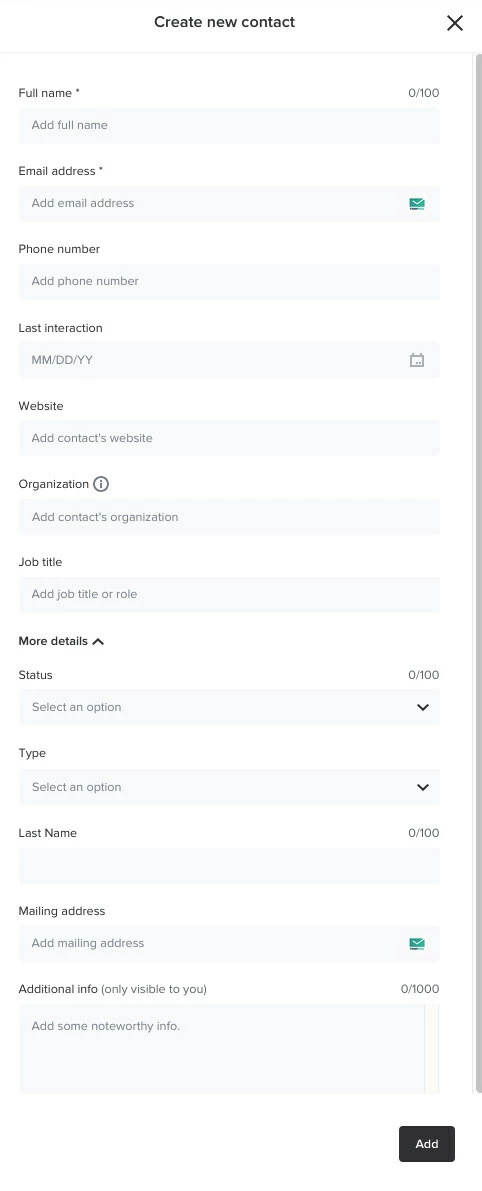
I’m new to HB and am entering client contact info. There are a number posts requesting a first name field and separate last name field instead of a single full name field.

That doesn’t seem to have changed. Has anyone found a workaround? 

Will.  last name, first name   work? 

It would be nice, too, to be able to rearrange  the locked contact fields.

3 replies

Kaitlyn Blair
Luminary
Forum|alt.badge.img+1

Hi ​@Barry Koblenz,


To input the client last name in an email, contract, or any field, you can type {first client last name}, and it will populate their last name.


If you go to the “Contacts” tab, you can also search by last name as well.


Can I ask where you’re having trouble populating the client’s last name?


Barry Koblenz

I want to create a new contact as per the attached screenshot, but there seems to be only a ‘Full Name’ field. Neither can I change field order. I added ‘Last Name’ field, but am unsure whether that helps. 

What workarounds are there to be able to sort by last name?


Kaitlyn Blair
Luminary
Forum|alt.badge.img+1

Hi ​@Barry Koblenz,


There isn’t any need to have a “Last Name” field as HoneyBook will automatically pull their last name when they complete the “Full Name” question.


When you say you’d like to sort by last name, where are you trying to sort them? In the contact page, projects, or somewhere else?