



TL;DR
Client’s accounting department needs to process payments, but direct payment links require the client’s name and email, causing errors. Suggestion: Allow anyone with access to submit payments or clarify error messages. Seeking community advice for a better solution.
The Situation:
I've encountered an issue where my client is the signer, but not the person who will be processing the payment. The actual payment will be submitted by the company's accounting department.
The Issue:
I believe that the official way to do it would be to add the accounting department to the project with their email address, but that presents many issues and isn’t realistic.
What I did just now was create a direct payment link attached to the client, and then he shared it with his accounting team. They received an error when trying to submit, and I did not know why. I’ve attached a screenshot of the error message.
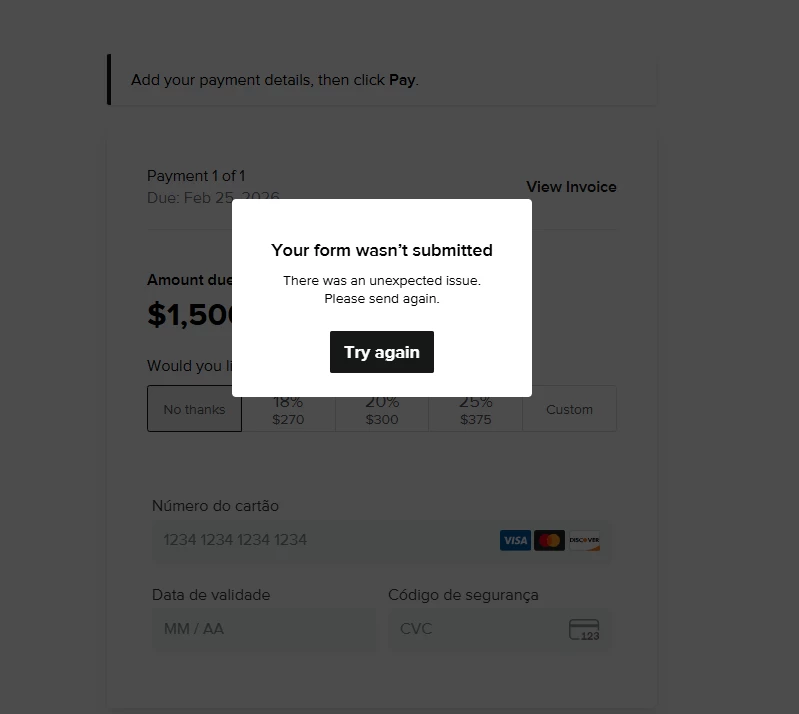
I then realized that they might need to enter the name and e-mail of the client to submit the payment, and that worked.
The Suggestion
This presents two things that could be addressed:
- Allow the payment link to be submitted by anyone who has access to it. I imagine this poses a security risk, but then maybe there is a password associated or something of the sort.
- If this error message came up because they entered the incorrect name and e-mail, then it should say that in the message itself instead of saying “unexpected issue.”
All in all, it was an embarrassing back and forth that I would like to avoid in the future. For now, my approach will be to instruct the recipients of the direct payment links to enter the name and e-mail of the client, but this feels inelegant, and I’d like a cleaner path.
To the community: Is there a feature or workflow that I’m missing to accomplish this?


