
Solved

Scheduling a meeting within a template for a team member

  • March 19, 2026
  • 8 replies
  • 27 views

Adrienne Schwartz
Forum|alt.badge.img

As the owner of our venue I get our initial inquiries and then choose which template we use to respond to the client. All of our templates have a link to my venue manager’s scheduler. Why is it when the client schedules it is coming up on my calendar and not hers? I should not be available for any meetings/ tours but when I turn my availability off it also turns hers off. What is the solution to this?


 

Best answer by Adrienne Schwartz

within the scheduler it had both of us selected as available on team availability and so would randomly “assign” one of us in round robin.  It took some digging. Also, is there a way to invite team members to meetings that are scheduled yet?

8 replies

Kaitlyn Blair
Luminary
Forum|alt.badge.img+1

Hi ​@Adrienne Schwartz 

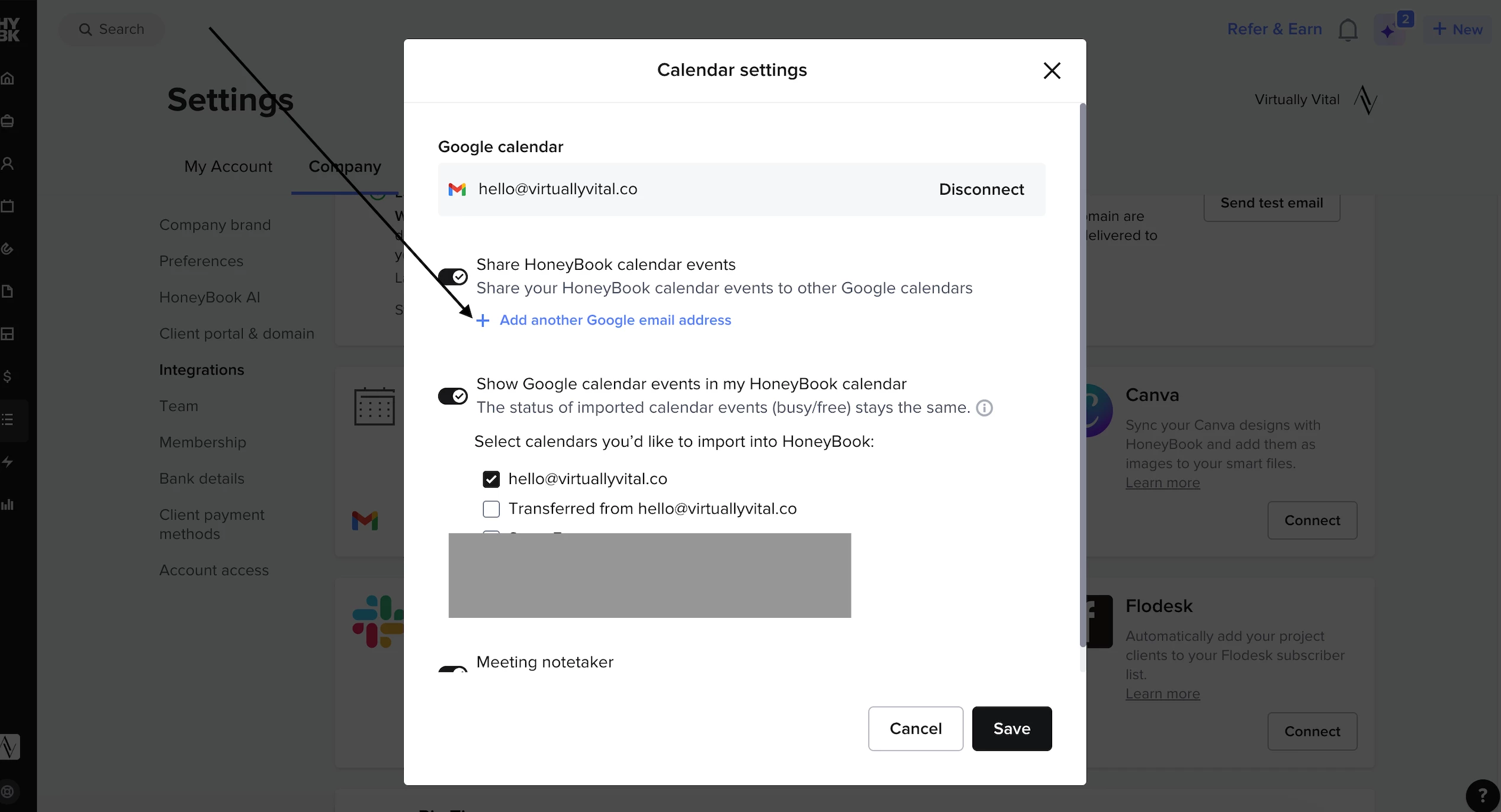
The best way to add a team members calendar to HoneyBook is to

  1.  Settings > Company Settings > Integrations > Calendar.
  2. There should be a gear icon on the top right box of that icon. Click it, then click “Add another email address.”

I added a photo of what it should look like

  • You’ll also want to make sure that your team member has connected THEIR calendar in their account as well. 


If you have done both of these things and it’s still not working, please reply!


Adrienne Schwartz
Forum|alt.badge.img

Ok, I have done that. But when I go into my scheduler and turn off my availability it also turns off my event manager’s availability. 


Adrienne Schwartz
Forum|alt.badge.img

And when we test it, if I send the scheduling link, it will create an appointment on my calendar. 


Monica R
HoneyBook Employee
Forum|alt.badge.img+7
  • HoneyBook Employee
  • March 19, 2026

Hey ​@Adrienne Schwartz! I’m going to connect you with the Support team. Look out for a message from them soon. 


Adrienne Schwartz
Forum|alt.badge.img

I think we may have it figured out.


Monica R
HoneyBook Employee
Forum|alt.badge.img+7
  • HoneyBook Employee
  • March 19, 2026

Amazing! What was the fix? I’d love to be able to share what worked for you with other members :) 


Adrienne Schwartz
Forum|alt.badge.img

within the scheduler it had both of us selected as available on team availability and so would randomly “assign” one of us in round robin.  It took some digging. Also, is there a way to invite team members to meetings that are scheduled yet?


Monica R
HoneyBook Employee
Forum|alt.badge.img+7
  • HoneyBook Employee
  • March 20, 2026

Not yet Adrienne! Please upvote this request here!